Stardew Valley Package Manager - v1.16 (Includes Save Backup and XNB Image Merge)
⚪ Last updated 2017⚠️ Install Order · 2 steps
Install in this order, then this mod last — most mods fail to load without their framework and dependencies in place.
Preview
🔍 Analysis
- 👍 4.4% endorsement rate — high engagement, a strong quality signal
- 🏆 #6 of 38 Modding Tools mods in this game by downloads
📋 About This Mod
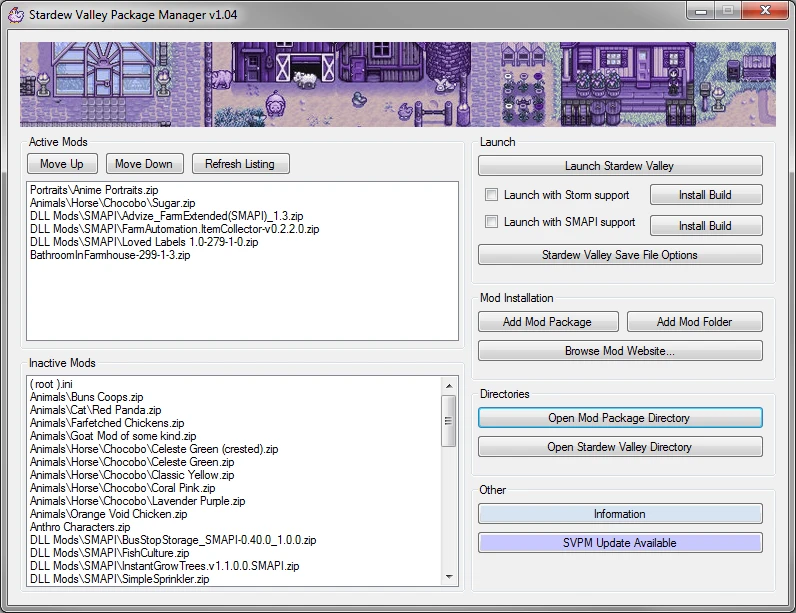
Stardew Valley Package Manager is a Mod Manager which allows Users to easily modify Stardew Valley with User created mods (including but not limited to SMAPI\STORM DLL mods) packaged in archives (.zip, rar, 7z, tar, bzip2). The simple user interface allows loading of mods without having to worry about game content backups, or save files.
Version 1. 14 - 1. 16 - Bug Fixes - DropBox changed their link urls, so SVPM was unable to update or download XNBNode. A manual update will be required to fix these links.
Version 1. 13
- Moves the DLL mods from APPDATA to the StardewValley directory in preperation for SMAPI 1. 0.
Version 1. 11 - 1. 12 - Bug Fixes
Version 1. 10 - SVPM now recognises the sub-directories of directories that contains DLL files as part of the DLL mod data, and now loads those mods properly. It also ignores those directories when checking their names against existing Stardew Valley data, preventing any unnecessary pop-up checks. - Save and Load features added for the Active Mod List. Allowing you to save and load active mod listings.
Version 1. 09 - Add the ability for SVPM to launch SMAPI \ Storm from Steam Desktop Shortcut Links. Allowing Steam to load those applications directly and inject the Steam Overlay. (Links can be added in SVPM Settings) - General Big Fixes
Version 1. 08 - Fixed bug where program crashes on launch because Steam and Game are installed on different drives. - XMB Image Merge now supports differently sized images for mods that extend the tilesheets. - Added a game files restore feature. - General bug fixes.
Version 1. 07 - Added XNB Image Merge feature – Enable in Settings Menu. XNB Image Merge is a process that scans your active mods for image resources that overwrite the same XNB file in the Stardew Valley folder, and creates a composite image XNB files. These composite XNB's are then loaded like a normal mod. This allows multiple mods to edit the same tile sheets, and make their own contributions to the output image the game uses.
Version 1. 05-1. 06 - Right clicking on an active\inactive mod containing a DLL will reveal the one or more DLL mods present in the archive, and list config files associated with them. Clicking on the DLL's config files will launch that file with your systems default editor, allowing you to edit the mod config directly. - The Save Settings button is now a button for general settings, inc
Stardew Valley Package Manager is a mod manager for Stardew Valley that lets users easily install mods from archives (.zip, rar, 7z, tar, bzip2), including SMAPI/STORM DLL mods. It also includes save backup and XNB image merge features. With 980 endorsements and 22,392 downloads, it's a popular tool, though it hasn't been updated since March 2017.
✨ Key Features
📊 Pros & Cons
✅ Pros
- Community-approved with 980 endorsements and over 22k downloads.
- Handles multiple archive formats, so you don't need to extract manually.
- Built-in save backup and XNB merge are handy extras for modders.
⚠️ Cons
- Last updated in March 2017 — likely outdated for current Stardew Valley versions.
- Description is cut off, so install instructions and full feature list are incomplete.
- No mention of compatibility with newer SMAPI versions or mod load order management.
For Stardew Valley players who want a simple way to install mods from archives without manual extraction. Also useful for modders who need save backup and XNB merge tools. Skip if you play on the latest game version — this tool may be outdated.
💡 Beginner Tips
- Since this is an older tool, check if it still works with your current Stardew Valley version before relying on it.
- Use the save backup feature before installing new mods to avoid losing progress.
- If you're using SMAPI mods, make sure you have SMAPI installed separately, as this manager doesn't include it.
📊 Mod Details
- Game
- Stardew Valley Mods
- Author
- NewSpecies
- Version
- 1.16
- Downloads
- 22,392
- Endorsements
- 980
- Category
- Modding Tools
- Created
- 4/21/2016
- Updated
- 3/24/2017
🔧 How to Install Stardew Valley Mods
Download from Nexus.
📖 Full step-by-step install guide for Stardew Valley →
Visit the official mod page for specific installation instructions for this mod.
🎮 Need cheat codes or console commands? Check ur gaming wiki for Stardew Valley commands, item IDs, and more.
Keep browsing — more Stardew Valley mods await