Daily Tasks Report
⚪ Last updated 2019⚠️ Install Order · 2 steps
Install in this order, then this mod last — most mods fail to load without their framework and dependencies in place.
Preview
🔍 Analysis
- 👍 5.0% endorsement rate — high engagement, a strong quality signal
- 🏆 #12 of 143 User Interface mods in this game by downloads
📋 About This Mod
Shows you a complete report about your daily tasks as a farmer, as well as showing you bubbles for some items.
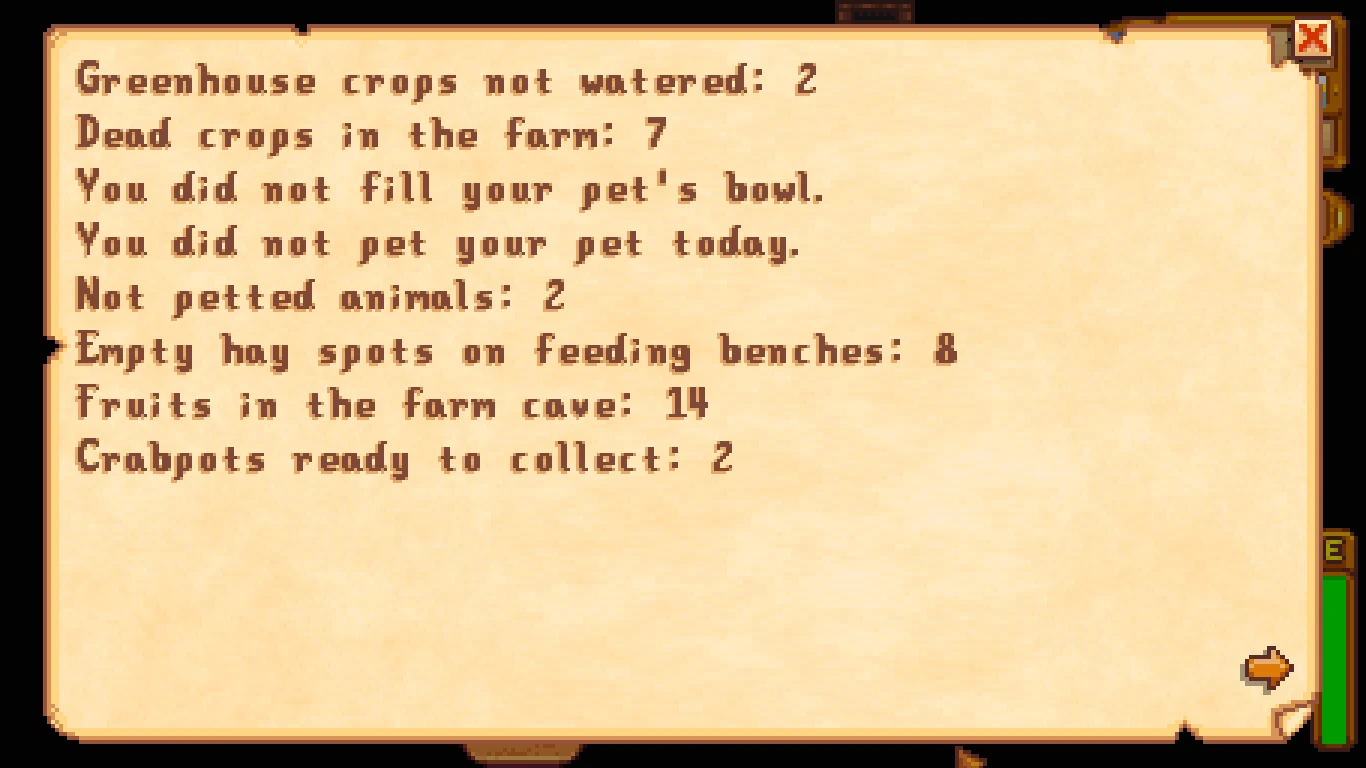
Press Y to open your report or click the button below the quests button. It shows (with detailed information about each item):
-
[]If The Queen of Sauce has a new recipe for you
[
]If it's someone's birthday[]If traveling merchant is in town
[]Unwatered crops (in the farm and greenhouse)
[]Crops ready to harvest (in the farm and greenhouse)
[]Dead crops
[]If you did not pet your pet
[]If you did not fill your pet's bowl
[]Animals that were not petted
[]Animals products ready to collect
[]Empty hay spots on feedings benches
[]If there are fruits/mushrooms to be collected in your farm cave.
[]Crab pots ready to be collected
[]Crab pots that were not baited
[]Machines ready to collect (full list of machines in the configuration section)
The mod can draw bubbles for (there is a configurable keybinding to turn them on/off without entering any menu):
-
[]Unwatered crops
[]Crops ready to harvest
[]Dead crops
[]Pet wants to be petted
[]Animals that were not petted
[]Animals that have produce
[]If there is animal produce inside a building
[]If there are hay spots missing in the animal house
[]Truffles
[]Crab pots that were not baited
[]Casks with a minimum item quality (set in the configuration)
There is also a settings menu that can be accessed through the report or by a keybinding, every configuration can be changed through this menu.
The bubbles settings menu can be accessed in the bubble on the main settings menu.
You can also navigate the report using the arrow keys, and the mod has controller compatibility.
The numbers (x, y) in the detailed information are the coordinates of the item in the map.
After you run the game with the mod for the first time, you can change the config.json to configure (detailed list in the configure section):
[*]The keybinding to open/close the report and
-
[]Unwatered crops
Daily Tasks Report is a compact UI mod for Stardew Valley that opens a report showing some of the remaining tasks for the day. With 1,158 endorsements and 22,964 downloads, it's a popular quality-of-life tool for players who want a quick overview of their daily to-dos. Last updated in 2019, it may not be compatible with the latest game version.
✨ Key Features
📊 Pros & Cons
✅ Pros
- Community-approved with 1,158 endorsements — clearly a mod many players find useful.
- Lightweight and focused: does one thing (daily task report) without bloating your UI.
- High download-to-endorsement ratio suggests it works well for most users.
⚠️ Cons
- Last updated in 2019 — likely broken with newer Stardew Valley versions, so check compatibility before installing.
For Stardew Valley players who want a quick reminder of incomplete daily tasks without digging through menus. If you're on an older game version (pre-1.4), this might work fine. Skip if you're on the latest update — it's probably outdated.
💡 Beginner Tips
- Since this mod is from 2019, check if it works with your Stardew Valley version — if you're on 1.5+, it may need SMAPI updates or a replacement.
- Use SMAPI to install and manage this mod; drop the folder into your Mods directory and launch the game via SMAPI.
- If the report doesn't show up, make sure you have the latest SMAPI installed and that the mod is enabled in your mod list.
📊 Mod Details
- Game
- Stardew Valley Mods
- Author
- GuiNoya
- Version
- 1.4.1
- Downloads
- 22,964
- Endorsements
- 1,158
- Category
- User Interface
- Created
- 11/10/2017
- Updated
- 3/8/2019
🔧 How to Install Stardew Valley Mods
Download from Nexus.
📖 Full step-by-step install guide for Stardew Valley →
Visit the official mod page for specific installation instructions for this mod.
🎮 Need cheat codes or console commands? Check ur gaming wiki for Stardew Valley commands, item IDs, and more.
Keep browsing — more Stardew Valley mods await