(CP) 6480's Giant Crops Recolour - For Better Crops and Foraging
⚪ Last updated 2024⚠️ Install Order · 4 steps
1🛠️ SMAPI — Stardew Modding API Download ↗
2🛠️ Content Patcher — Content Patcher (framework) Download ↗
3📦 6480's Giant Crops Find it →
4📦 Better Crops and Foraging Find it →
Install in this order, then this mod last — most mods fail to load without their framework and dependencies in place.
Preview
🔍 Analysis
- 👍 2.3% endorsement rate — high engagement, a strong quality signal
- 🏆 #106 of 205 Visuals and Graphics mods in this game by downloads
📋 About This Mod
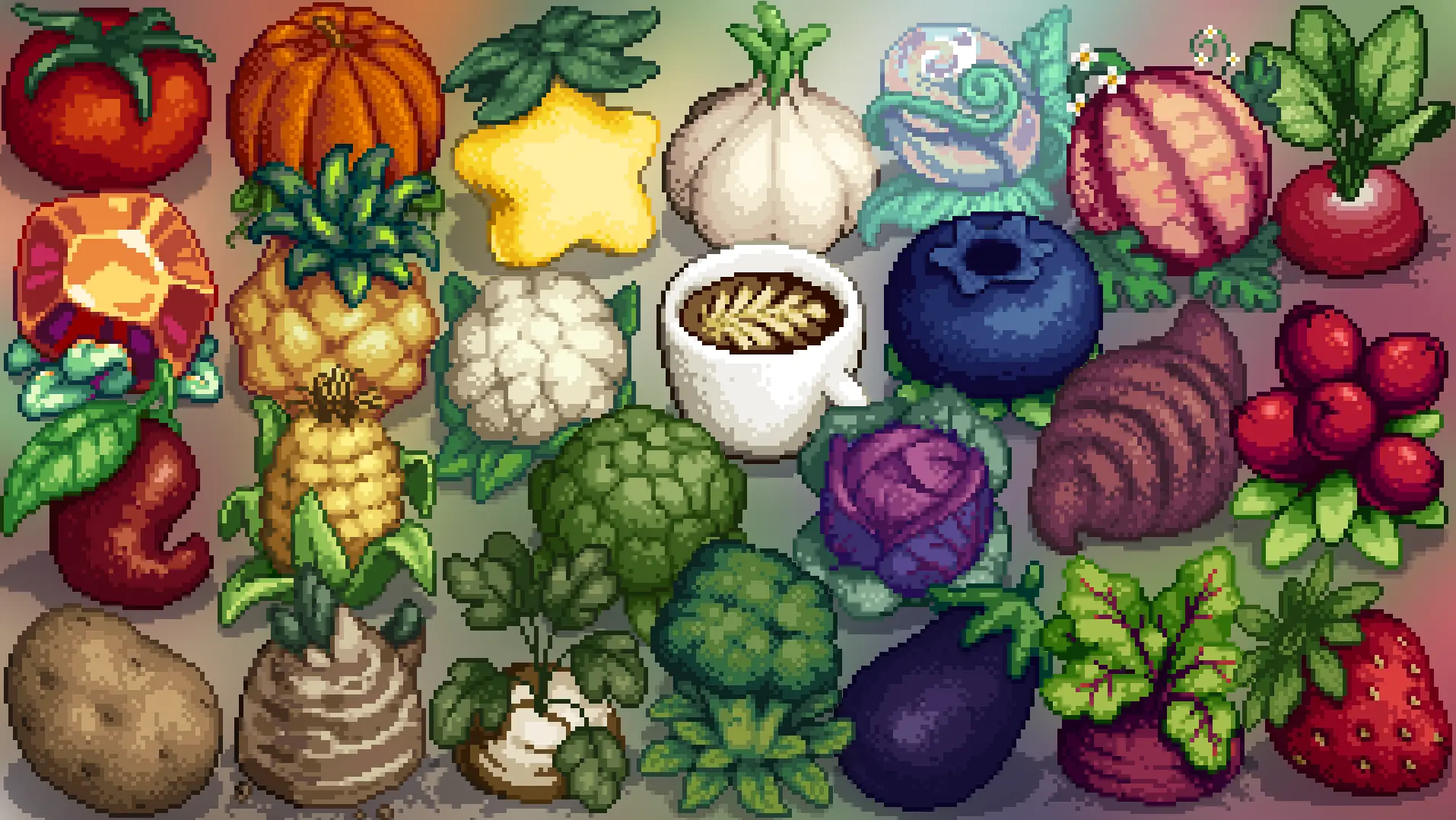
(1. 6) A recolour of 6480's Giant Crops to match Cometkins' Better Crops and Foraging.
🤖 AI-enhanced — based on mod data
A recolour of 6480's Giant Crops to match Cometkins' Better Crops and Foraging, for Stardew Valley 1.6. With 302 endorsements and 12,926 downloads, it's a popular visual consistency mod for players using both mods.
✨ Key Features
Recolours 6480's Giant Crops to match Cometkins' Better Crops and Foraging.
Compatible with Stardew Valley 1.6.
Requires the original 6480's Giant Crops mod and Better Crops and Foraging.
📊 Pros & Cons
✅ Pros
- Solid community backing with 302 endorsements and over 12k downloads.
- Keeps your farm looking cohesive if you're already using Better Crops and Foraging.
- Simple recolour—no gameplay changes, just visual polish.
⚠️ Cons
- Requires two other mods to work, so it's not a standalone addition.
- Only affects giant crops—if you want recolours for all crops, this isn't it.
- Last updated in March 2024—might not be updated for future game patches.
🎯 Is This For You?
For Stardew Valley players who use both 6480's Giant Crops and Better Crops and Foraging and want a unified look. Skip if you don't use those mods or prefer the original giant crop colours.
For Stardew Valley players who use both 6480's Giant Crops and Better Crops and Foraging and want a unified look. Skip if you don't use those mods or prefer the original giant crop colours.
📦 Install:Easy· Under 1 minute
💡 Beginner Tips
- Make sure you have both required mods installed before adding this recolour, or it won't work.
- Use a mod manager like Vortex or Stardrop to keep track of dependencies and updates.
- If you see giant crops with the old colours, double-check that this mod is placed after the originals in your load order.
📊 Mod Details
- Game
- Stardew Valley Mods
- Author
- Shyzie x Jas x 6480
- Version
- 1.0.2
- Downloads
- 12,926
- Endorsements
- 302
- Category
- Visuals and Graphics
- Created
- 3/26/2024
- Updated
- 3/28/2024
🔧 How to Install Stardew Valley Mods
Download from Nexus.
📖 Full step-by-step install guide for Stardew Valley →
Visit the official mod page for specific installation instructions for this mod.
🎮 Need cheat codes or console commands? Check ur gaming wiki for Stardew Valley commands, item IDs, and more.
Keep browsing — more Stardew Valley mods await