World Scale
🟡 Updated this yearPreview
🔍 Analysis
- ✅ Updated 0 day after the latest game patch — actively maintained
- 🏆 #39 of 46 plugin mods in this game by downloads
📋 About This Mod
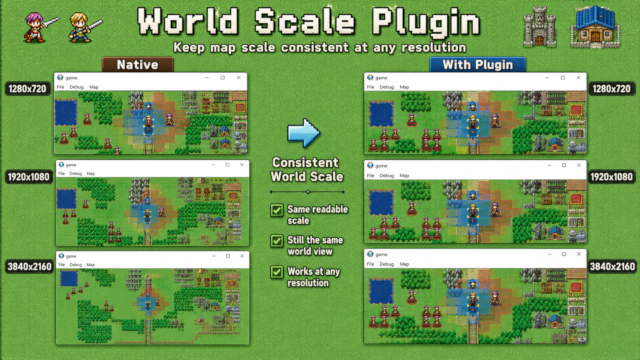
This plugin scales the map/world view so map chips, units, cursors, panels, and map interaction can appear larger while keeping SRPG Studio's native tile logic intact. The plugin's main goal is to let a project use normal SRPG Studio map data while drawing the world at a configurable scale such as 2x, 3x, etc. This makes pixel art appear larger but crisp since we use Nearest Neighbor Interpolation and keeps the gameplay grid in native SRPG tile coordinates. The main benefits are 1. Map Size is not tied to screen resolution anymore. You can open a 1920x1080 window. scale a 640x480 native map size (20 x 15 tiles) by 3 to get almost the same result but in 1080p window 2. Since we can now increase resolution freely, this allows us to always use higher resolutions in projects, design UI assets in HD then downscale them while also keeping map size to our personal size. Previously UI assets would have been upscaled from 480p when going in fullscreen OR you deal with huge maps and tiny visuals due to map size being tied to resolution. Demo video https://files.catbox.moe/vnwtbm.mp4 Github Repo: https://github.com/gallickgunner/SRPG-Studio-Plugins/tree/main P. S: Yes thumbnail is AI generated and I don't care about your stinking opinion.
📊 Mod Details
- Game
- Srpg Studio Mods
- Author
- 76561198073211166
- Version
- N/A
- Downloads
- 15
- Endorsements
- 0
- Category
- plugin
- Created
- 7/13/2026
- Updated
- 7/13/2026
🔧 How to Install SRPG Studio Mods
Subscribe on Steam Workshop. Mods auto-download and install. Launch the game to activate.
📖 Full step-by-step install guide for SRPG Studio →
Visit the official mod page for specific installation instructions for this mod.
🎮 Need cheat codes or console commands? Check ur gaming wiki for SRPG Studio commands, item IDs, and more.
Keep browsing — more SRPG Studio mods await