xSHADOWMANx's Dll Loader
⚪ Last updated 2017⚠️ Install Order · 5 steps
Install in this order, then this mod last — most mods fail to load without their framework and dependencies in place.
Preview
🔍 Analysis
- 👍 2.9% endorsement rate — high engagement, a strong quality signal
- 🏆 #39 of 81 Utilities mods in this game by downloads
📋 About This Mod
- This cannot be installed with NMM, it will cause issues. You must install manually to avoid all issues. -
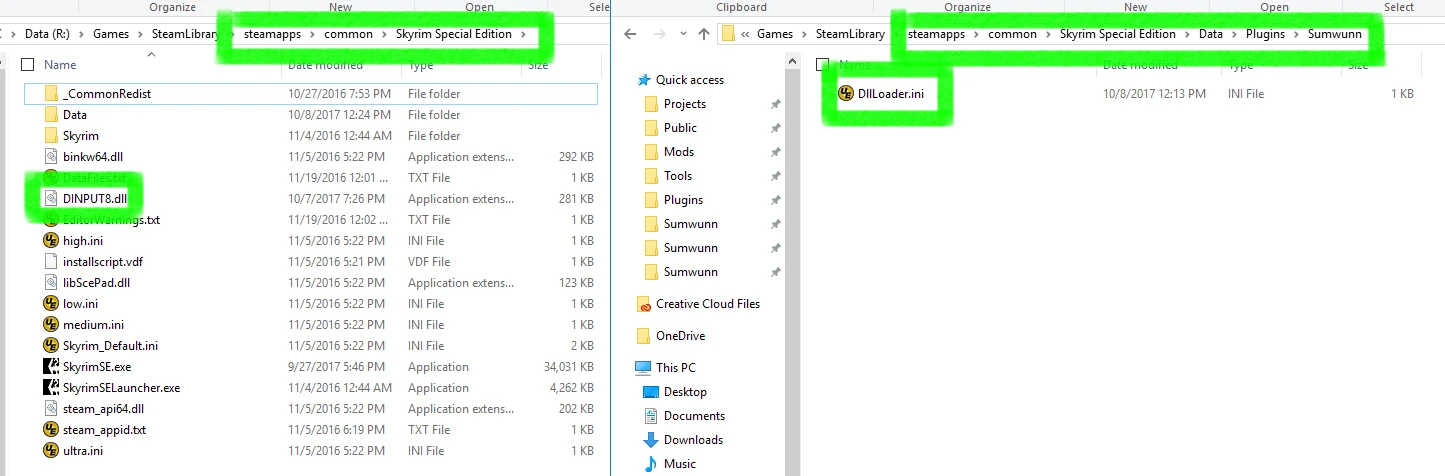
What is this and how does it work? This is my dll loader that I've created for use with all my dll mods. It loads any dlls placed in Data\Plugins\Sumwunn. And then calls any exports listed via the dlls respective TXT exports file.
How to install
- []Copy DINPUT8.dll & the Data folder from the download to Skyrim SE's root folder (where SkyrimSE.exe is, overwrite if asked, refer to THIS IMAGE if confused). []After you've installed it, all of my mods can be installed via NMM. []Read the notes.
- []Delete DINPUT8.dll from Skyrim SE's root folder. []Delete DllLoader.ini from Data\Plugins\Sumwunn.
iEnableLogging=1 ; 0 = Disabled. ; 1 = Enabled.
How do I know if it's working? DllLoader.log will be generated in Data\Plugins\Sumwunn. It contains info about what dlls were loaded, what addresses they were loaded at, including any exports that were called along with their return values.
For developers: Any dlls placed in Data\Plugins\Sumwunn will be loaded.
If you wish to have your dll exports called, you need to create a txt file that matches your dlls file name. Then append "_Exports.txt" so your txt file name looks like: YourDll.dll_Exports.txt.
Now you can use that exports txt to list your dll exports that will be called by the dll loader. Each dll export name must be on it's own line.
The working directory has not been changed, so if you want your log files to appear in Data\Plugins\Sumwunn you'll have to code it that way.
You MUST link my dll loader as a requirement when you upload your mod. This way your mod can be NMM enabled.
PM me if you any questions.
Source Code
NOTES
- []This will not get you VAC banned in any manner as Skyrim SE does not use any anti-cheat. []This is NOT a SKSE replacement. []If the dll loader is not working, try restarting Steam and/or your computer. []This is NOT NMM compatible. It must be installed manually. []This does not use SKSE. It will also not conflict with it.
- []Written in C++/ASM. []The Dll loader can be used to load any dll into Skyrim SE.
A utility mod for Skyrim Special Edition that loads DLL files, required for all of the author's DLL-based mods. With over 73,000 endorsements and 2.5 million downloads, it's a widely used tool, though it hasn't been updated since 2017.
✨ Key Features
📊 Pros & Cons
✅ Pros
- Massive community trust: 73k endorsements and 2.5M downloads show this is the go-to DLL loader for Skyrim SE.
- Essential for running xSHADOWMANx's DLL-based mods, so if you use those, this is a must-have.
- Simple utility that does one job well — no bloat, just loads DLLs.
⚠️ Cons
- Last updated in 2017 — might not be compatible with the latest Skyrim SE patches, so check before installing.
- Only useful if you actually need DLL mods; if you don't use xSHADOWMANx's mods, you can skip this.
For Skyrim SE players who use mods that require DLL loading, especially those from xSHADOWMANx. If you're into SKSE plugins or utility mods, this is a foundational piece. Skip if you only use simple texture or mesh mods.
💡 Beginner Tips
- Make sure you have Skyrim Script Extender (SKSE64) installed, as most DLL mods require it to work.
- Place the DLL loader files in your Skyrim SE Data folder, or use a mod manager like Vortex or Mod Organizer 2 for easier management.
- Check the mod's comments or forum for any compatibility notes with the latest Skyrim SE version, since it's old.
📊 Mod Details
- Game
- Skyrim Mods
- Author
- xSHADOWMANx or Sumwunn at github
- Version
- 1.0.0.4
- Downloads
- 2,501,881
- Endorsements
- 73,133
- Category
- Utilities
- Created
- 11/10/2016
- Updated
- 10/8/2017
🧩 Commonly Used Together
Users add these mods to the same collections — a real compatibility signal, not an AI guess.
🔧 How to Install Skyrim Mods
Download from Nexus.
📖 Full step-by-step install guide for Skyrim →
Visit the official mod page for specific installation instructions for this mod.
🎮 Need cheat codes or console commands? Check ur gaming wiki for Skyrim commands, item IDs, and more.
Keep browsing — more Skyrim mods await