Volume Sliders for Weather
🟡 Updated this year⚠️ Install Order · 5 steps
Install in this order, then this mod last — most mods fail to load without their framework and dependencies in place.
Preview
🔍 Analysis
- 👍 2.2% endorsement rate — high engagement, a strong quality signal
- 🏆 #45 of 60 Audio mods in this game by downloads
📋 About This Mod
DESCRIPTION
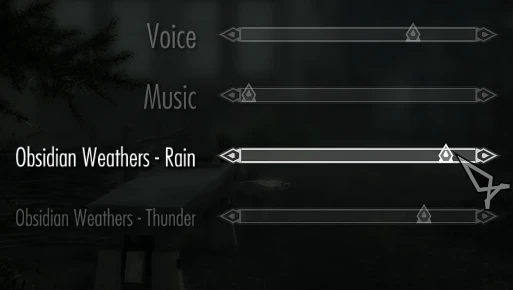
Adds volume sliders to rain, snow, interiors and thunder.
Additional patches for following mods are available:
- Aequinoctium
- Aequinoctium Addon for Obsidian Weathers
- Astralite Weathers
- Azurite Weathers II
- Azurite Weathers III
- Cathedral Weathers
- Climates of Tamriel
- Climates of Tamriel LE
- Dolomite Weathers
- Manguz Simply Obsidian Weathers
- Mythical Ages
- Natural and Atmospheric Tamriel - ENB III
- Northern Weathers
- Obsidian Weathers and Seasons
- Onyx - VR Weathers
- Ordinator - Perks of Skyrim
- Picturesque
- Raid Weathers
- Rustic Weathers and Lighting
INSTALLATION
Run the installer and select optional patches, then autosort with LOOT. You know, the usual.
If your weather mod is not on the list, chances are it doesn't need a patch. You may still use this mod in conjunction with your weather mod (sometimes they miss a few sounds), however then make sure to place this mod ABOVE your weather mod in the load order.
DEMONSTRATION
uKSINTbcr4E
RELATED MODS
Quieter Magic SFX
Vanilla Nights
Adds volume sliders for rain, snow, interiors, and thunder, with patches for various mods. A quality-of-life audio mod for players who want finer control over weather and interior sounds. Popular with 439 endorsements and nearly 20k downloads.
✨ Key Features
📊 Pros & Cons
✅ Pros
- Community-approved with 439 endorsements and nearly 20k downloads.
- Gives you direct control over weather and interior audio levels.
- Patches for other mods mean it plays nice with your setup.
⚠️ Cons
- Only covers four sound categories—no wind, footsteps, or ambient noise.
- Patches are separate downloads, so you'll need to hunt them down.
- Compatibility risk with other audio mods that touch the same sound categories.
For players who find rain or thunder too loud and want to tweak audio without editing files. Also for modders who want to fine-tune sound levels in their load order. Skip if you're happy with default audio or want a full audio overhaul.
💡 Beginner Tips
- Check if your other audio mods have patches for this mod to avoid conflicts.
- Use the in-game settings menu to adjust sliders—no need to edit INI files.
- If you use a mod manager, install the base mod first, then any patches.
📊 Mod Details
- Game
- Skyrim Mods
- Author
- Mugnum
- Version
- 2.9.0
- Downloads
- 19,884
- Endorsements
- 439
- Category
- Audio
- Created
- 4/24/2021
- Updated
- 4/16/2026
🔧 How to Install Skyrim Mods
Download from Nexus.
📖 Full step-by-step install guide for Skyrim →
Visit the official mod page for specific installation instructions for this mod.
🎮 Need cheat codes or console commands? Check ur gaming wiki for Skyrim commands, item IDs, and more.
Keep browsing — more Skyrim mods await