True Shades of Skyrim - ReShade
⚪ Last updated 2017⚠️ Install Order · 5 steps
Install in this order, then this mod last — most mods fail to load without their framework and dependencies in place.
Preview
🔍 Analysis
- 👍 4.4% endorsement rate — high engagement, a strong quality signal
- 🏆 #10 of 17 Presets - ENB and ReShade mods in this game by downloads
📋 About This Mod
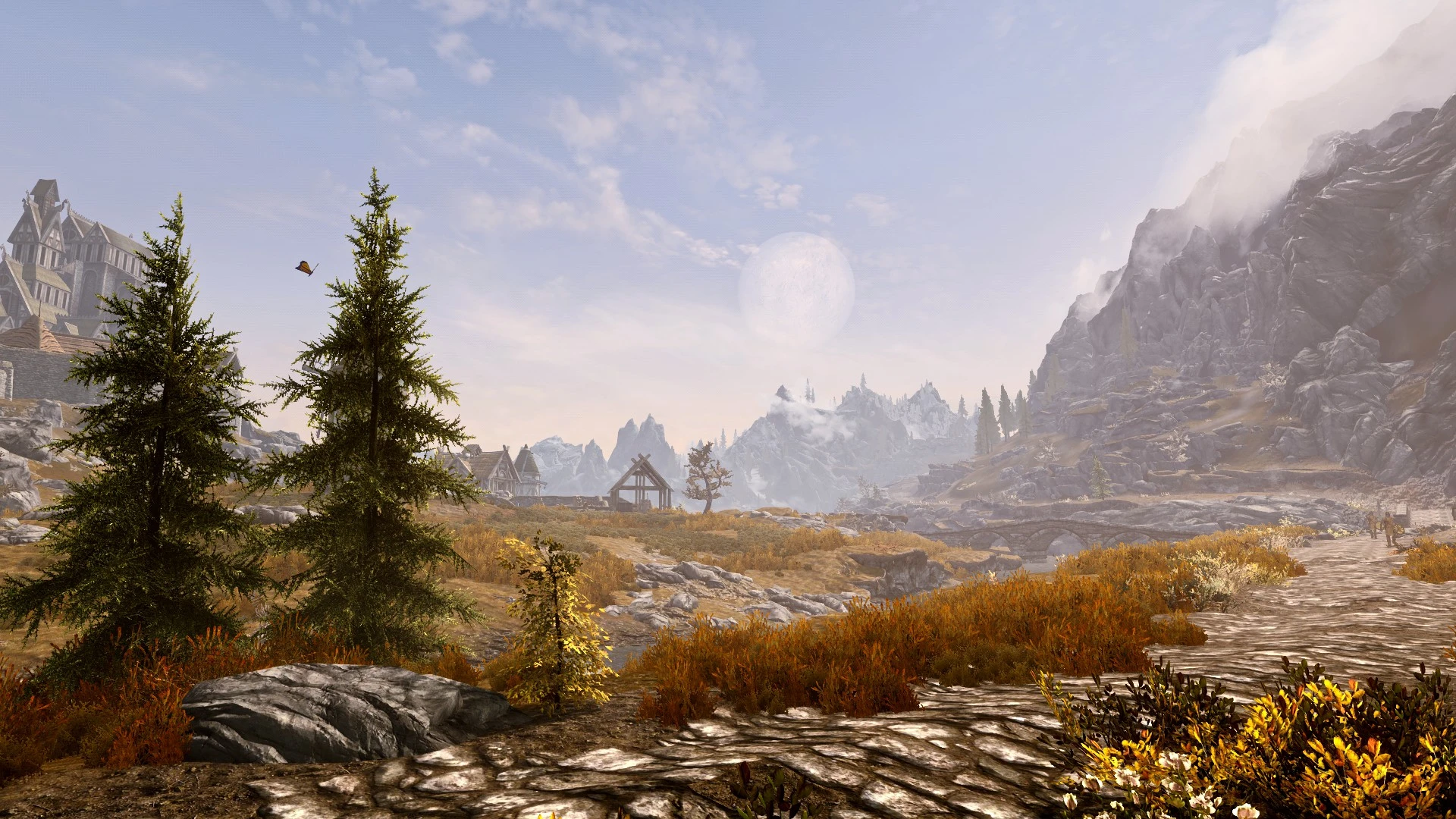
Skyrim's colours re-balanced and emphasized. No strong sepia filter. No over-saturation. Just Skyrim's True Shades. Your millage may vary.
Installation
To install and get this mod working you will need to do the following:- []Head over to ReShade's website, scroll to the bottom of the page and download ReShade's installer. []Run Reshade's installer and select Skyrim Special Edition's executable. []When it prompts you to "select rendering API" click Direct3D 10+. []When prompted, click "yes" to download "a collection of standard effects". []When given the choice of which effect files to install, install all the effects if you plan on using other Reshade presets or only DPX, Levels, Curves, Clarity and Fine Sharp if you only want the effects required for this preset. []Download True Shades of Skyrim's main file. Drop the contents of the folder in your Skyrim Special Edition directory. []Press Shift+F2 (default keybind) to bring up the ReShade interface and read through the tutorial. []Select True Shades of Skyrim.ini in the drop down box. []Set ReShade to Performance mode (option found in ReShade's Settings tab). []I recommend designating a toggle key in ReShade to compare the visuals on/off.
Other Information Visual mods you may notice in the included images are: None used in v3 screenshots.
True Shades of Skyrim is a ReShade preset that rebalances and emphasizes Skyrim's colors without heavy sepia or oversaturation. It's a lightweight visual tweak for players who want a more natural look. With 1,837 endorsements and 42,187 downloads, it's a popular choice, though it hasn't been updated since 2017.
✨ Key Features
📊 Pros & Cons
✅ Pros
- Community-approved with 1,837 endorsements and over 42k downloads
- Keeps colors natural without the typical sepia or oversaturated look
- Lightweight preset that doesn't require heavy performance cost
⚠️ Cons
- Last updated in 2017, so it may not be compatible with the latest ReShade versions
- Mileage may vary depending on your mod setup and weather mods
- Compatibility risk with other visual mods that alter lighting or colors
For Skyrim players who want a subtle color correction without the heavy filters of many ENBs. If you're tired of sepia-tinted or oversaturated presets, this gives a more natural look. Skip if you want dramatic visual overhauls or if you're using a mod setup that already adjusts colors heavily.
💡 Beginner Tips
- Make sure you have ReShade installed and set up for Skyrim before adding this preset.
- If you use a weather mod like Climates of Tamriel, test the preset in different weather conditions to see if it fits your taste.
- Adjust the preset's settings in-game with the ReShade overlay to fine-tune the look to your preference.
📊 Mod Details
- Game
- Skyrim Mods
- Author
- DahrkE
- Version
- 3.0
- Downloads
- 42,187
- Endorsements
- 1,837
- Category
- Presets - ENB and ReShade
- Created
- 11/2/2016
- Updated
- 11/29/2017
🔧 How to Install Skyrim Mods
Download from Nexus.
📖 Full step-by-step install guide for Skyrim →
Visit the official mod page for specific installation instructions for this mod.
🎮 Need cheat codes or console commands? Check ur gaming wiki for Skyrim commands, item IDs, and more.
Keep browsing — more Skyrim mods await