Slimventory - compact layout for Dear Diary Dark Mode
🟠 Updated over a year ago⚠️ Install Order · 7 steps
Install in this order, then this mod last — most mods fail to load without their framework and dependencies in place.
Preview
🔍 Analysis
- 👍 2.0% endorsement rate — high engagement, a strong quality signal
- 🏆 #22 of 117 User Interface mods in this game by downloads
📋 About This Mod
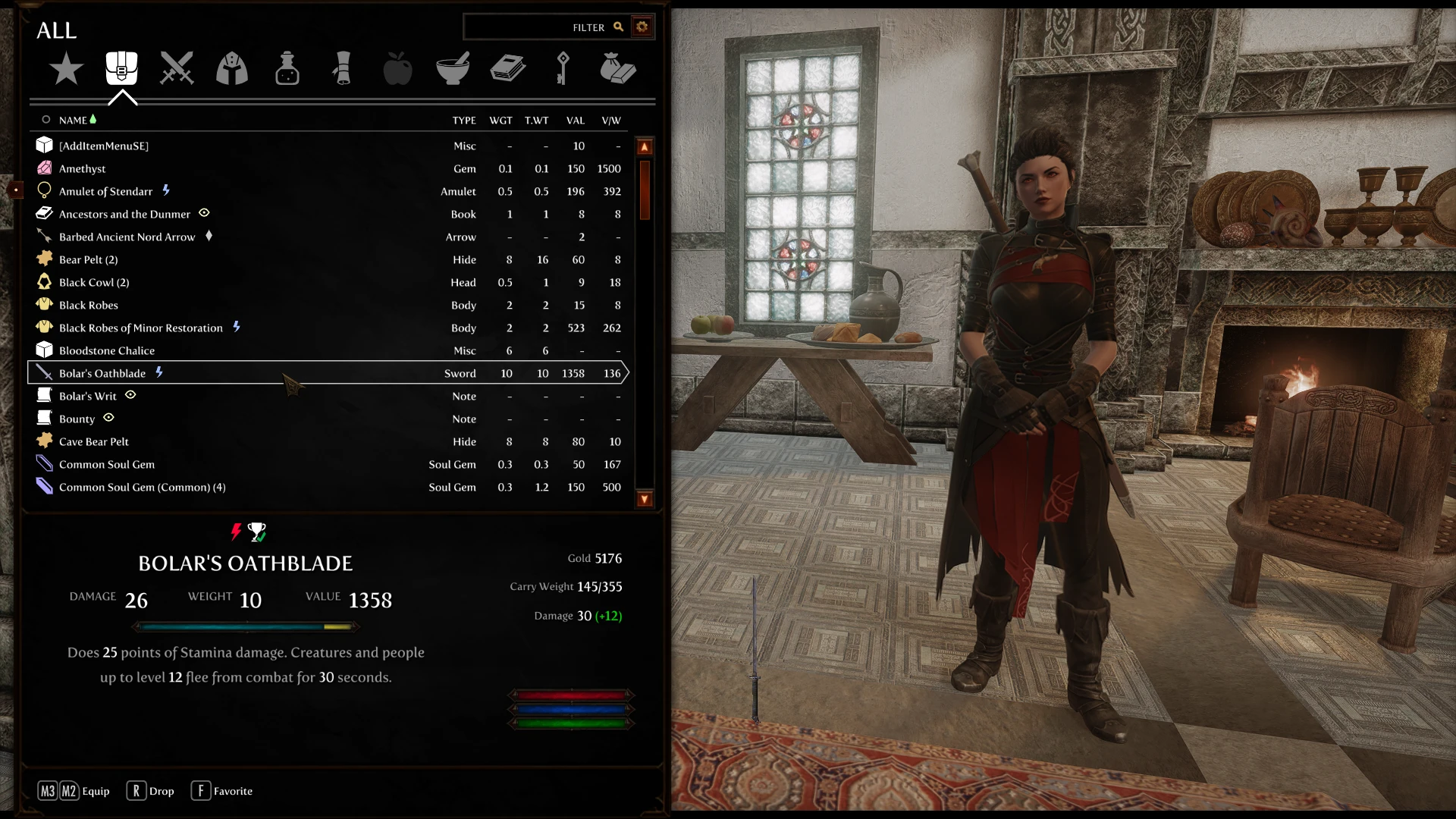
Created with the intention of freeing-up the right side of the screen to compliment mods such as the unpaused menus of Skyrim Souls and/or Show Player In Menu, but it also works fine without either of those if you simply want to try a different/arguably tidier layout than what we've had with SkyUI for years.
I've also made a few more of the UI elements external in Dear Diary's folder structure, to support even easier skinning for modders.
Including patches for Untarnished and New Horizons in the FOMOD, minor tweaks to make them fit the new layout and external elements. You'll find that most skins will fit surprisingly well out-of-the-box but these little tweaks can improve it even more.
Constructible Objects Custom Keyword System coverage is included and the menus all have support for Completionist
Installation
Simply install as you would any other mod through your mod manager. When following the FOMOD be sure to select the correct Skyrim game version (to avoid squashed UI on post-Marketplace versions) and the correct Dear Diary Dark Mode text version you are using (the button graphic filenames are different in the two versions, so you'll have a CTD if you get the wrong one)
MO2 order would be
-
[]Dear Diary Dark Mode
[
]Skin (Untarnished/New Horizons Etc) - Slimventory
One quite important setting in game: ensure in the SkyUI MCM Advanced tab that the ItemCard Horizontal and Vertical offsets are both at zero (alignment doesn't matter). It's very likely if you've got UI mods that these aren't your default settings, and although I include an MCM Helper SkyUI_SE.ini in this mod, it could be overwritten by your MO2 Overwrite folder or maybe you simply don't use MCM Helper (I recommend it). On that note, feel free to delete my SkyUI_SE.ini file if you don't like my changes to the 3D Item preview location or plan to hide them all with Show Player In Menu.
Another quite important setting in your INI files: thanks to user Firestorm 962 who also pointed out that if you're using MoreHUD Inventory Edition, you also need to ensure that in the config file SKSE\Plugins\AHZmoreHUDInventory.ini, that on line 10 bEnableItemCardResize=0 and not =1. Dear Diary Dark mode sets this to zero, but you may have another mod that has reverted it back.
uranreactor for Dear Diary Dark Mode
xcal68 for the DDDM squish fixes and helping me with learning to implement them blind
Vorganger for Untarnished
parapets, for C. O. C. K. S.
Faen90 for Completionist
Slimventory is a UI overhaul for Dear Diary Dark Mode that compacts the inventory layout to free up the right side of the screen, complementing mods like Skyrim Souls or Show Player In Menu. It includes patches for Untarnished and New Horizons, supports Completionist and Constructible Objects Custom Keyword System, and offers externalized UI elements for easier skinning.
✨ Key Features
📊 Pros & Cons
✅ Pros
- Community-trusted with 258 endorsements and over 12k downloads.
- Frees up screen space for a cleaner inventory view, especially useful with unpaused menu mods.
- Includes patches for popular skin mods like Untarnished and New Horizons, plus support for Completionist and COCKS.
⚠️ Cons
- Requires Dear Diary Dark Mode and SkyUI as dependencies, so it's not for players using other UI frameworks.
- FOMOD requires selecting the correct Skyrim game version and text version, or you risk a CTD from mismatched button graphics.
- Potential conflicts with other UI mods that alter the same inventory elements, and you must reset SkyUI MCM offsets to zero for proper display.
For Skyrim players who use Dear Diary Dark Mode and want a more compact inventory layout that frees up screen space, especially if you also use unpaused menu mods like Skyrim Souls. It's also great for modders who want easier skinning with externalized UI elements. Skip if you don't use Dear Diary Dark Mode or prefer the classic SkyUI layout.
💡 Beginner Tips
- In the SkyUI MCM Advanced tab, set ItemCard Horizontal and Vertical offsets to zero to avoid misaligned UI.
- Use a mod manager like MO2 and follow the load order: Dear Diary Dark Mode, then your skin, then Slimventory.
- If you don't use MCM Helper, you can delete the included SkyUI_SE.ini to avoid unwanted 3D item preview changes.
📊 Mod Details
- Game
- Skyrim Mods
- Author
- rob18
- Version
- 1.02
- Downloads
- 12,748
- Endorsements
- 258
- Category
- User Interface
- Created
- 3/28/2024
- Updated
- 12/24/2024
🔧 How to Install Skyrim Mods
Download from Nexus.
📖 Full step-by-step install guide for Skyrim →
Visit the official mod page for specific installation instructions for this mod.
🎮 Need cheat codes or console commands? Check ur gaming wiki for Skyrim commands, item IDs, and more.
Keep browsing — more Skyrim mods await