SkyUI 3D Item Offset Fix for MCM Helper (SkyUI 5.2 - Updated - Centered Item Card - Script Fix)
🟡 Updated this year⚠️ Install Order · 7 steps
Install in this order, then this mod last — most mods fail to load without their framework and dependencies in place.
Preview
🔍 Analysis
- 👍 0.3% endorsement rate
- 🏆 #100 of 141 User Interface mods in this game by downloads
📋 About This Mod
SkyUI 6 has been updated and this fix is now incorporated.
Only download this if you are using SkyUI 5. 2.
REQUIREMENTS
MCM Helper (1. 5. 0)
DESCRIPTION
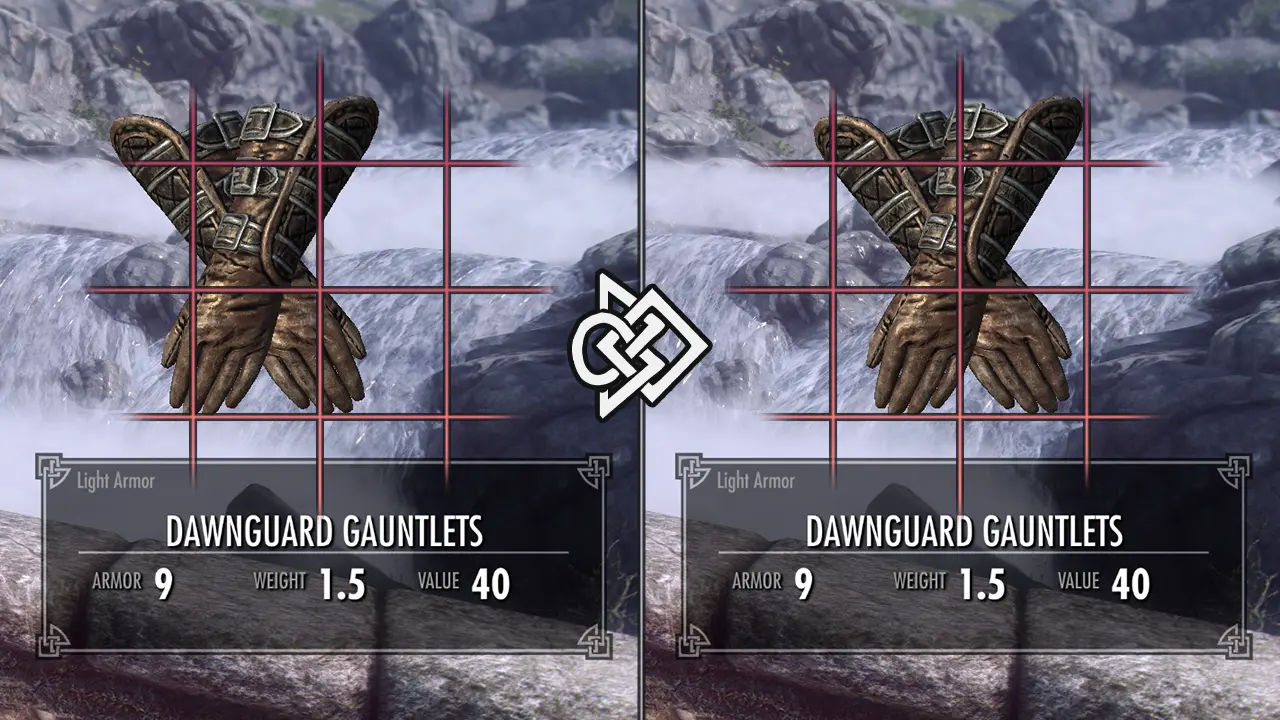
SkyUI default 3D Item horizontal offset is incorrect by 6. 56 units, resulting in the inventory art being misaligned with the item card.
This can be fixed by going into the mod configuration menu and setting 3DItemXOffset to -6 under Advanced.
Unfortunately, most people don't know this.
Or simply forget to fix this. Or it resets itself.
Or have even looked at the SkyUI's MCM.
This is an updated SKI_ConfigMenu.pex that changes four lines to account for this offset.
Two options are available depending on whether or not you are an MCM Helper user.
Feel free to not install this file. This will be removed once it is integrated into the main SkyUI SE download.
SkyUI has now been updated to version 6. We are now only waiting on an MCM Helper update.
COMPATIBILITY
Load after SkyUI and MCM Helper.
Not compatible with anything that edits SKI_ConfigMenu.pex.
Probably not compatible with SkyUI VR – you probably don't need this.
Probably not compatible with Widescreen Fix – you probably need your own values.
RECOGNITION
Thank you to SkyUI Team for SkyUI.
Thank you to Parapets for MCM Helper.
Thank you to MrNeverLost for their nl_online repository.
Thank you to me – for having the most courage.
This mod recompiles SkyUI's script to fix the 3D item inventory art being off-center when starting new games. It's a small, focused fix for Skyrim players using SkyUI 5.2, with a large user base (3,659 endorsements, 1.4M downloads) and recent updates.
✨ Key Features
📊 Pros & Cons
✅ Pros
- Huge community trust: 3,659 endorsements and 1.4M downloads show it's widely used.
- Targeted fix for a common annoyance—no more crooked item cards when starting fresh.
- Actively maintained (last updated March 2026), so it's likely up-to-date with current patches.
⚠️ Cons
- Only addresses a visual offset—if you're expecting other UI improvements, this isn't it.
- Requires SkyUI 5.2 and MCM Helper as dependencies, so you need those installed first.
For Skyrim players who use SkyUI and are bothered by the 3D item preview being off-center when starting a new game. If you're a modded playthrough veteran who wants a clean UI, this is a must-have. Skip if you don't use SkyUI or don't care about that minor visual glitch.
💡 Beginner Tips
- Make sure you have SkyUI 5.2 and MCM Helper installed before adding this fix, or it won't work.
- Use a mod manager like Vortex or Mod Organizer 2 to handle the script replacement safely.
- If you're starting a new game, install this before you create your character to see the fix immediately.
📊 Mod Details
- Game
- Skyrim Mods
- Author
- SkyUI Team - Dylan James
- Version
- 1.1.0
- Downloads
- 1,431,591
- Endorsements
- 3,659
- Category
- User Interface
- Created
- 6/2/2023
- Updated
- 3/27/2026
🔧 How to Install Skyrim Mods
Download from Nexus.
📖 Full step-by-step install guide for Skyrim →
Visit the official mod page for specific installation instructions for this mod.
🎮 Need cheat codes or console commands? Check ur gaming wiki for Skyrim commands, item IDs, and more.
Keep browsing — more Skyrim mods await