Show Animation Command
⚪ Last updated 2024⚠️ Install Order · 5 steps
Install in this order, then this mod last — most mods fail to load without their framework and dependencies in place.
Preview
🔍 Analysis
- 👍 1.0% endorsement rate
- 🏆 #30 of 46 Utilities mods in this game by downloads
📋 About This Mod
Get the v1. 6+ support here
Mod Description:
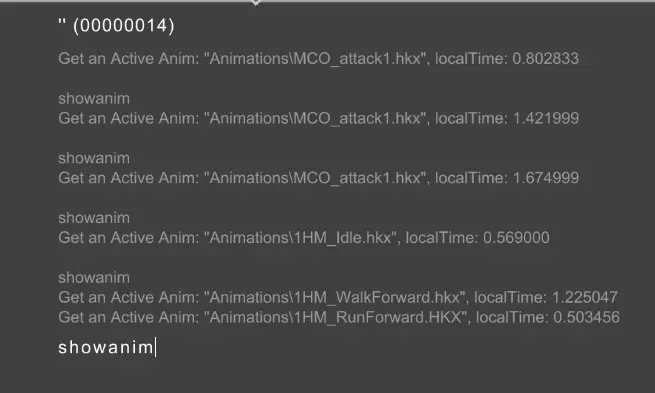
Just a simple SKSE plugin that adds the ShowAnimation console command to display the info (animaiton file name & local time) of the current active animations clips playing on character.
How to Install:
Requirement:
(1) SKSE for the correspond game version.
(2) Address Library for SKSE Plugins.
(3) Visual C++ Redistributables (2015/2017/2019/2022)
To Install:
Download and Install the mod files with mod manager.
To Use:
Open console, select an actor, then enter ShowAnim or SA.
Source Code
This utility mod for Skyrim adds a console command that displays information about the animation clips currently playing on a character. It's a niche tool for modders and advanced users who need to debug or understand animation behavior. With 613 endorsements and frequent updates, it's a reliable utility for those who need it.
✨ Key Features
📊 Pros & Cons
✅ Pros
- Community-trusted (613 endorsements) and widely downloaded (63k+).
- Does exactly what it says: shows animation clip info in console.
- Invaluable for mod authors and tinkerers who need to see what animations are playing.
⚠️ Cons
- Not for casual players – it's a developer tool, not a gameplay enhancement.
- Requires console knowledge; no in-game UI or menu.
- Potential compatibility risk with mods that heavily alter animation systems, though no specific conflicts are known.
For Skyrim mod authors and advanced users who need to debug animation behavior or verify which clips are playing. Also useful for players troubleshooting animation-related issues. Skip if you're not comfortable with console commands or don't need animation debugging.
💡 Beginner Tips
- Open the console with the tilde key (~) and click on a character to select them before using the command.
- Use the command on yourself or NPCs to see active animation clips, which helps identify mod conflicts.
- If you're a mod author, pair this with animation log outputs to get a full picture of what's playing.
📊 Mod Details
- Game
- Skyrim Mods
- Author
- Maxsu
- Version
- v1.2.1
- Downloads
- 63,678
- Endorsements
- 613
- Category
- Utilities
- Created
- 8/25/2022
- Updated
- 2/17/2024
🔧 How to Install Skyrim Mods
Download from Nexus.
📖 Full step-by-step install guide for Skyrim →
Visit the official mod page for specific installation instructions for this mod.
🎮 Need cheat codes or console commands? Check ur gaming wiki for Skyrim commands, item IDs, and more.
Keep browsing — more Skyrim mods await