Rock-Wall Texture Patches for High Poly Project
⚪ Last updated 2020⚠️ Install Order · 6 steps
Install in this order, then this mod last — most mods fail to load without their framework and dependencies in place.
Preview
🔍 Analysis
- 👍 0.6% endorsement rate
- 🏆 #74 of 302 Patches mods in this game by downloads
📋 About This Mod
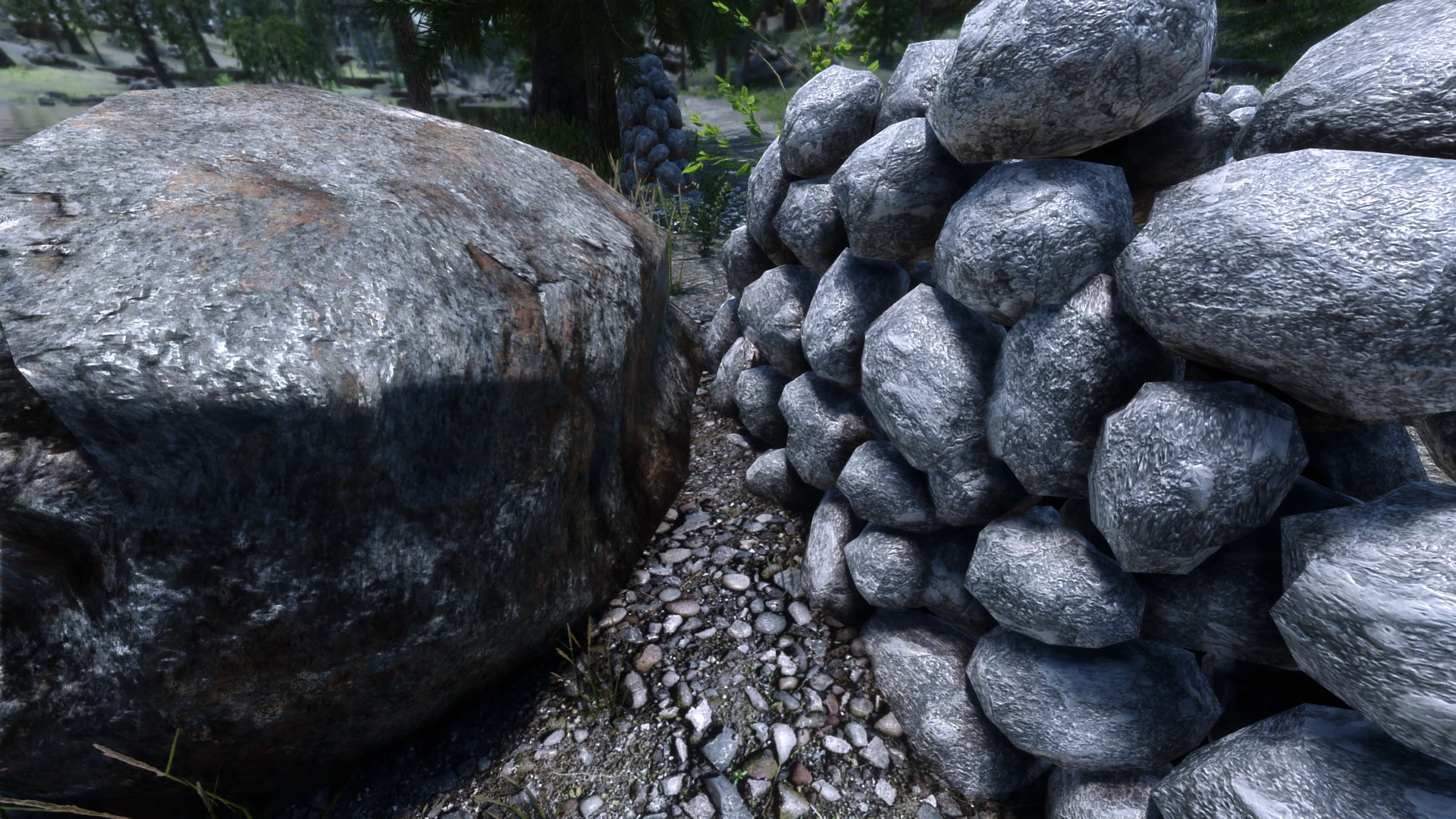
High Poly Project is an amazing mod, but there's a tiny issue when using it alongside popular texture overhauls like Majestic Mountains. Textures for the new rock fences added by High Poly Project look out of place compared to some modded textures. This is a collection of loose files that change the rock fence texture to match your mountain textures.
Download and install the file that matches your rock textures. You could also use one that doesn't match your rock textures if you wish. Try all of them out and choose your favorite if you want! Choose only one. These mods are 100% safe to swap out mid playthrough since they're just textures.
Place this mod anywhere below High Poly Project in Mod Manger so that it overwrites High Poly Project.
Currently supports:
Majestic Mountains - Cathedral Concept (lightside, darkside and main)
Vivid Landscapes
Northfire's Photoreal Mountains 2 (main and vanilla)
The following spoiler contains instructions on how to make this extremely simple patch yourself. You can use this to make a patch for any texture mod you want, and it's really easy.
Mod Organizer 2 users only:
1. Find the texture mod that does mountain textures in your mod-list, right-click it and select "Open in explorer"
2. Navigate to textures -> Landscape -> mountains
3. Inside the mountains folder, copy "mountainslab01.dds" and "mountainslab01_n.dds"
4. Go back to your mod-list in MO2 and create an empty mod. Call it "HPP rockfence patch" or something.
5. Right-click the empty mod you just made and select "Open in explorer"
6. Inside, create a folder named "textures"
7. Inside "textures", create a folder named "high poly project"
8. Inside "high poly project", paste mountainslab01.dds and mountainslab01_n.dds from your mountain texture mod
9. rename mountainslab01.dds to "stonewall.dds" and rename mountainslab01_n.dds to "stonewall_n.dds"
10. Go back to your mod-list and make sure the patch is anywhere below High Poly Project. Activate it
11. Test in-game. If you don't like the way it looks, in step 3 you could copy mountainslab02.dds and mountainslab02_n.dds instead and see if that's better
(note: any texture seams and stretching you notice was there before this fix. I don't know what to do about that, sorry)
All credit goes to the original authors of the mods supported in this patch.
This patch mod replaces the bright-grey rock-fence texture from High Poly Project with textures that match various texture overhaul mods. It's a small, focused compatibility fix for Skyrim players using High Poly Project alongside texture mods, with 1,324 endorsements and over 208k downloads.
✨ Key Features
📊 Pros & Cons
✅ Pros
- Community-approved with 1,324 endorsements and over 208k downloads.
- Solves a real visual inconsistency for High Poly Project users.
- Simple, focused patch that does one job well.
⚠️ Cons
- Only addresses the rock-fence texture, not other potential mismatches.
- Requires High Poly Project and a compatible texture mod to be useful.
- Last updated in 2020, so may not be tested with newer mod versions.
For Skyrim modders who use High Poly Project and a texture overhaul mod and notice the bright-grey rock-fence sticking out. If you don't use High Poly Project or don't care about rock-fence textures, this patch isn't for you.
💡 Beginner Tips
- Install this patch after High Poly Project and your texture mod in your mod manager so it overwrites the rock-fence texture correctly.
- If you're using a mod manager like Vortex or MO2, enable the patch and let it deploy; no manual file copying needed.
- Check that your texture mod actually changes rock-fence textures, otherwise the patch may have no visible effect.
📊 Mod Details
- Game
- Skyrim Mods
- Author
- dumbBumCrumb
- Version
- 1.0
- Downloads
- 208,937
- Endorsements
- 1,324
- Category
- Patches
- Created
- 3/29/2020
- Updated
- 3/30/2020
🔧 How to Install Skyrim Mods
Download from Nexus.
📖 Full step-by-step install guide for Skyrim →
Visit the official mod page for specific installation instructions for this mod.
🎮 Need cheat codes or console commands? Check ur gaming wiki for Skyrim commands, item IDs, and more.
Keep browsing — more Skyrim mods await