Rally's Five Cities Roadsigns
⚪ Last updated 2020⚠️ Install Order · 5 steps
Install in this order, then this mod last — most mods fail to load without their framework and dependencies in place.
Preview
🔍 Analysis
- 👍 1.2% endorsement rate — high engagement, a strong quality signal
- 🏆 #67 of 308 Models and Textures mods in this game by downloads
📋 About This Mod
Description:
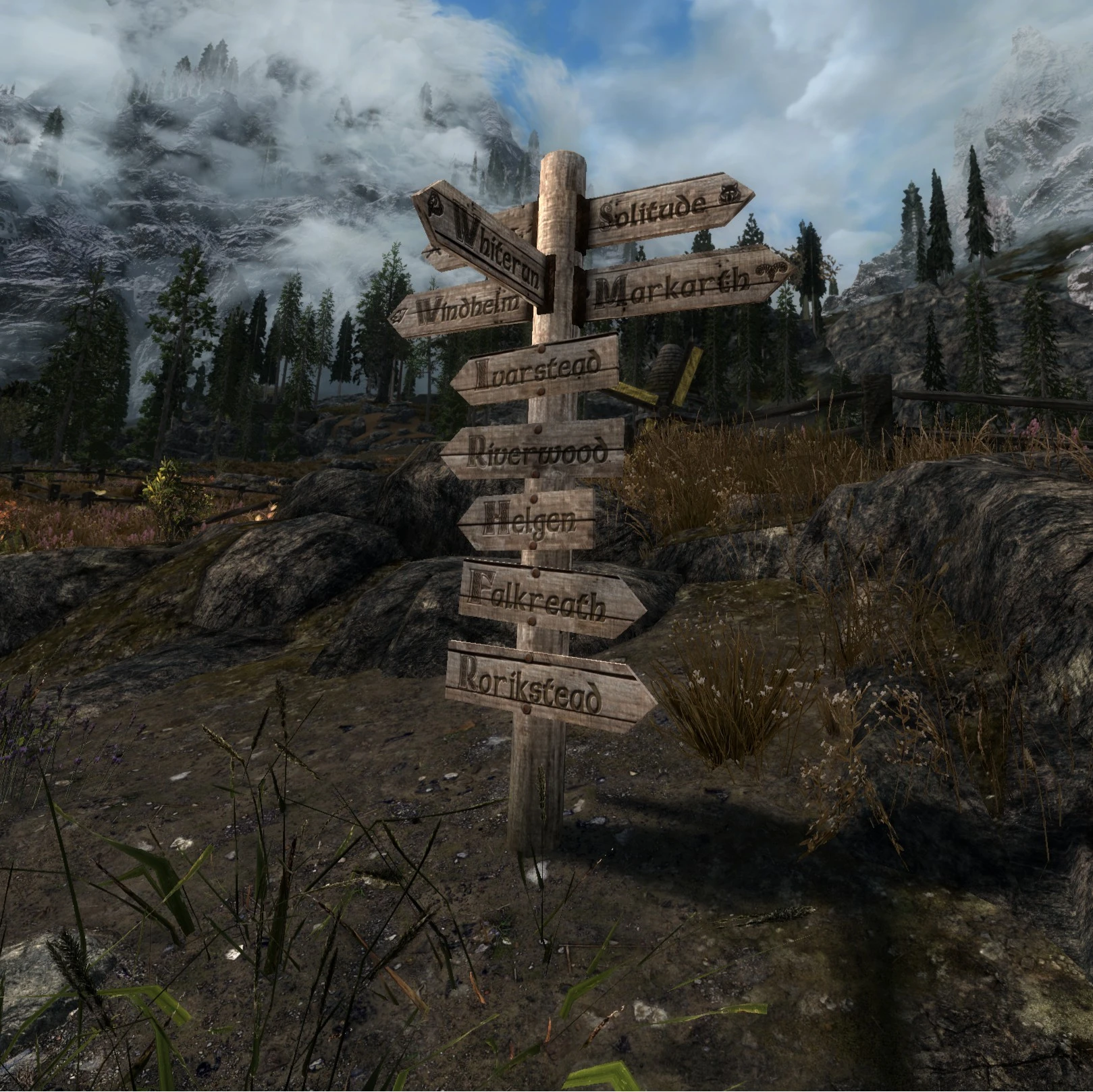
This is the third mod of my "Five Cities" series, after Five Cities - Multiple Currencies and Five Cities Cloaks. This replaces the textures of Roadsigns found throughout Skyrim. I´ve added a new font, as all Roadsigns are using the same and i wanted to give it a different look.
The five big cities have their coat of arms on the signs.
Resolution:
All signs are made in 2K
Install:
- download with your prefered mod manager, install and overwrite when promt
- or download manually, extract and put the "Data" folder of this mod in your Skyrim directory
- disable/uninstall the mod from your manager or remove the files from your Skyrim directory
Compatiblity: These textures are compatible with Point the way
Patches available for:
- Kynesgrove (Point the way)
- Beyond Skyrim Bruma
- Cutting Room Floor
- Whistling Mine
Also check my other mods
Rallyeator's Five Cities Roadsigns is a texture overhaul that retextures road signs across Skyrim, with patches for Point the Way, Cutting Room Floor, Bruma, Keld-Nar, and Whistling Mine. It's a popular cosmetic mod with 599 endorsements, last updated in January 2020.
✨ Key Features
📊 Pros & Cons
✅ Pros
- Community favorite with 599 endorsements and over 50k downloads
- Comes with patches for several popular mods, so it plays nice with your load order
- Simple texture replacer—no gameplay changes, just better-looking signs
⚠️ Cons
- Last updated in January 2020, so it might not be compatible with the latest Skyrim versions or mods
- Only covers road signs—if you want more varied sign textures, you'll need other mods
- Potential conflicts with other mods that alter the same sign meshes or textures
For Skyrim players who want a quick visual upgrade to the roads without overhauling the whole game. If you're using Point the Way or Bruma, the included patches make this a no-brainer. Skip if you're looking for gameplay changes—this is purely cosmetic.
💡 Beginner Tips
- If you're using a mod manager like Vortex or MO2, just download and install—it'll handle the file placement automatically.
- Make sure to load the patches after the main mod and after the mods they patch (e.g., Point the Way) to ensure proper overwrite order.
- For Skyrim Special Edition, check if the mod has an SE version or if you need to convert the textures—this mod is from 2020, so it might be for Oldrim.
📊 Mod Details
- Game
- Skyrim Mods
- Author
- Rallyeator
- Version
- 1.0
- Downloads
- 50,613
- Endorsements
- 599
- Category
- Models and Textures
- Created
- 9/28/2018
- Updated
- 1/27/2020
🔧 How to Install Skyrim Mods
Download from Nexus.
📖 Full step-by-step install guide for Skyrim →
Visit the official mod page for specific installation instructions for this mod.
🎮 Need cheat codes or console commands? Check ur gaming wiki for Skyrim commands, item IDs, and more.
Keep browsing — more Skyrim mods await