Purge Uninstalled Downloads - MO2 Plugin
🟠 Updated over a year ago⚠️ Install Order · 5 steps
Install in this order, then this mod last — most mods fail to load without their framework and dependencies in place.
Preview
🔍 Analysis
- 👍 0.4% endorsement rate
- 🏆 #22 of 26 Utilities mods in this game by downloads
📋 About This Mod
This is a Mod Organizer 2 plugin which can list and optionally delete all downloaded mod archives and respective meta files associated with mods deleted from the mod list.
This tool works by looking for any download archive meta files that indicate they are Uninstalled, a tag only applied when a respective mod is deleted from the mod list completely.
This tool was primarily created for Wabbajack modlist development, to ease the compilation process. Nonetheless, you may find this useful to keep a clean archive directory. Let me know if you have any suggestions, and feel free to contribute to the tool!
Usage
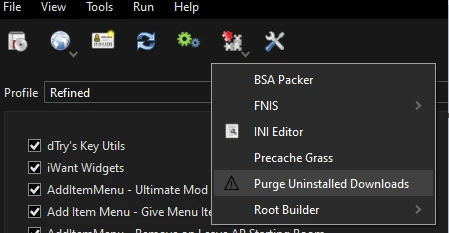
Clicking on this will show a dialog menu, where you can choose the available options;
List Purgable Archives:
Will list (and NOT delete) all archives associated with a mod that has been deleted from the mod list.Purge Archives:
Will DELETE archives associated with a mod that has been deleted from the mod list. Deleted archives will be listedOutput a log file to Overwrite:
Checking this will write a log file to Mod Organizer's Overwrite with the archives affected.1.
Close Mod Organizer 2!2.
Open your Mod Organizer 2 instance directory, and open the plugins directory.3
. Download this mod, and drag the PurgeUninstalledDownloads.py file into the plugins directory of your Mod Organizer 2 instance.4.
Open Mod Organizer, confirm the Purge Uninstalled Downloads option exists under the Puzzle icon.Source
A Mod Organizer 2 plugin that lists and optionally deletes downloaded mod archives and meta files for mods removed from the mod list. Useful for clearing out orphaned downloads and freeing disk space. Small but practical utility with 38 endorsements and 10,489 downloads.
✨ Key Features
📊 Pros & Cons
✅ Pros
- Practical cleanup tool for MO2 users with cluttered download folders
- Decent adoption for a niche utility (10,489 downloads)
- Actively maintained (last updated March 2025)
⚠️ Cons
- Only works with Mod Organizer 2, so Vortex or manual users are out of luck
- Limited to deleting files for mods already removed from the mod list—won't help with other download clutter
- Potential risk of accidentally deleting archives you might want to reinstall, so double-check before confirming
For Mod Organizer 2 users who have accumulated a pile of downloaded mod archives for mods they've since deleted and want to reclaim disk space. If you're careful about managing your downloads manually, you might not need it, but it's a handy safety net for hoarders.
💡 Beginner Tips
- Make sure you have Mod Organizer 2 installed and running before adding the plugin—place the plugin file in the 'plugins' folder of your MO2 installation.
- Run the plugin from the MO2 toolbar to see a list of orphaned downloads; review the list carefully before deleting anything.
- If you're unsure about a file, keep it—deleting is permanent and you'd have to re-download the mod if you change your mind.
📊 Mod Details
- Game
- Skyrim Mods
- Author
- Zediious
- Version
- 1.2
- Downloads
- 10,489
- Endorsements
- 38
- Category
- Utilities
- Created
- 3/12/2025
- Updated
- 3/12/2025
🔧 How to Install Skyrim Mods
Download from Nexus.
📖 Full step-by-step install guide for Skyrim →
Visit the official mod page for specific installation instructions for this mod.
🎮 Need cheat codes or console commands? Check ur gaming wiki for Skyrim commands, item IDs, and more.
Keep browsing — more Skyrim mods await