Nif Batch Processing Scripts
⚪ Last updated 2022⚠️ Install Order · 5 steps
Install in this order, then this mod last — most mods fail to load without their framework and dependencies in place.
Preview
🔍 Analysis
- 👍 2.3% endorsement rate — high engagement, a strong quality signal
- 🏆 #2 of 22 Modders Resources mods in this game by downloads
📋 About This Mod
Do not blindly run these scripts on your data folder.
They are a modders resource to be used in providing patches and reducing repetitive manual work in releases.
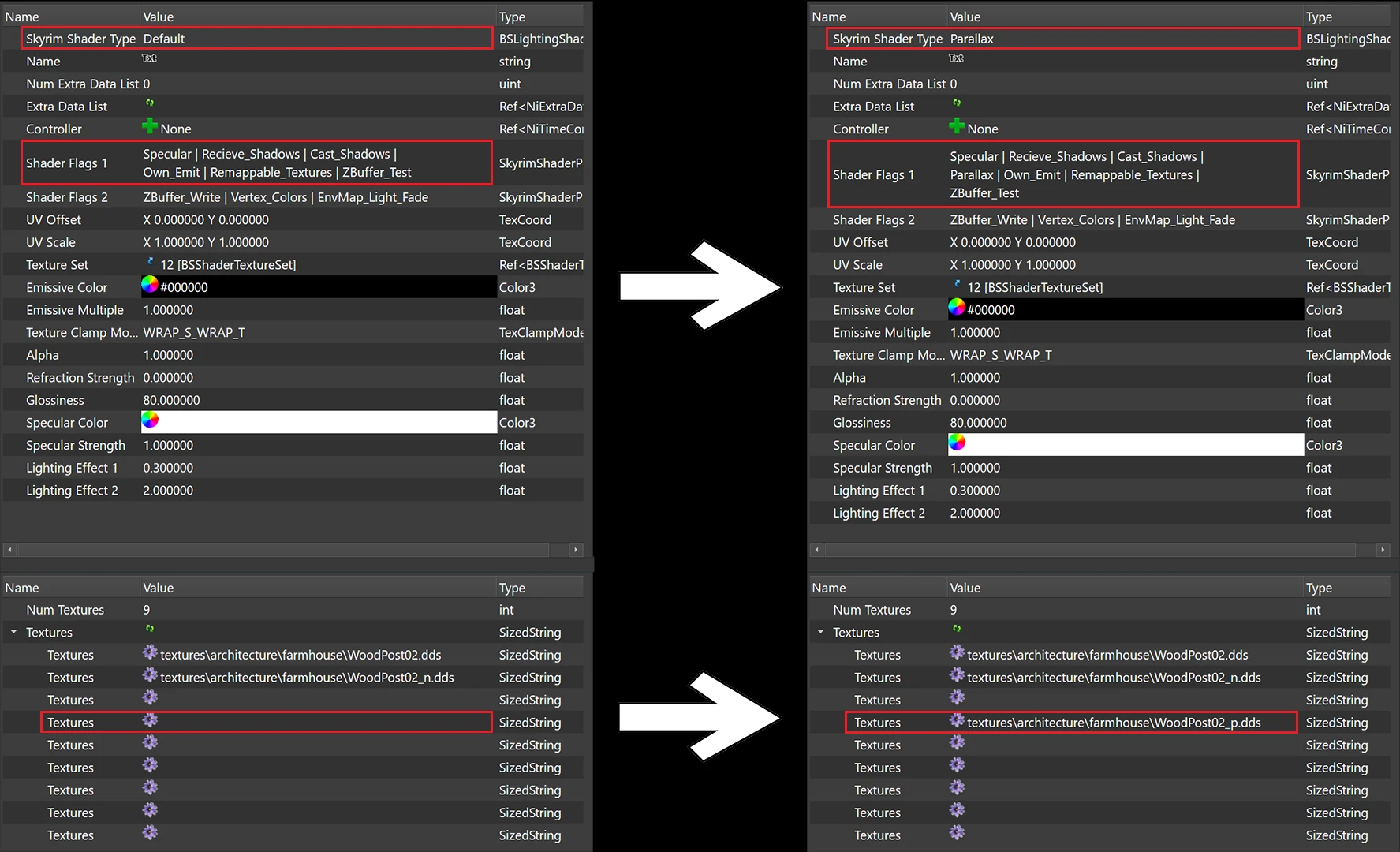
With Parallax being the best thing since sliced bread on SE currently, I was surprised there was never some kind of automated tool to actually set up a mesh for parallax, even on LE. Or at least, I couldn't find anything.
With some Googling and referring to the scripts from Kriffin's AllGUD SE, I was able to cobble together a script that can process meshes in batches to add parallax to them. Hopefully this means new parallax releases will include mesh patches for other mods since this script eliminates most of the effort required beyond creating the textures.
This evolved over time to include other automation scripts.
What It Does
(Parallax)(/removal)
-
[]Sets Shader Type and Shader Flags 1
[
]Adds vertex colors (white) to meshes lacking[] This is required for meshes to be visible when parallax is enabled on them
[]Automatically generates the parallax texture path (see features)
[]Ignores blocks where the shader type is already set (ie. non Default: Environmental, GlowMap, etc) excluding Parallax
[] This prevents removing other desired mesh effects
[]Ignores blocks that have transparency
[] These seem to cause problems with parallax
[]Ignores blocks with skinning
[] Parallax isn't supported on these kinds of blocks
[]Ignores blocks with back lighting
[] This causes lighting issues when parallax is enabled
[]Ignores meshes with attached havok animations
[] These cause a game crash when parallax is enabled
-
[]Sets Shader Flags 1 to enable specular
[
]Sets Glossiness to the user-defined value if it's 0[]Sets the Specular Color to the user-defined value if it's black
(Set Shader Flags)
-
[]Sets selected shader flags under sections 1 and 2 to enabled or disabled depending on settings
[] Rim lighting on shapes can cause glowing under certain lighting conditions.
-
[]Texture Blacklist allows you to exclude specific blocks from being modified based on the diffuse or normal texture they use
[]Non-destructive
[]User interface and logging
[]Parallax: choose to generate texture path based on diffuse or normals
[]Specular: choose color and gloss values set when meshes are generated
Installation:
Extract the archive to your "Edit Scripts" folder where SSEEdit/xEdit is installed.
[]Open xEdit
[]Load at
-
[]Texture Blacklist allows you to exclude specific blocks from being modified based on the diffuse or normal texture they use
-
[]Sets selected shader flags under sections 1 and 2 to enabled or disabled depending on settings
-
[]Sets Shader Flags 1 to enable specular
A suite of NifSkope scripts for automating mesh processing, including parallax and specular enablers and shader flag setters, all with a user interface. Designed for modders working with NIF files, this resource has 394 endorsements and 17,143 downloads, last updated in January 2022.
✨ Key Features
📊 Pros & Cons
✅ Pros
- Solid community trust with 394 endorsements and over 17k downloads.
- Automates tedious mesh processing tasks, saving modders time.
- User interface makes the scripts accessible even if you're not a scripting wizard.
⚠️ Cons
- Last updated in January 2022, so it might not support the latest NifSkope versions.
- As a modder's resource, it's useless if you're just a player looking for gameplay mods.
- Potential compatibility risk with newer NIF formats or game updates.
For Skyrim modders who regularly edit NIF files and want to speed up parallax/specular setup. Skip if you're a player—this is a tool, not a gameplay mod.
💡 Beginner Tips
- Make sure you have NifSkope installed and know how to run scripts from its interface.
- Test the scripts on a backup of your mesh before applying to your main files.
- Check the script's UI options to understand what each flag does before batch processing.
📊 Mod Details
- Game
- Skyrim Mods
- Author
- Spongeman131
- Version
- 3.6
- Downloads
- 17,143
- Endorsements
- 394
- Category
- Modders Resources
- Created
- 3/24/2020
- Updated
- 1/21/2022
🔧 How to Install Skyrim Mods
Download from Nexus.
📖 Full step-by-step install guide for Skyrim →
Visit the official mod page for specific installation instructions for this mod.
🎮 Need cheat codes or console commands? Check ur gaming wiki for Skyrim commands, item IDs, and more.
Keep browsing — more Skyrim mods await