MinMin Nyr - High Poly Character Preset - RaceMenu
⚪ Last updated 2022⚠️ Install Order · 6 steps
Install in this order, then this mod last — most mods fail to load without their framework and dependencies in place.
🖼️ Gallery (12 images)




🔍 Analysis
- 👍 0.4% endorsement rate
- 🏆 #10 of 222 Body, Face, and Hair mods in this game by downloads
📋 About This Mod
MinMin Nyr - High Poly Character Preset - RaceMenu
PLEASE DON'T FORGET TO ENDORSE THE MOD IF YOU END UP LIKING IT!
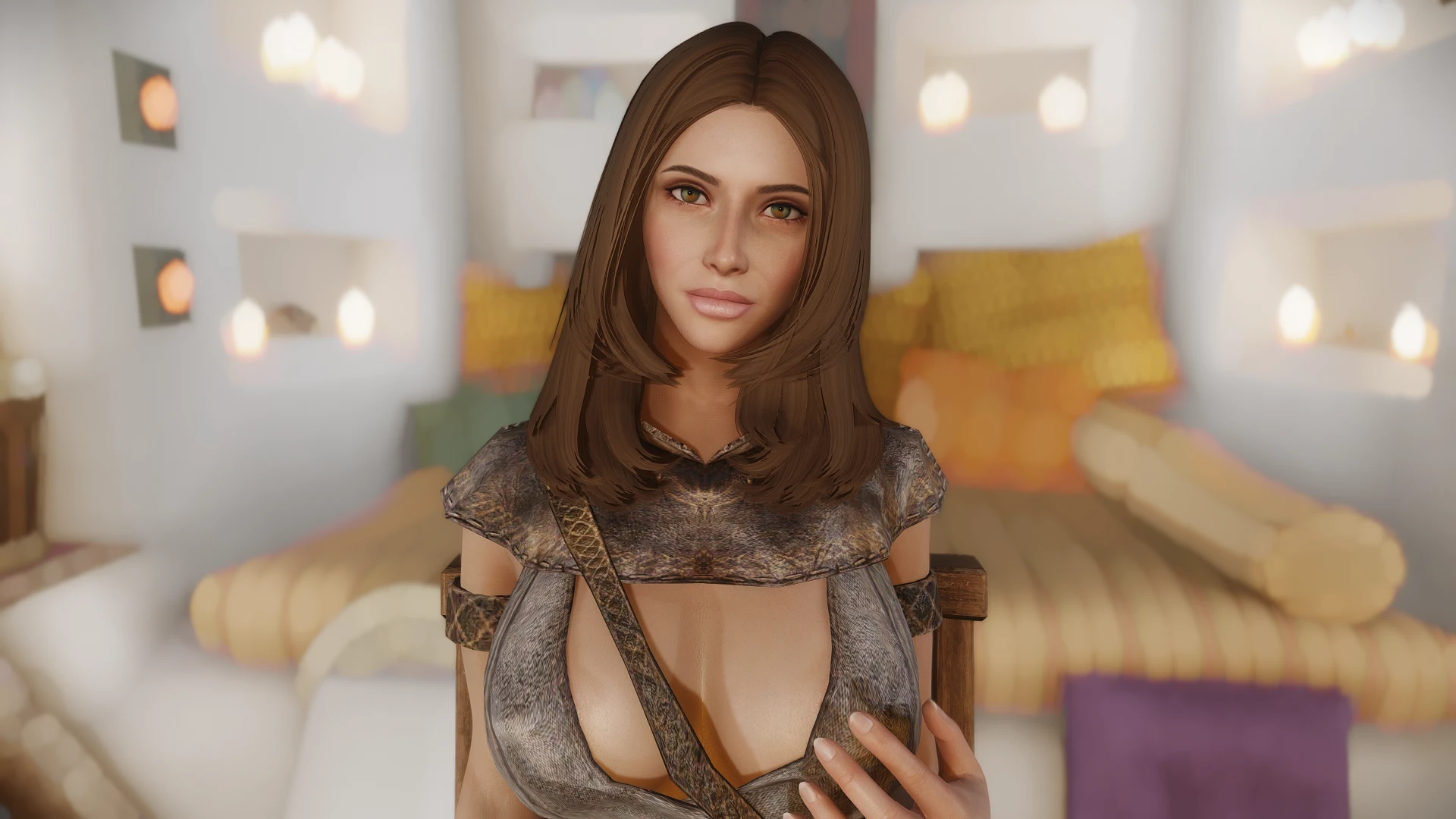
This is a RaceMenu Character Preset, using High Poly Head and EFM and can be used with Breton, Nord, Imperial, Redguard, High Elf, Dark Elf, and Wood Elf, being Imperial the main race here.
READ THE DESCRIPTION for information on how to use, FAQ, and Requirements & Recommended Mods.
How to use:
1. Choose one of the races. If you are Imperial, you probably only need Steps 2 and 4.
2. Go to the "Preset" tab in the top right corner of the screen, press F9, and load the "MinMin Nyr" preset.
3. Go to the "Head" sliders and change "Face Part" to the High Poly Head (usually #3).
4. If it still looks a bit weird, especially in other races, you may want to load the sculpt. Go to the Load sculpt in the top right corner, press F9 to load the sculpt and select "MinMin Nyr".
5. (OPTIONAL) - If using any of the Elven Races, you will probably want to change the Ear Type for an Elven one in the Sliders -> "Head" tab and change the "Ear Type" slider.
FAQ:
Q: The body is purple, what should I do?
A: Purple body means that a texture for the body paint is missing. This mod does not have any body paint, so it shouldn't happen.
Q: My Elven Character looks odd, what could be the case?
A: I do not use Aesthetic Elves nor any other Elven Changer, this could be the cause. Usually, you just need to install the High Poly Head with the Expressive Facegen Morphs.
Q: The colors look odd, what could be the case?
A: I use The Pure as my Skin Texture mod, so this was built on The Pure. If you use another skin texture, you may need to do some minor adjustments to skin color and makeup. Also, the ENB can affect the colors, although I use a "neutral" ENB.
Requirements
HEAD (REQUIRED)
High Poly Head
EYEBROW (The 2 files are needed) (REQUIRED)
Maevan2's Eye Brows SE
Maevan2's Eye Brows SE - High Poly (File found here - Hvergelmir Brows and SG Eyebrows for High Poly Head)
EYE
xrayys hd eye normal map SE (Recommended) - Eyemaps
Tullius Eyes Pack 6. 1 SE (Required)
SC - Cubemaps (Recommended) - For me, this is a game-changer. The eyes look so shiny and beautiful, I recommend it.
HAIR (REQUIRED)
A RaceMenu character preset for Skyrim SE/AE, offering a realistic female face sculpt called MinMin Nyr. With 944 endorsements and 244,959 downloads, it's a popular choice for players seeking a less fantasy-like appearance. Last updated in March 2022, it remains a solid option for character customization enthusiasts.
✨ Key Features
📊 Pros & Cons
✅ Pros
- Huge community trust with 944 endorsements and nearly 245k downloads.
- Realistic aesthetic stands out from typical fantasy presets.
- Simple to use—just load the preset in RaceMenu.
⚠️ Cons
- Requires RaceMenu and its dependencies (SKSE, etc.) to function.
- Last updated in 2022—may not be compatible with the latest Skyrim updates.
- Only one preset included; you might want more variety.
For Skyrim players who want a realistic, non-fantasy female face without sculpting from scratch. Perfect for character creation enthusiasts who enjoy sharing and using presets. Skip if you prefer stylized or fantasy looks.
💡 Beginner Tips
- Make sure you have Skyrim Script Extender (SKSE) installed, as RaceMenu requires it.
- Use a mod manager like Vortex or Mod Organizer 2 to install the preset files easily.
- After installing, load the preset in RaceMenu's preset tab and adjust as needed.
📊 Mod Details
- Game
- Skyrim Mods
- Author
- TheFaceSculptor
- Version
- 1.0
- Downloads
- 244,959
- Endorsements
- 944
- Category
- Body, Face, and Hair
- Created
- 3/13/2022
- Updated
- 3/13/2022
🔧 How to Install Skyrim Mods
Download from Nexus.
📖 Full step-by-step install guide for Skyrim →
Visit the official mod page for specific installation instructions for this mod.
🎮 Need cheat codes or console commands? Check ur gaming wiki for Skyrim commands, item IDs, and more.
Keep browsing — more Skyrim mods await