Lockpicking Interface Redone
⚪ Last updated 2018⚠️ Install Order · 5 steps
Install in this order, then this mod last — most mods fail to load without their framework and dependencies in place.
Preview
🔍 Analysis
- 👍 3.2% endorsement rate — high engagement, a strong quality signal
- 🏆 #87 of 154 User Interface mods in this game by downloads
📋 About This Mod
Lockpicking Interface Redone
"Re-Thought, Re-Modeled, Re-Textured, Re-Done"
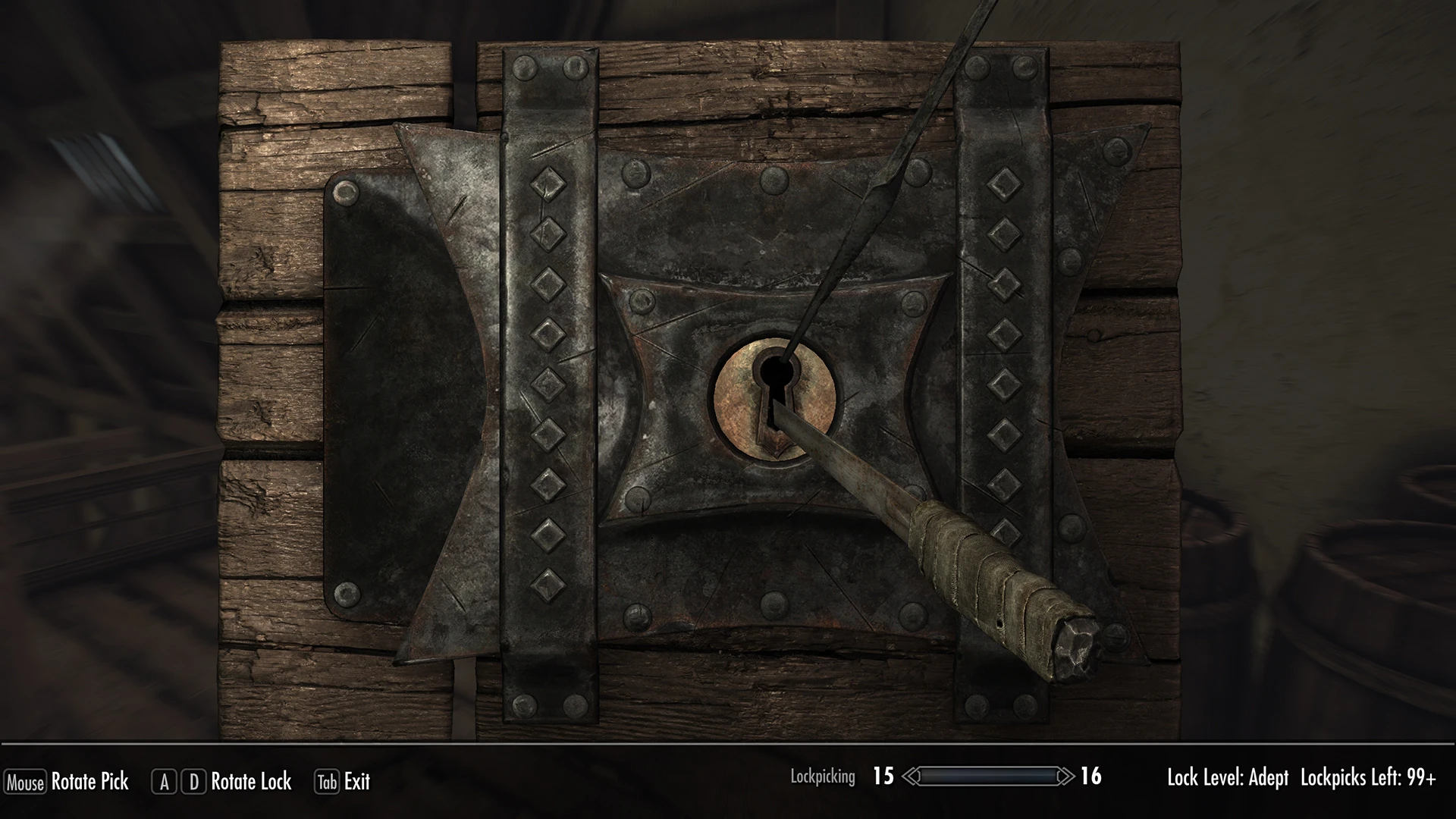
Remake of lockpicking interface assets with 100% new model and HD textures. Now the lock is a lot bigger, occupying most of the screen space that would otherwise be wasted. As a result of the increased detail and the addition of several bolts you'll have more reference points that will make lockpicking a bit less tedious without cheating.
It is compatible with most mods modifying lockpicking interface given only the model is modified, not the interface files themselves. Mods modifying the lockpick texture are also compatible and textures have been redirected so as to not interfere with Hearthfire DLC locks.
Lockpicking Interface Redone replaces the lockpicking interface assets in Skyrim with a 100% new model and HD textures. This UI overhaul is for players who want a fresh, high-definition look for the lockpicking minigame. With 5,827 endorsements and 183,356 downloads, it's a popular choice.
✨ Key Features
📊 Pros & Cons
✅ Pros
- Community favorite with 5,827 endorsements and 183k downloads
- Gives the lockpicking minigame a fresh, high-res look
- Simple asset replacement—no gameplay changes to worry about
⚠️ Cons
- Last updated in 2018, so it may not be compatible with the latest Skyrim versions or other UI mods
- Only affects the lockpicking interface—if you want broader UI overhauls, this won't cover them
- Potential conflicts with other mods that alter lockpicking assets or UI
For Skyrim players who want a sharper, more detailed lockpicking interface without changing gameplay. If you're a UI enthusiast looking to refresh the look of the minigame, this is a solid pick. Skip if you're after gameplay changes or a full UI overhaul.
💡 Beginner Tips
- Use a mod manager like Vortex or Mod Organizer 2 to install and manage this mod easily.
- If you're on Skyrim Special Edition, check if the mod has a compatible version or use the classic version with caution.
- Place this mod early in your load order to ensure other UI mods don't overwrite its textures.
📊 Mod Details
- Game
- Skyrim Mods
- Author
- FrankFamily
- Version
- 2.0
- Downloads
- 183,356
- Endorsements
- 5,827
- Category
- User Interface
- Created
- 6/16/2018
- Updated
- 6/16/2018
🧩 Commonly Used Together
Users add these mods to the same collections — a real compatibility signal, not an AI guess.
🔧 How to Install Skyrim Mods
Download from Nexus.
📖 Full step-by-step install guide for Skyrim →
Visit the official mod page for specific installation instructions for this mod.
🎮 Need cheat codes or console commands? Check ur gaming wiki for Skyrim commands, item IDs, and more.
Keep browsing — more Skyrim mods await