Lazy Item Hider - Toggle helm weapons and more
⚪ Last updated 2023⚠️ Install Order · 5 steps
Install in this order, then this mod last — most mods fail to load without their framework and dependencies in place.
Preview
🔍 Analysis
- 👍 1.1% endorsement rate — high engagement, a strong quality signal
- 🏆 #12 of 104 Gameplay mods in this game by downloads
📋 About This Mod
Why
Because I got tired of falling for the "Spend an hour creating a face - wear helmet the whole game" meme
Getting started
-
[]Install mod
[
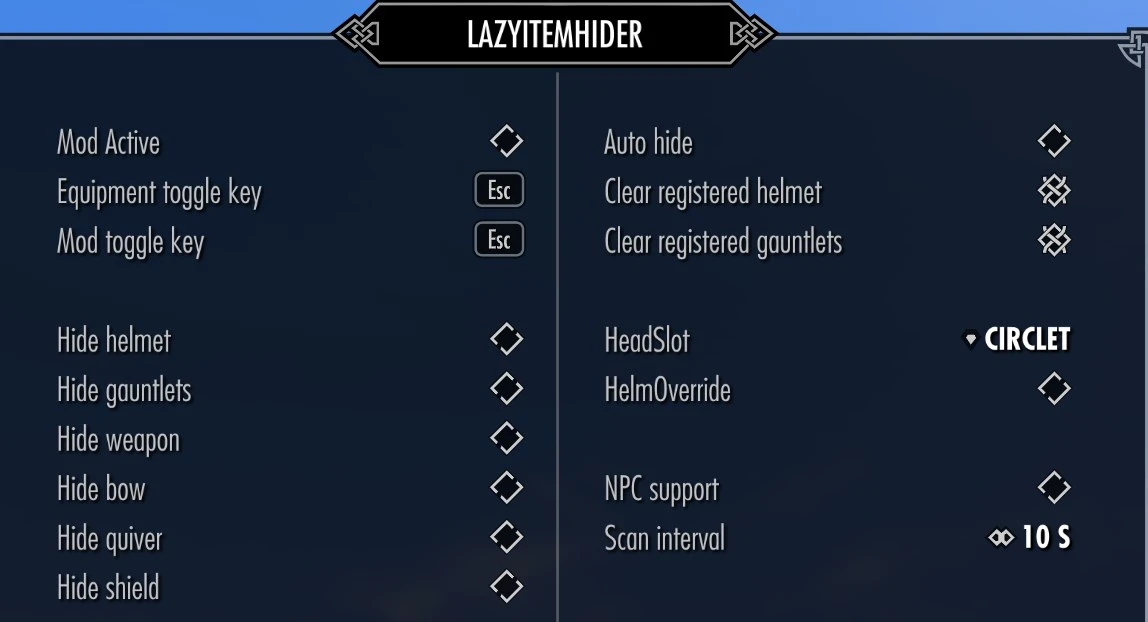
]Wait until SkyUI message pops up about menu being registered[]If you don't want to use the auto hide function make sure to bind the toggle key. Note - you can have auto hide enabled and still toggle manually
[]Helm and gauntlets are automatically detected when mod starts up. If you weren't wearing any at this time they'll be detected whenever any are equipped instead.
How it works
Helm and gauntlets are unequipped - Armor rating and effects of attached enchantments will be removed
Weapons are rescaled to 0 - Won't show but still there so any custom stuff they offer will still be active
Supported nodes
WeaponBack
Weapon
WeaponAxe
WeaponMace
WeaponSword
WeaponDagger
WeaponAxeLeft
WeaponMaceLeft
WeaponSwordLeft
WeaponDaggerLeft
WeaponStaff
WeaponStaffLeft
WeaponBow (includes crossbows as well)
Quiver
Shield
WARNING - Activating NPC support increases number of targets monitored and in turn the number of running scripts stored in your game/save, no way around it. If you don't know what this mean do not use this optionNotes
[]The purpose of Lazy Item Hider is to manage the bulky or concealing gear worn when adventuring. If you're not doing so and need to wear say enchanted gauntlets to boost your alchemy skill at home or something similar a toggle hotkey option is available to quickly enable or disable the mod/hider.
[]Tested with vanilla and XPMSSE. If you're using a skeleton that places weapons on different nodes or lack them entirely mod won't work.
[]The script is conditional triggered and should be very lightweight. No cloak effects, loops or other scripts are running in the background.
[]The node scaling is a game session only override and not permanent. The mod will however rehide your equipment on game load when applicable.
[]The nodes are assumed to have a default scale of 1 so if you've used another mod to change their size in game this will be overridden
[]Mod has been tested with vanilla headwear. If you're using modded variants you may have to change the "HeadSlot" to a different set
Lazy Item Hider lets you automatically or manually hide helmets, gauntlets, shields, and weapons for both the player and NPCs. With 2,548 endorsements and 233,343 downloads, it's a popular quality-of-life mod for those who want cleaner visuals without losing gear stats.
✨ Key Features
📊 Pros & Cons
✅ Pros
- Huge community trust with 2,548 endorsements and 233k downloads
- Flexible control: automatic or manual toggling
- Covers all major gear slots: helm, gauntlets, shield, weapons
⚠️ Cons
- Last updated in Feb 2023 — may not work with the latest game patches
- No mention of compatibility with other mods that alter equipment visuals
For players who want to show off their character's face or armor without being forced to wear a helmet, or who prefer a cleaner look on NPCs. Skip if you're fine with default gear visuals or want gameplay changes — this is purely cosmetic.
💡 Beginner Tips
- Check if your game version is still supported since the mod hasn't been updated since early 2023.
- If you use a mod manager, try installing manually first to see if it works without extra tools.
- Test the toggle feature on your own character before applying to NPCs to get the hang of it.
📊 Mod Details
- Game
- Skyrim Mods
- Author
- LazyGirl
- Version
- 0.12.5
- Downloads
- 233,343
- Endorsements
- 2,548
- Category
- Gameplay
- Created
- 4/9/2018
- Updated
- 2/26/2023
🔧 How to Install Skyrim Mods
Download from Nexus.
📖 Full step-by-step install guide for Skyrim →
Visit the official mod page for specific installation instructions for this mod.
🎮 Need cheat codes or console commands? Check ur gaming wiki for Skyrim commands, item IDs, and more.
Keep browsing — more Skyrim mods await