Hearthfire Dolls Are Ugly V.1.0 (Special Edition)
⚪ Last updated 2016⚠️ Install Order · 6 steps
Install in this order, then this mod last — most mods fail to load without their framework and dependencies in place.
Preview
🔍 Analysis
- 👍 7.0% endorsement rate — high engagement, a strong quality signal
- 🏆 #64 of 65 Miscellaneous mods in this game by downloads
📋 About This Mod
Hearthfire Dolls Are Ugly! SE V. 1. 0 Also available for Original Skyrim HERE
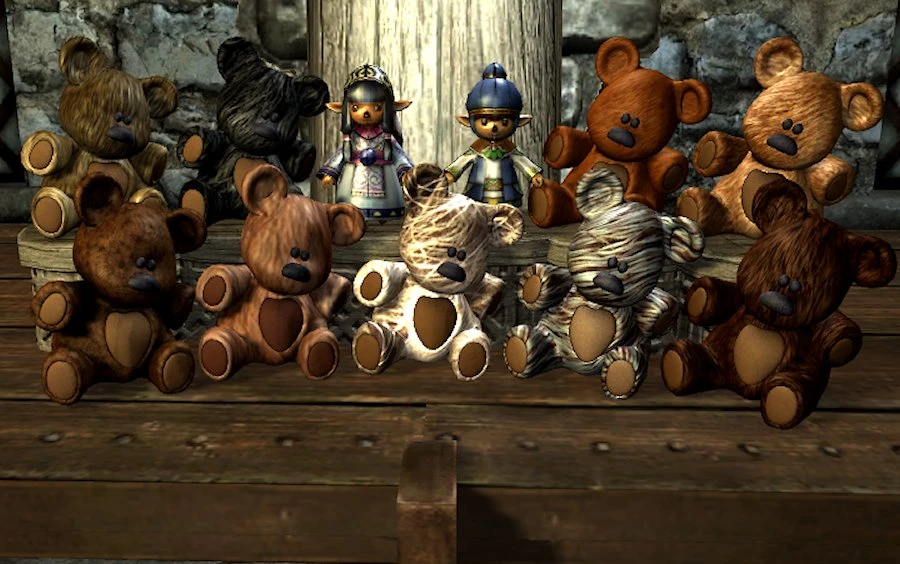
Well they are! And they cost 10 Septims! 10 SEPTIMS!! I could get a nice bit of that Breton cheese for that! Try these instead, choose between 9 teddy bears & 2 little Elven dolls, quality guaranteed!
This mod is a replacer for the god-awful sack-cloth & straw dolls in the Hearthfire DLC. (Hearthfire DLC required!)
Now you can own all bears and dolls and now includes 3 displays. Unfortunitely the game limits your child to only playing with one which you select on install (NMM only, hand install instructions below). To change the selected doll/bear simply right click the mod in NMM, select the reinstall option then select a different bear or doll. All dolls/bears and displays are now levelled, you'll need to reach level 25 to collect them all. The best places to buy are the Khajiit traders as they are the ones who make them though a selection is often available from the general stores you can find throughout the land (Khajiit traders are definately best though).
As you are able to collect and give all 11 dolls and bears to your daughters I have had to edit 2 of the original game files that control the giving and playing with of the the dolls/bears (AI Package & Idle Animation). This means that this mod WILL NOT BE COMPATIBLE WITH ANY OTHER MOD THAT DOES THE SAME THING! This is only applicable to the girls, any mods for the boys should be fine.
To use the display stands drop the display from your inventory then look at the display and hold <E> (or whatever you've rebound <Activate> to) to hold it in front of you and manuever into position then hit <E> again to drop. Now activate the display and select <Lock> to lock it in place. Activate again to place all dolls/bears in your inventory on the display where they'll be locked into place. To take any doll/bear just take as normal. If you are not entirely happy with the display's angle crouch activate and select <Rotate> then stand and turn your head to rotate the display in the direction you look. Crouch again to re-lock. You can also crouch-activate and select <Flip> to reverse which side the dolls/bears are facing. To take the display crouch-activate and select <Unlock> then activate again and select <Take>.
A quick look at using the displays. (Video is from Skyrim Standard Edition but works the same on Skyrim Special Edition.) Euu6r6-Uhkc
These bears and dolls are not made by me, I just altered them to be usable by the children and created the installer so you can switch them out whenever you like! Full credit goes to Runspect for his Elven dolls (http://skyrim.nexusmods.com/mods/26132), Abitor from thefree3dmodel
Replaces the ugly Hearthfire dolls with 9 teddy bears and 2 Elven dolls, adding 3 display stands. Requires Hearthfire DLC and is incompatible with mods that alter the same AI/idle files for girls. Popular with 940 endorsements and 13,426 downloads.
✨ Key Features
📊 Pros & Cons
✅ Pros
- Community favorite with 940 endorsements and over 13k downloads.
- Adds real variety with 9 teddy bears and 2 Elven dolls, plus display stands.
- Leveled items give you a reason to keep exploring and shopping.
⚠️ Cons
- Incompatible with any other mod that edits the same AI/idle files for girls, so check your load order.
- Only affects the girls' dolls; boys' toys are untouched.
- You can only select one doll/bear for your child to play with at install time, and changing it requires reinstalling the mod.
For Skyrim players who hate the vanilla Hearthfire dolls and want cuter alternatives for their kids' rooms. Also for collectors who enjoy hunting down leveled items and displaying them. Skip if you don't use Hearthfire or if you have other mods that alter child doll behavior.
💡 Beginner Tips
- Use NMM to install so you can easily reinstall to switch the active doll/bear.
- Buy from Khajiit traders for the best selection of dolls and bears.
- To place displays, drop the display, hold Activate to position, then activate again to lock.
📊 Mod Details
- Game
- Skyrim Mods
- Author
- berticus0001
- Version
- 1.0
- Downloads
- 13,426
- Endorsements
- 940
- Category
- Miscellaneous
- Created
- 11/15/2016
- Updated
- 11/15/2016
🔧 How to Install Skyrim Mods
Download from Nexus.
📖 Full step-by-step install guide for Skyrim →
Visit the official mod page for specific installation instructions for this mod.
🎮 Need cheat codes or console commands? Check ur gaming wiki for Skyrim commands, item IDs, and more.
Keep browsing — more Skyrim mods await