HD Stone Quarry and Clay Deposit SE
🟡 Updated this year⚠️ Install Order · 5 steps
Install in this order, then this mod last — most mods fail to load without their framework and dependencies in place.
Preview
🔍 Analysis
- 👍 0.3% endorsement rate
- 🏆 #221 of 565 Models and Textures mods in this game by downloads
📋 About This Mod
HD Stone Quarry and Clay Deposit SE
This is a port of the original HD Stone Quarry and Clay Deposit for Hearthfire.
Ported with permission from author.
Cathedral Landscapes and RWT used in images.
Overview
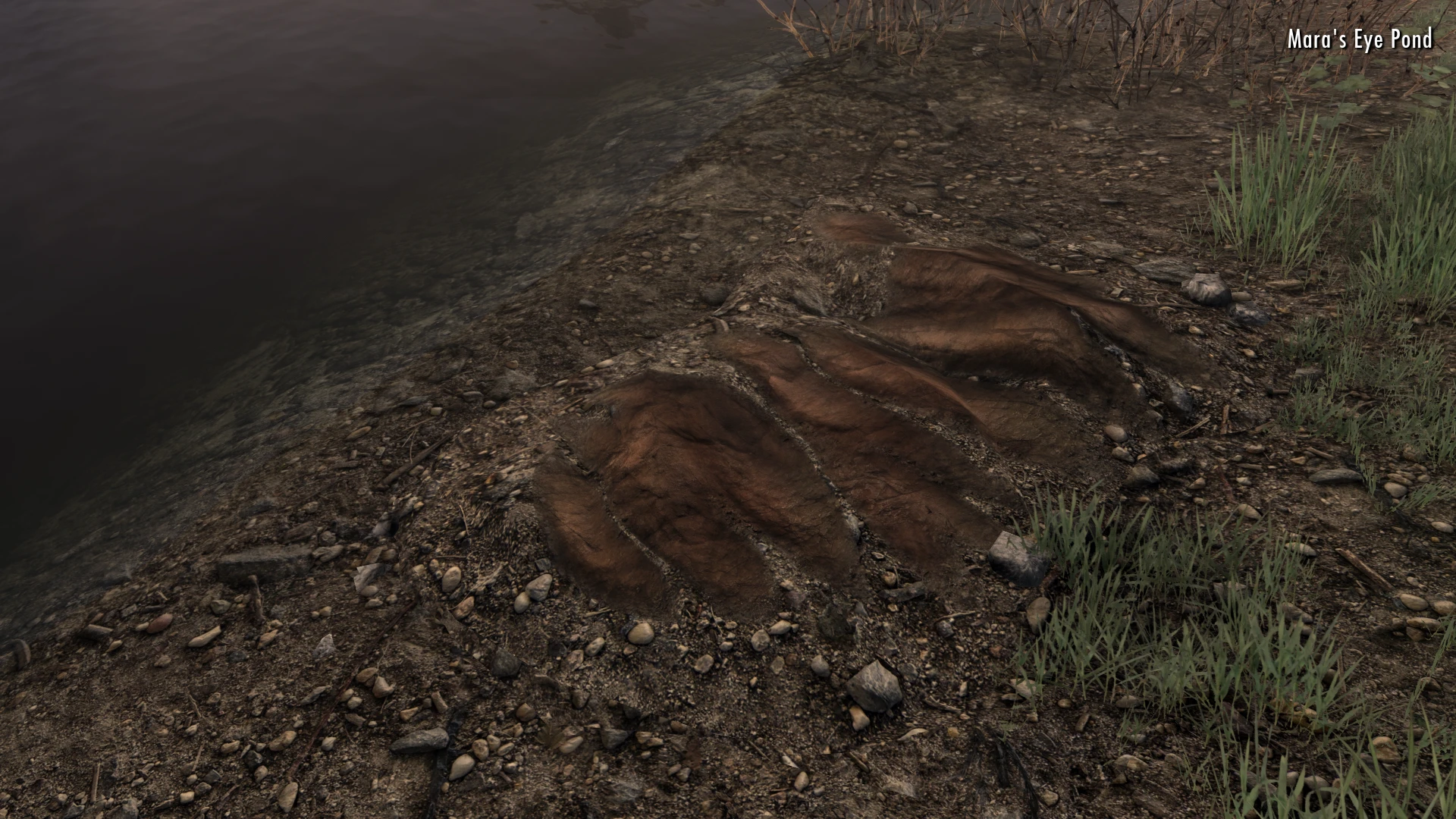
High definition texture and mesh replacer for the Stone Quarry and Clay Deposit resources added by the Hearthfire DLC. These are hand-made, high-quality textures done from scratch.
-
[]Realistic, High Definition textures for Stone Quarry and Clay Deposits[/]
[]Textures available in 2K and 4K versions[/]
[]Removed the annoying "plastic" shine on clay deposit[/]
[]New Normal Maps, available in 2K, made for detail and realism[/]
[]Custom meshes included to minimize stretching, seams, and add fix for blending[/]
[]ESL-flagged plugin also included, and required, as part of the blending fix[/]
Compatibility
Due to the blending fix, the clay deposits are now compatible with all landscape mods, without the need for texture patches! The blending fix uses an alpha to hide all the top texture besides the part that is desired. This means the clay deposits will work with any landscape texture overhaul.
The stone quarries are technically compatible will all mountain retextures, however, they are made for vanilla textures. This means they may not match the color and luminosity of other mountain retextures. Since I discovered most mountain retextures don't allow permission for asset use, I've provided two resource files for users to edit and make their desired mountain textures compatible with this mod's stone quarry texture.
The available texture patches are provided in the original resolution of their respective mods. The following mods have patches available:
- []Majestic Mountains (all versions)[/]
A high definition retexture for the Stone Quarry and Clay Deposit resources from the Hearthfire DLC, available in 2K and 4K. With over 5,400 endorsements and 2 million downloads, it's a popular choice for Skyrim players seeking improved visual fidelity for these building resources.
✨ Key Features
📊 Pros & Cons
✅ Pros
- Huge community trust: 5,497 endorsements and 2 million downloads show this mod is a go-to for many players
- Offers both 2K and 4K options, so you can pick based on your VRAM and performance needs
- Directly improves the look of Hearthfire resources, making your homestead building feel more immersive
⚠️ Cons
- Only covers Stone Quarry and Clay Deposit – other Hearthfire resources like lumber or straw remain untouched
- No explicit mention of compatibility with other texture overhauls, so you might need to manage load order carefully
- Last updated in April 2026 – while recent, there's no info on whether it supports future game patches
For Skyrim players who build homesteads and want those quarry and clay deposits to look sharper without overhauling the entire game. Perfect if you're into visual upgrades but don't want a heavy texture pack. Skip if you're looking for gameplay changes – this is purely cosmetic.
💡 Beginner Tips
- If you're using a mod manager like Vortex or MO2, just download and install – the mod will handle the file placement automatically.
- Choose the 2K version if you're on a mid-range GPU to keep performance smooth; 4K is for high-end rigs.
- Place this mod after other texture overhauls in your load order to ensure it takes priority for these specific resources.
📊 Mod Details
- Game
- Skyrim Mods
- Author
- skyrimaguas-TechAngel85
- Version
- 1.1.0
- Downloads
- 1,981,915
- Endorsements
- 5,497
- Category
- Models and Textures
- Created
- 7/7/2020
- Updated
- 4/23/2026
🧩 Commonly Used Together
Users add these mods to the same collections — a real compatibility signal, not an AI guess.
🔧 How to Install Skyrim Mods
Download from Nexus.
📖 Full step-by-step install guide for Skyrim →
Visit the official mod page for specific installation instructions for this mod.
🎮 Need cheat codes or console commands? Check ur gaming wiki for Skyrim commands, item IDs, and more.
Keep browsing — more Skyrim mods await