Eyes of The Beholder - An Eye Texture Replacer
⚪ Last updated 2018⚠️ Install Order · 6 steps
Install in this order, then this mod last — most mods fail to load without their framework and dependencies in place.
Preview
🔍 Analysis
- 👍 3.7% endorsement rate — high engagement, a strong quality signal
- 🏆 #189 of 260 Body, Face, and Hair mods in this game by downloads
📋 About This Mod
With the great loss of True Eyes from nexus I felt a hole was missing to be filled. And thus Eyes of The Beholder was born.
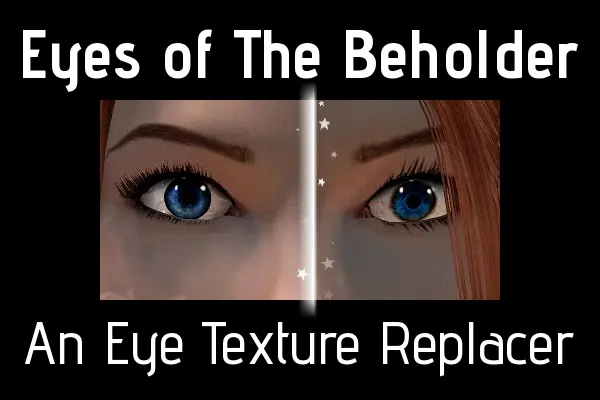
Eyes of The Beholder is a texture mod that aims to make in-game eyes look better resolution, and more beautiful. Beauty is, of course, in the eye of the beholder. Currently the mod is incomplete, and only replaces Human, Vampire, High Elf and Dark Elf eyes.
Textures are 1k (4x bigger than default and Total Character Makeover/Natural Eyes).
There is also a download to make brown eyes darker, to fit better with Asian player characters and more African looking Redguard characters.
Additionally there is a mod to make the blind eye more realistic.
This mod requires Eye Normal Map Fix SSE for correct normal maps.
I was going to make my own, but that mod already fits perfectly if the version for True Eyes is installed, as my textures and True Eyes use the same size iris.
REMEMBER: ENB's and Lighting Mods may alter colours slightly.
Compatibility:
-
[]NPC's that have their faces changed by mods such as RS Children and the various Bijn mods will not be affected, as they have unique eye textures packaged in the respective mod
[
]Any complete character graphic overhauls, such as Total Character Makeover, ARE compatible, just install my mod after and overwrite any files it asks about during installation.Coming soon:
-
[]All races textures done
[
]New additional standalone colours (optional download)[]White Eyeball colour for Mer (optional download)
[]Standalone versions of all replacers (optional download)
[]Bijn mods eye replacers/compatibility (optional download)
[]RS children eye replacers/compatibility (optional download)
- Make a FOMOD to consolidate the main and all optional files into one download with an installer
-
[]All races textures done
Eyes of The Beholder is a Skyrim Special Edition texture replacer that enhances eye resolution to 1k, covering Human, Vampire, High Elf, and Dark Elf eyes. It includes optional darker brown eyes and realistic blind eye textures. Requires Eye Normal Map Fix SSE. Compatible with overhauls like Total Character Makeover if installed after.
✨ Key Features
📊 Pros & Cons
✅ Pros
- Solid community backing with 404 endorsements and over 10k downloads.
- Textures are 4x higher resolution than default and popular overhauls, so eyes actually pop.
- Optional darker brown eyes and realistic blind eye add nice customization for specific character looks.
⚠️ Cons
- Incomplete—only covers four races, so Khajiit, Argonian, Orc, and Wood Elf players are left out for now.
- Requires Eye Normal Map Fix SSE as a dependency, which is an extra install step.
- ENB and lighting mods can shift the colors, so what you see in the preview might not match in-game.
For Skyrim players who want sharper, more detailed eyes without overhauling their whole character mod setup. If you play a Human, Vampire, High Elf, or Dark Elf and care about eye aesthetics, this is a quick win. Skip if you play other races or want a complete eye replacer covering everyone.
💡 Beginner Tips
- Install Eye Normal Map Fix SSE first, then this mod, and let it overwrite when prompted.
- If you use Total Character Makeover, install this mod after it and choose to overwrite the eye files.
- Test with your ENB or lighting mod—colors may shift, so tweak brightness or contrast if eyes look off.
📊 Mod Details
- Game
- Skyrim Mods
- Author
- Jonin Cactuar
- Version
- MAIN-1.1
- Downloads
- 10,919
- Endorsements
- 404
- Category
- Body, Face, and Hair
- Created
- 2/8/2018
- Updated
- 3/8/2018
🔧 How to Install Skyrim Mods
Download from Nexus.
📖 Full step-by-step install guide for Skyrim →
Visit the official mod page for specific installation instructions for this mod.
🎮 Need cheat codes or console commands? Check ur gaming wiki for Skyrim commands, item IDs, and more.
Keep browsing — more Skyrim mods await