Equipment HUD SE
🟠 Updated over a year ago⚠️ Install Order · 5 steps
Install in this order, then this mod last — most mods fail to load without their framework and dependencies in place.
Preview
🔍 Analysis
- 👍 2.6% endorsement rate — high engagement, a strong quality signal
- 🏆 #93 of 123 User Interface mods in this game by downloads
📋 About This Mod
Goal
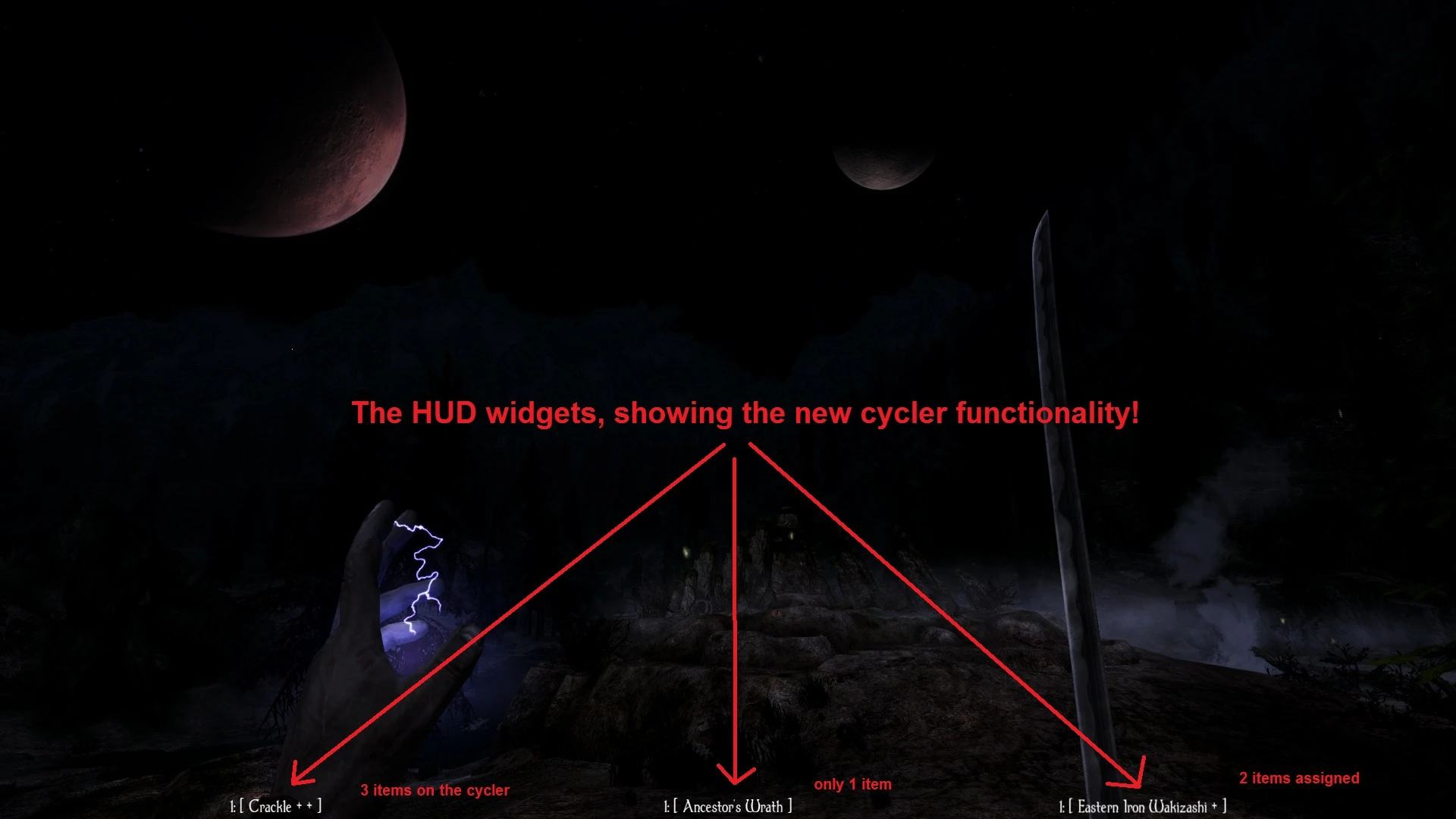
Equipment HUD is a mod designed to increase the fluidity of Skyrim. It adds three configurable HUD widgets that show the names of the currently equipped power/shout and items in the player's left and right hands, preventing the need to check for currently equipped gear in a menu.
Furthermore, since version 2. 0, the concept of cycler hotkeys has been implemented. These cycler hotkeys, or cyclers for short, aim to replace the standard Skyrim hotkeys with something more flexible. You are now able to assign 7 weapons, spells, and powers/shouts, to a cycler. A cycler is basically a rotating list of items that you step through by each press of a hotkey. Each hand slot and the power/shout slot get 2 separate cyclers, giving you 6 7 = 42 items assignable to hotkeys (or even more if you allow more items per cycler through the MCM). The assignment and management of the cyclers can be done entirely in-game using designated hotkeys for adding, removing, and shifting items around. You don't need to enter the MCM in order to manage the items on a cycler!
All configuration options and hotkey bindings can be backed up to disk (in the Maintenance page of the MCM).
A mod that offers similar functionality is the recently released Souls Quick Menu by Christian Weeks and Zachary McNellis. My mod aims to do things a bit more fluid and visually less intrusive. Do however check out their mod as well!
Cycler Hotkeys
Note: you need to configure your cycler hotkeys in the MCM first!
A cycler is defined by an equip slot (left hand, power/shout, right hand) and a configurable hotkey.
-
[] To add an equipped item to a cycler, press and hold the "Add to cycler" modifier (suggested `=') and then the cycler hotkey. So if you were holding an iron sword in your right hand, press and hold `=' then `3' to add the sword to your right hand cycler #1. You can then equip something else and add that to the cycler too, in the same way. You can even do this while staying in the inventory menu to quickly equip and add a sequence of weapons or spells to your cyclers.
[] To step through a cycler, simply press its associated hotkey (suggested are 1 and 2 for the left hand cyclers, 3 and 4 for right hand, and 5 and 6 for the power/shout cyclers. You can also step backwards by pressing and holding the "Reverse cycler" modifier (suggested `left shift').
[] To remove an equipped item from a cycler, press and hold the "Remove from cycler modifier (suggested `-') and then the cycler hotkey.
[] To switch the equipped item's position in a cycler, press and hold the "Shift cycler cursor" modifiers (suggested `[' for left and `]' for right), and then the cycler hotkey.
[] All hotkeys can be configured in the MCM.
You can see the status of your cyclers in the HUD widgets using a basic textual scheme where
Equipment HUD SE adds three configurable HUD widgets to Skyrim that display the names of your currently equipped power/shout and left/right hand items, aiming to improve gameplay fluidity. With 981 endorsements and 38,455 downloads, it's a popular UI enhancement for players who want quick visual reference of their loadout.
✨ Key Features
📊 Pros & Cons
✅ Pros
- Community-approved with 981 endorsements and over 38k downloads—clearly a go-to for HUD tweaks.
- Lightweight UI mod that doesn't overhaul your whole interface, just adds the info you need.
- Configurable widgets mean you can tailor the HUD to your playstyle, whether you're a mage or a dual-wielder.
⚠️ Cons
- Description cuts off mid-sentence, so you're flying blind on the full feature list—might miss hidden gems.
- Last updated in May 2025, so if you're on the latest Skyrim patch, there's a chance of compatibility hiccups.
- UI mods can clash with other HUD overhauls—if you run something like SkyUI or iHUD, test carefully.
For Skyrim players who want a cleaner, more informative HUD without a full interface overhaul. If you're tired of squinting at your hands to see what's equipped, this is for you. Skip if you prefer minimal UI or already use a comprehensive HUD mod that covers this.
💡 Beginner Tips
- If you're using a mod manager like Vortex or MO2, just download and install—no manual file placement needed.
- Check your MCM (Mod Configuration Menu) if you have SkyUI installed; that's where you'll tweak the widget positions and visibility.
- Since it's a UI mod, make sure it loads after other HUD mods in your load order to avoid conflicts.
📊 Mod Details
- Game
- Skyrim Mods
- Author
- Snotgurg
- Version
- 2.1.9
- Downloads
- 38,455
- Endorsements
- 981
- Category
- User Interface
- Created
- 11/5/2017
- Updated
- 5/20/2025
🔧 How to Install Skyrim Mods
Download from Nexus.
📖 Full step-by-step install guide for Skyrim →
Visit the official mod page for specific installation instructions for this mod.
🎮 Need cheat codes or console commands? Check ur gaming wiki for Skyrim commands, item IDs, and more.
Keep browsing — more Skyrim mods await