Ecotone Dual Sheath
⚪ Last updated 2019⚠️ Install Order · 5 steps
Install in this order, then this mod last — most mods fail to load without their framework and dependencies in place.
Preview
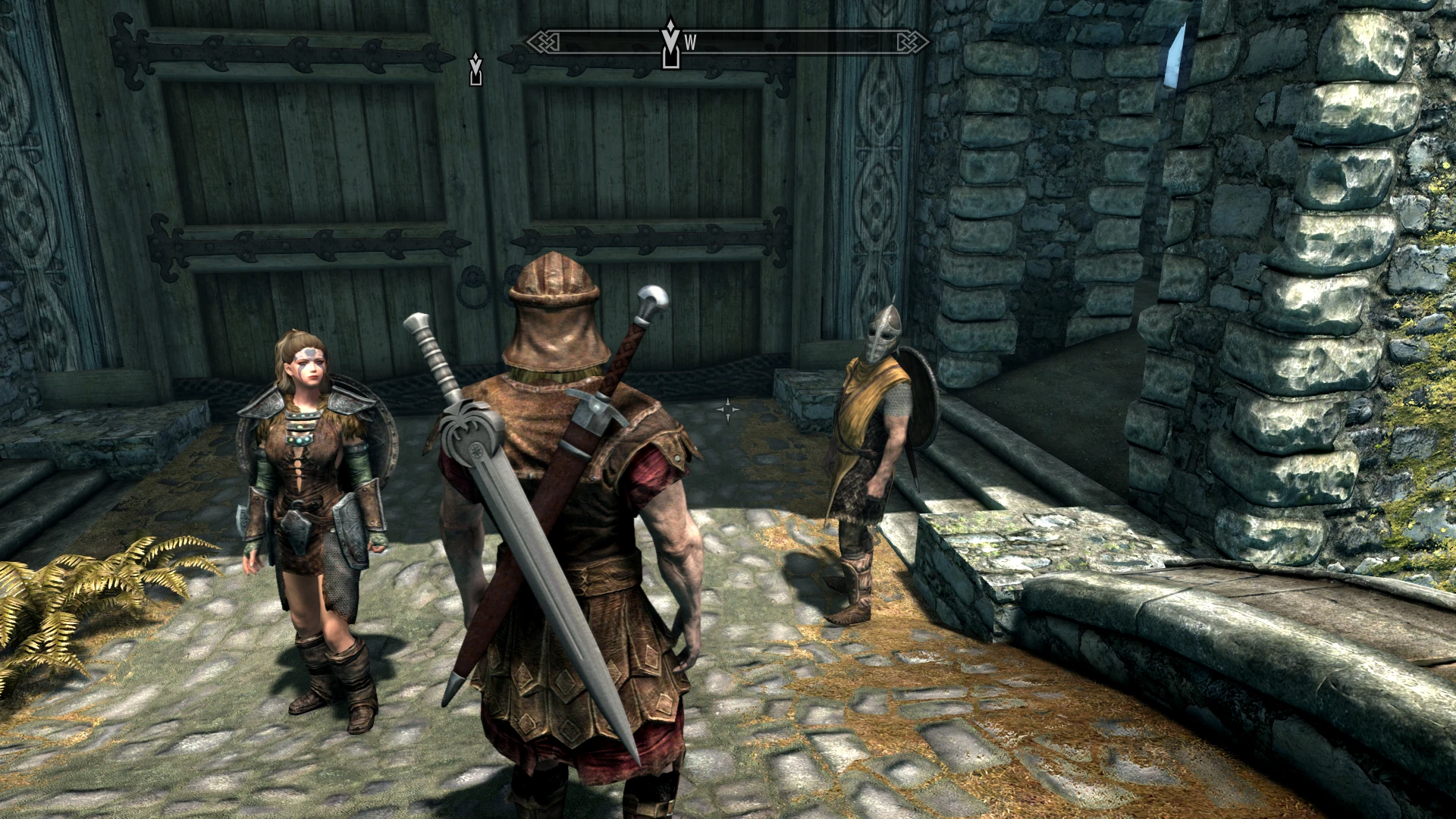
🔍 Analysis
- 👍 2.9% endorsement rate — high engagement, a strong quality signal
- 🏆 #10 of 162 Immersion mods in this game by downloads
📋 About This Mod
I really liked Dual Sheath Redux by Neovalen for Oldrim so I decided to recreate it for SSE. This mod uses the same mesh design as DSR but the script is entirely my own work.
When creating this mod I hoped to find a way to automatically generate left hand meshes for all the weapons and shields you have install by running some kind of script but I could not find any tool that programmatically modified nif files. Long after I created this mod cskriffin published All Geared Up Derivative SE - AllGUD that included an xEdit script to do just that. Turns out that xEdit could do just what I wanted but it wasn't documented anywhere.
The best way to use this mod is to install just the mod without any of the included meshes (uncheck all mods when installing) then follow the instructions from Vyxenne in the first sticky post.
I would love to create a single xEdit script that incorporates both left hand meshes generation and patch generation but creating and testing the scripts take a great deal to time which I don't really have now.
If you don't want to run any script then you can install the meshes that come with this mod. See the "Meshes Included" section below.
Requirements
You will need SKSE64, JContainers SE, SkyUI, and XP32 Maximum Skeleton Special Extended - XPMSSE. For the targeted debugging options you will also need PapyrusUtil SE. If you are not using targeted debugging the you will not need PapyrusUtil SE. The only other required plugin is Skyrim.esm.
Installation
UPDATING: If you're updating it's best to completely remove this mod. From the MCM menu disable the mod then save. Remove this mod then reload your save. You should get a warning about missing content. Click "Yes" and let the game load. Make a new save. That should be enough but to be sure you could run FallrimTools on the last save file.
1) Follow the SKSE64 installation instructions here STEAM Community - SKSE64 Installation Guide or see this video by Gopher.
2) Install JContainesrs.
3) (optional) Install PapyrusUtil SE
4) Install XP32 Maximum Skeleton Special Extended:
a) (optional) Install RaceMenu.
b) Install Fores New Idles in Skyrim SE - FNIS SE
c) Install XP32 Maximum Skeleton Special Extended:
5) Install SkyUI.
6) Install Ecotone Dual Sheath.
Use a mod manager that support FOMOD installer. Here is what it looks like then using MO2:
For best results leave everything under "Custom" unchecked and follow the instructions in the first sticky post to generate the meshes and
Ecotone Dual Sheath is a Skyrim Special Edition mod that displays your equipped left-hand weapon and shield on your back when out of combat. Inspired by Dual Sheath Redux, it brings this popular feature to SSE. With over 12,000 endorsements and 428,000 downloads, it's a well-established immersion mod for players who want visual realism.
✨ Key Features
📊 Pros & Cons
✅ Pros
- Huge community trust with 12,360 endorsements and 428k downloads.
- Brings a beloved Oldrim feature to Special Edition.
- Simple immersion boost—no more weapons clipping through your back.
⚠️ Cons
- Last updated in 2019—might have issues with newer Skyrim SE patches or mods.
- Only affects left-hand weapons and shields; right-hand weapons are not shown.
- Requires a compatible skeleton and possibly other mods to work correctly, but no dependencies are listed.
For Skyrim Special Edition players who want more realistic weapon visuals without heavy gameplay changes. If you're tired of your shield disappearing when sheathed, this is for you. Skip if you want combat overhauls—this is purely cosmetic.
💡 Beginner Tips
- Make sure you have a skeleton mod like XPMSE installed, as many cosmetic mods require it for proper bone placement.
- Use a mod manager like Vortex or Mod Organizer 2 to avoid overwriting files manually.
- Check the mod's posts section on Nexus for compatibility notes with other skeleton or animation mods.
📊 Mod Details
- Game
- Skyrim Mods
- Author
- Ecotone
- Version
- 0.4.0
- Downloads
- 428,817
- Endorsements
- 12,360
- Category
- Immersion
- Created
- 6/3/2018
- Updated
- 2/17/2019
🧩 Commonly Used Together
Users add these mods to the same collections — a real compatibility signal, not an AI guess.
🔧 How to Install Skyrim Mods
Download from Nexus.
📖 Full step-by-step install guide for Skyrim →
Visit the official mod page for specific installation instructions for this mod.
🎮 Need cheat codes or console commands? Check ur gaming wiki for Skyrim commands, item IDs, and more.
Keep browsing — more Skyrim mods await