Dye Manager
⚪ Last updated 2019⚠️ Install Order · 6 steps
Install in this order, then this mod last — most mods fail to load without their framework and dependencies in place.
Preview
🔍 Analysis
- 👍 2.6% endorsement rate — high engagement, a strong quality signal
- 🏆 #38 of 126 User Interface mods in this game by downloads
📋 About This Mod
Warning: This mod requires
SKSE64 2. 0. 16 (or greater)
AND
RaceMenu Special Edition 0. 4. 0 (or greater)
Armors MUST support the Dye system to work!
What does it do?
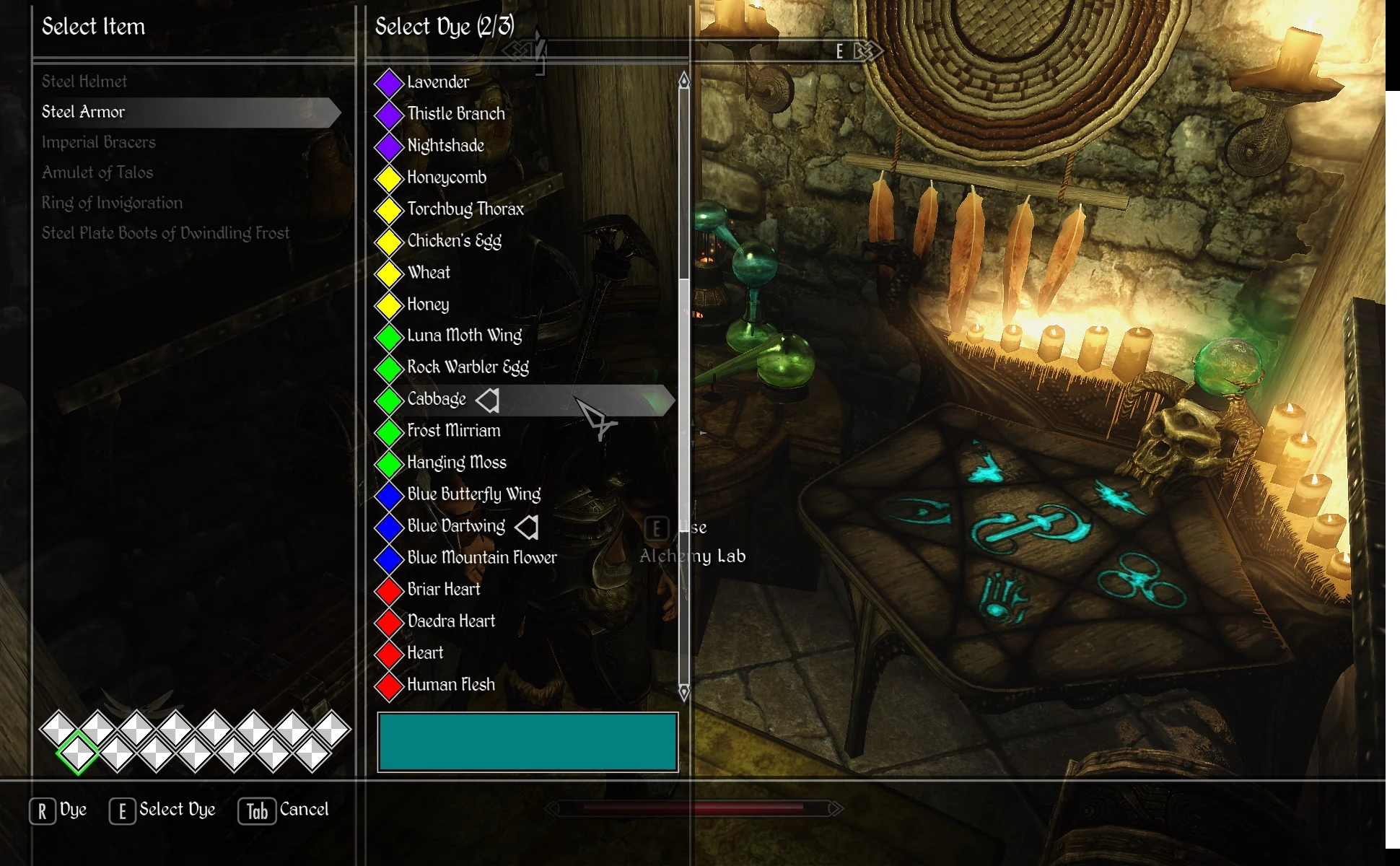
Adds the ability to dye supported armor from a menu. Items that are dyed can be given to other Actors and will maintain their colors.
How do I dye my armor?
Go to an Alchemy Table or Tabletop, if the mod did not encounter any errors on startup you will have the "Dye" option in addition to "Use Alchemy Table". When the menu opens you will be met with a list on the left of currently equipped items, or previously dyed items. Select an item and select a color diamond at the bottom, this represents the layer. The first layer usually tints the entire armor, it is more desirable to select the next layer that can potentially colorize only specific parts.
How do I remove dye from my armor?
When in the Dye Menu, select your item, the rectangle in the Dye list should be transparent. Press the Dye key while no dyes are selected and it will revert your armor to its default colors.
Things to know
Dye ingredients will be consumed whether anything was actually dyed or not. Know what layers the item you're dyeing supports before dyeing. The system cannot tell what layers are available at dye-time nor can it tell what the default colors are, it just knows that there is a maximum of 15 layers, and what the current overrides are.
Weapons are not supported yet, only Armor.
Differences from LE
- []No layer limit, only the UI is limited to 15 layers
[
]Now supports targeting any layer (diffuse, normal, specular, environment, glowmap)[]No longer changes the underlying shader type
[]Mask size will be scaled to the size of the source texture
[]Masks are iterative not combined before blending. Overlapping masks will have overlapping effects
[]Various blend modes now available
- New blend shaders can be created (shader program name must be the name of the file, and be lowercase)
Why are there three plugins, can't you make it one?
There are 3 plugins because it may be desirable to remove the default ingredients completely for overhaul mods, in which case you just disable DyeManagerDefaults.esl, or overwrite the included script with your own list of ingredients. UIExtensions holds all of the menu assets, this is where all of my custom menus go, while I could int
Dye Manager is a UI mod for Skyrim that uses NiOverride to enable dyeing of items. With nearly 2,000 endorsements and 76,000 downloads, it's a popular tool for players who want to customize the colors of their gear. Last updated in December 2019, it remains a go-to for dye enthusiasts.
✨ Key Features
📊 Pros & Cons
✅ Pros
- Community-approved with nearly 2k endorsements and 76k downloads.
- Adds a whole new layer of customization to your gear.
- Built on NiOverride, so it's solid for modders who know the framework.
⚠️ Cons
- Last updated in 2019, so it might be outdated for newer Skyrim versions.
- Requires NiOverride, which can be a pain to set up if you're not used to it.
- Potential conflicts with other mods that alter item properties or UI.
For Skyrim players who love customizing their character's look and want to dye their armor and weapons. If you're into role-playing or fashion, this is a must-have. Skip if you're not into cosmetic tweaks or if you're on a version that doesn't support NiOverride well.
💡 Beginner Tips
- Make sure you have NiOverride installed and properly set up before adding Dye Manager.
- Use a mod manager like Vortex or MO2 to handle the installation and load order.
- Check the mod's compatibility with your Skyrim version (SE or LE) to avoid crashes.
📊 Mod Details
- Game
- Skyrim Mods
- Author
- Expired
- Version
- 2.1.0
- Downloads
- 76,052
- Endorsements
- 1,948
- Category
- User Interface
- Created
- 8/19/2019
- Updated
- 12/19/2019
🧩 Commonly Used Together
Users add these mods to the same collections — a real compatibility signal, not an AI guess.
🔧 How to Install Skyrim Mods
Download from Nexus.
📖 Full step-by-step install guide for Skyrim →
Visit the official mod page for specific installation instructions for this mod.
🎮 Need cheat codes or console commands? Check ur gaming wiki for Skyrim commands, item IDs, and more.
Keep browsing — more Skyrim mods await