Display Enemy Level
⚪ Last updated 2023⚠️ Install Order · 5 steps
Install in this order, then this mod last — most mods fail to load without their framework and dependencies in place.
Preview
🔍 Analysis
- 👍 2.5% endorsement rate — high engagement, a strong quality signal
- 🏆 #120 of 141 User Interface mods in this game by downloads
📋 About This Mod
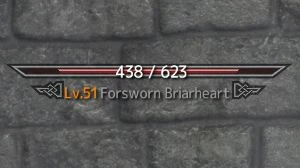
This MOD displays enemy level and enemy health numbers on the HUDMenu.
You can open "DisplayEnemyLevel.ini" to change the settings.
SkyHUD - Compatible.
Customizable UI Replacer SE - Some presets do not change color. See "How to fix color for Customizable UI Replacer.png" to fix it. The position of the enemy HP numbers will be out of position, so open "DisplayEnemyLevel.ini" and set the position. See the "Customizable UI Replacer SE" mod page for the values.
SKSE team for SKSE.
meh321 for Address Library for SKSE Plugins.
My Mods
LE | SE MiniMap
LE | SE Equipment Upgrades
LE | SE Armor Break
LE | SE Floating Damage V2
LE | SE Copy Character Appearance
LE | SE Attributes
LE | SE Floating Damage
LE | SE Equipment Durability System
LE | SE Display Enemy Level
LE | SE Locational Damage(SKSE Plugin)
LE | SE Difficulty Balance
LE | SE Animation Loading Fix
LE | SE Disable Follower Collision
LE | SE Additional Techniques
LE | SE Copy and Paste in Console
LE | SE Dynamic Animation Replacer
LE | SE Player Rotation in ShowRaceMenu
Display Enemy Level is a lightweight UI mod that shows enemy level and health numbers directly on the HUD menu. With over 30,000 endorsements and 1.2 million downloads, it's a highly popular quality-of-life addition for players who want clear combat information at a glance.
✨ Key Features
📊 Pros & Cons
✅ Pros
- Massive community trust with 30,879 endorsements and 1.2M downloads.
- Simple, focused purpose—does exactly what it says with no bloat.
- Last updated in January 2023, so it's relatively recent for a UI mod.
⚠️ Cons
- Only shows level and health numbers, no other enemy info like resistances or buffs.
- Compatibility with other UI mods is unknown—could conflict with HUD overhauls.
For players who want clear enemy level and health info without digging into menus. Great for min-maxers and anyone who likes knowing exactly how tough an enemy is. Skip if you prefer a minimal HUD or use a comprehensive UI overhaul that already includes this.
💡 Beginner Tips
- If you're using a mod manager, just download and activate—most UI mods like this are drop-in.
- Check your in-game HUD settings to see if the new numbers overlap with other elements; adjust scale if needed.
- If you use other UI mods, test in a low-stakes area first to ensure no conflicts.
📊 Mod Details
- Game
- Skyrim Mods
- Author
- Felisky
- Version
- 1.1.5
- Downloads
- 1,229,072
- Endorsements
- 30,879
- Category
- User Interface
- Created
- 7/12/2018
- Updated
- 1/9/2023
🧩 Commonly Used Together
Users add these mods to the same collections — a real compatibility signal, not an AI guess.
🔧 How to Install Skyrim Mods
Download from Nexus.
📖 Full step-by-step install guide for Skyrim →
Visit the official mod page for specific installation instructions for this mod.
🎮 Need cheat codes or console commands? Check ur gaming wiki for Skyrim commands, item IDs, and more.
Keep browsing — more Skyrim mods await