(Deprecated) Minimalistic Custom Skills Menu for AE
⚪ Last updated 2022⚠️ Install Order · 8 steps
Install in this order, then this mod last — most mods fail to load without their framework and dependencies in place.
Preview
🔍 Analysis
- 👍 2.2% endorsement rate — high engagement, a strong quality signal
- 🏆 #9 of 11 Skills and Leveling mods in this game by downloads
📋 About This Mod
NOTICE: The original mods have been updated to AE, rendering this mod redundant. Please go get them instead.
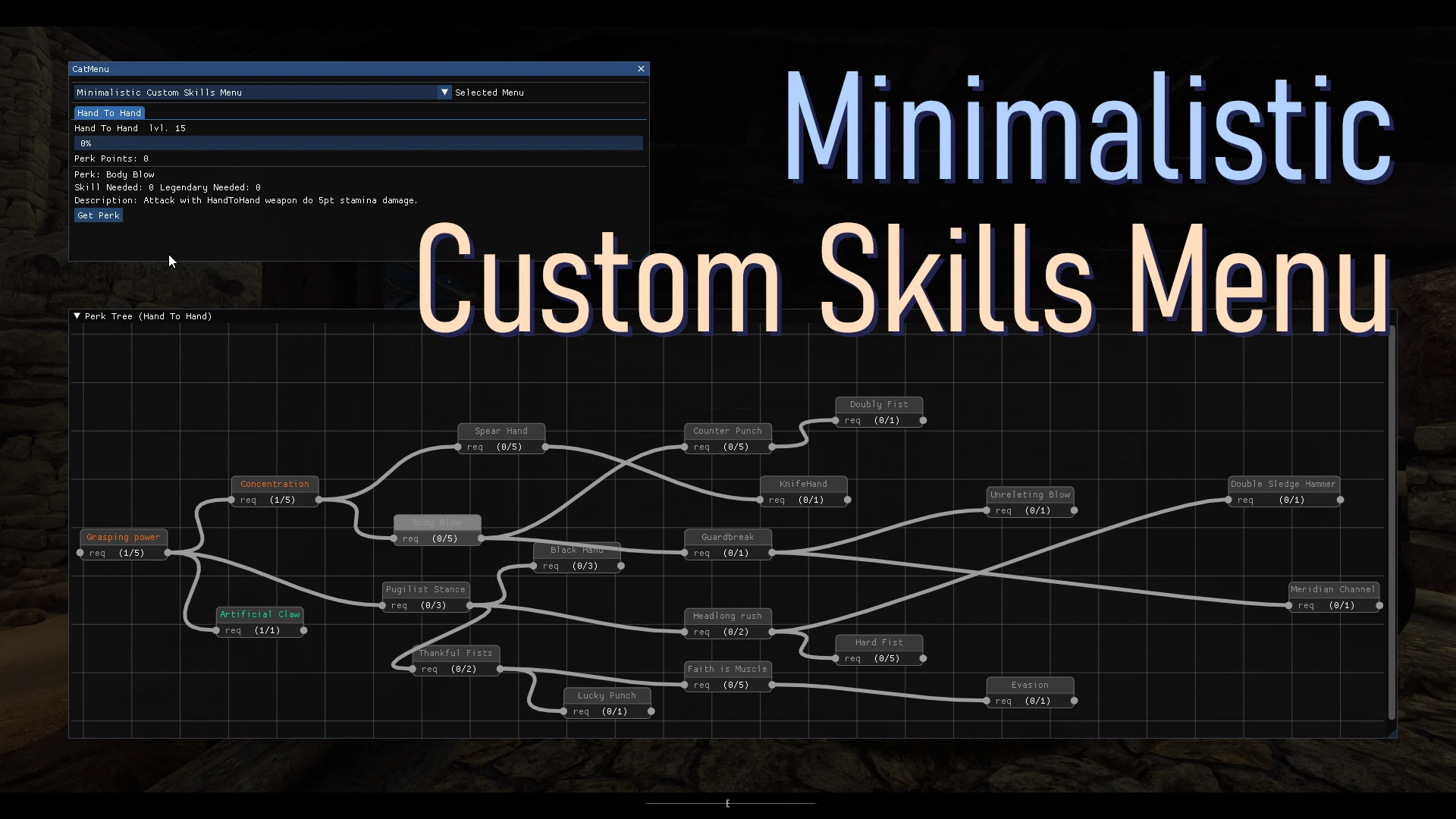
This is a substitute for meh321's Custom Skills Framework + OsmosisWrench's Custom Skills Menu for Skyrim Anniversary Edition (1. 6.x), since . NET Framework's AE update is probably not going to happen. It's crude, it's shabby, but it just works (for me at least).
Requirement
Address Library
Usage
After installation, in game you can press designated hotkeys (default F6) to invoke CatMenu from my 5LCat's Utils. From there you can tick the 'Minimalistic Custom Skills Menu' checkbox. Each skill's own methods of invoking perk trees are ignored. You must use my menu to access the skills. Obey or fall down and bleed to death.
The perk tree can be dragged with middle mouse button.
This mod is made to replace meh321's SE framework on AE, so any custom skill mod that depends on it can be used almost directly. However, due to the style of my programming (i.e. simply calling tomlplusplus library), the config file must now follow a stricter TOML schema, which includes:
[]UTF-8/ANSI Encoding: vicn's custom skills (Hand2Hand, Unarmoured Defence, Vigilant, Glenmoril) uses UCS-2 encoding, which needs to be converted to UTF-8. This can be done using default Windows notepad: open the config txt under data\NetScriptFramework\Plugins and File->Save As. There's a encoding drop down list at the bottom of the file dialog. Both ANSI & UTF-8 are okay.
[]Capitalization: Make sure your config follow the exact capitalization used in Custom Skills Framework's example. For instance, Molag's Will - A Vampire Skill Tree has 'Id' spelt as 'ID', 'Levelup' as 'LevelUp', 'false' as 'False', which is sadly unreadable for my cognitively challenged parser.
[]No Back Slash '\' in File Path: Back slashes are interpreted as escape sequence (blah blah blah). To fix this, either put another back slash next to it, or replace it with front slash '/'. This usually occurs in the skydome nif path, as in Dragonborn - Shouts Perk Tree.
[]No unfinished lines: In Dragonborn - Shouts Perk Tree there's a line 'Node2. Links ='. Now either put an empty string after it, or don't write it at all.
[*]Decimal needs whole numbers: Legacy of The Dragonborn Perk Menus has one decimal written as '. 7'. I'm sorry but folks at toml-lang ruled it illegal, so put a zero before it if you please e.g. 0. 7 <
This is a deprecated substitute for Custom Skills Framework and Custom Skills Menu, made for Skyrim Anniversary Edition before the originals were updated. It lets you access custom skill trees via a hotkey menu, but requires config file edits and is now redundant. For players still on old AE versions who need a workaround.
✨ Key Features
📊 Pros & Cons
✅ Pros
- Solid community trust with 310 endorsements and over 14k downloads
- Fills a real gap for AE players before the originals got updated
- Works with popular custom skill mods like Hand2Hand and Vigilant after config tweaks
⚠️ Cons
- Deprecated and redundant now that the original mods are updated to AE
- Requires manual config file edits (encoding and capitalization) which can be tedious
- Forces you to use its own menu instead of each skill's native perk tree access
For Skyrim AE players stuck on old versions who absolutely need custom skill trees and can't update the original framework. Skip if you're on the latest AE or prefer the updated originals—this is a stopgap, not a long-term solution.
💡 Beginner Tips
- Make sure you have SKSE, Address Library, and CatHub installed before adding this mod—it won't work without them.
- Convert config files to UTF-8 using Notepad's Save As dialog, and double-check capitalization matches the Custom Skills Framework examples.
- Use the F6 hotkey to open CatMenu and enable the Minimalistic Custom Skills Menu checkbox to access your custom skill trees.
📊 Mod Details
- Game
- Skyrim Mods
- Author
- Penta-limbed-cat
- Version
- 1.1.3
- Downloads
- 14,095
- Endorsements
- 310
- Category
- Skills and Leveling
- Created
- 4/4/2022
- Updated
- 11/8/2022
🔧 How to Install Skyrim Mods
Download from Nexus.
📖 Full step-by-step install guide for Skyrim →
Visit the official mod page for specific installation instructions for this mod.
🎮 Need cheat codes or console commands? Check ur gaming wiki for Skyrim commands, item IDs, and more.
Keep browsing — more Skyrim mods await