Convenient Dialogue UI - SE
⚪ Last updated 2021⚠️ Install Order · 5 steps
Install in this order, then this mod last — most mods fail to load without their framework and dependencies in place.
Preview
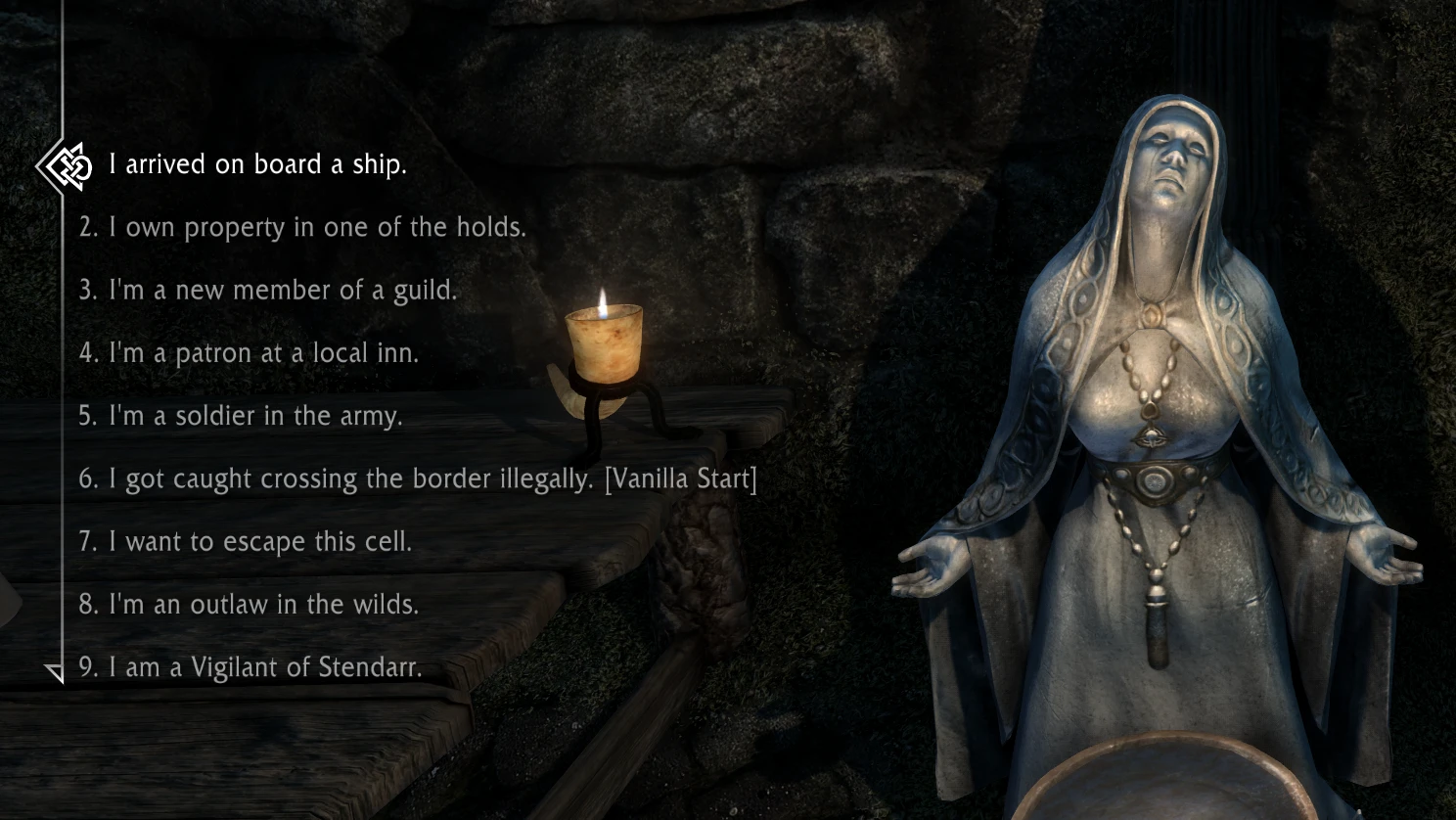
🔍 Analysis
- 👍 1.0% endorsement rate — high engagement, a strong quality signal
- 🏆 #20 of 146 User Interface mods in this game by downloads
📋 About This Mod
While working on Dear Diary Dark Mode I put my hands on the dialogue menu.
I bring some handy features together, so decided to release it as a separate mod.
These features will be included in Dear Diary's dialogue menu as well of course.
- Better Dialogue Controls integrated
- Topics selectable with numbers keys
- More dialogue topics displayed
- Configurable topics list and NPC name positions
- NPC name and exit button can be hidden
- Configurable text size and color
- Works on any aspect ratio (16:9, 16:10, 21:9, 32:9, 4:3, 5:4, etc)
- 60 frames per second
- No scripts, no ESP, no DLL, install or remove on current playthrough
- Available skins: Vanilla, Nordic UI, Dialogue Interface Reshaped
TECH DETAILS
This mod comes with configuration file: "interface\dialoguemenu.txt". In this file you can: hide NPC name, hide exit button, hide topic numbers, set positions and colors of some elemets. You can edit these parameters while the game is running, just save the file and reopen the dialogue menu to see the effect.
Better Dialogue Controls mod is fully integrated with all its features (listed on that mod's page).
You can use 1-9 number keys (including numpad keys) on your keyboard to choose between first 9 dialogue topics. The main difference with Numerical dialogue options mod is that this feature now fully compatible with Nether's Follower Framework custom dialogue topics (and any other similar mods). Besides, you'll now see all 9 numbered topics on the screen (in vanilla menu only 4 is displayed without scrolling). Only 9 topics are numbered, because you can't press "10" on keyboard ;)
I've done my best to make this menu work properly with any aspect ratio, ultrawide, normal, or "square". Let me know if you face any issue on some non-standard sreen resolution.
There are four different versions: Vanilla, Nordic UI, Dialogue Interface Reshaped, Minimalist Dialogue Interface. These versions are different only in visual design, all features are equal. Take a look at screenshots. Let me know if there are some more interesting menu designs with open permissions to patch.
SETTINGS DESCRIPTION
In the "interface\dialoguemenu.txt" file you have:
bHideName (default false): hide the NPC name.
bHideExitButton (default false): hide the Exit button.
bHideNumbers (default false): hide the topic numbers (the selecting function will still work).
bHideTopics (default false): hide the topics list while the NPC is talking.
Convenient Dialogue UI - SE enhances Skyrim Special Edition's dialogue menu with quality-of-life improvements: number key selection, more visible topics, configurable list and NPC name positions, multiple skins, and ultrawide support. A popular UI mod with 4,623 endorsements, last updated in November 2021.
✨ Key Features
📊 Pros & Cons
✅ Pros
- Huge community trust with 4,623 endorsements and 452k downloads.
- Number key selection speeds up dialogue navigation for power users.
- Configurable layout and skins let you tailor the UI to your taste.
⚠️ Cons
- Last updated in 2021 — may need testing with the latest Skyrim SE patches.
- No explicit mention of compatibility with other UI overhaul mods, so conflicts possible.
For Skyrim SE players who spend a lot of time in dialogue and want faster, cleaner menu interactions. Also great for ultrawide users who need better UI scaling. Skip if you prefer a completely vanilla dialogue experience or use heavy UI overhauls that might conflict.
💡 Beginner Tips
- Use a mod manager like Vortex or Mod Organizer 2 to install and manage this mod easily.
- If you use other UI mods, load Convenient Dialogue UI after them to ensure its changes take priority.
- Check the mod's forum posts for any known compatibility patches with popular UI overhauls.
📊 Mod Details
- Game
- Skyrim Mods
- Author
- uranreactor
- Version
- 1.2
- Downloads
- 452,188
- Endorsements
- 4,623
- Category
- User Interface
- Created
- 11/5/2021
- Updated
- 11/7/2021
🔧 How to Install Skyrim Mods
Download from Nexus.
📖 Full step-by-step install guide for Skyrim →
Visit the official mod page for specific installation instructions for this mod.
🎮 Need cheat codes or console commands? Check ur gaming wiki for Skyrim commands, item IDs, and more.
Keep browsing — more Skyrim mods await