Celtic Enchanting Table SSE
⚪ Last updated 2020⚠️ Install Order · 5 steps
Install in this order, then this mod last — most mods fail to load without their framework and dependencies in place.
Preview
🔍 Analysis
- 👍 7.4% endorsement rate — high engagement, a strong quality signal
- 🏆 #120 of 147 Models and Textures mods in this game by downloads
📋 About This Mod
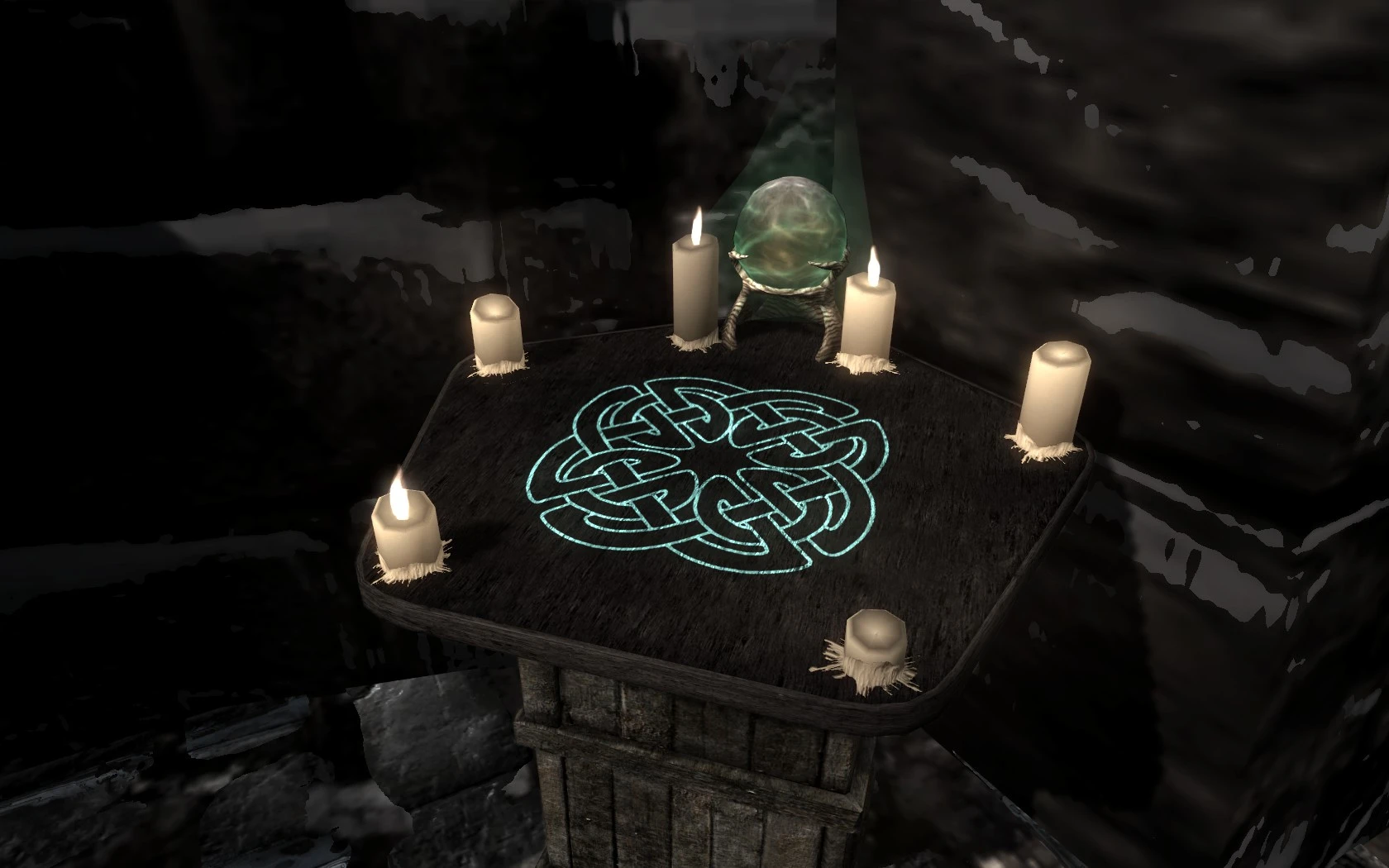
Texture Replacer: This is a version of the enchanting table that I thought better meshed with Skyrim. I made it for myself, but you're welcome to it.
Original Mod Details (copied <with edits> from my mod-page):
The changes I made were:
1. I took off the dark lines on the top of the table. To accomplish this I had to use use overlapping wood textures. I would rather have used an independent source texture, but after trying several, the original was not only adequate, it was perfect for what I had in mind, so I just used what I had.
2. I replaced the vanilla symbols with a centralized, simple Celtic knot pattern. This gave the the table the Celtic style I was looking for.
3. I replaced the horn textures around the skull with an actual photo of a rams horn. I was pleasantly surprised at the effect this created.
I made this for myself, but thought I would upload it just in case anyone else might want to use it as well.
*********************************************************************************************************************
The easiest way to get these files to the right place is to use Vortex or its equivalent, but if you still want to use the manual install method, you should just merge (drag and drop or cut and paste) the data folder I have provided with your data folder in your game directory.
For me it is as follows:
C:\Program Files(x86)\Steam\steamapps\common\skyrim special edition\data
Final resting place for the three files are:
C:\Program Files (x86)\Steam\steamapps\common\skyrimspecial edtion\data\textures\clutter
This is where they go on my setup - I'm not sure what the different install directories are for other machines - so do a bit of sniffing around on Google, and you should find the info pretty quick.
Good Luck!!
SSE NOTES: This is a simple texture replacer for the enchanting table, and no conversion was needed as far as I could tell. I just re-packaged it and uploaded it here. I seem to recall it working just fine in the old form when installed manually using Vortex: you shouldn't have any problems installing it using a mod installer.
📊 Mod Details
- Game
- Skyrim Mods
- Author
- Gatormeat
- Version
- 1.0
- Downloads
- 4,450
- Endorsements
- 331
- Category
- Models and Textures
- Created
- 7/17/2020
- Updated
- 7/17/2020
🔧 How to Install Skyrim Mods
Download from Nexus.
📖 Full step-by-step install guide for Skyrim →
Visit the official mod page for specific installation instructions for this mod.
🎮 Need cheat codes or console commands? Check ur gaming wiki for Skyrim commands, item IDs, and more.
Keep browsing — more Skyrim mods await