BSA Auto Extract
⚪ Last updated 2018⚠️ Install Order · 5 steps
Install in this order, then this mod last — most mods fail to load without their framework and dependencies in place.
Preview
🔍 Analysis
- 👍 8.4% endorsement rate — high engagement, a strong quality signal
- 🏆 #19 of 29 Utilities mods in this game by downloads
📋 About This Mod
BSA Auto Extract
I like to work with ModOrganizer 2 and I like to merge mods using Merge Plugins xEdit Script. I've found that the best way to merge mods while working with MO2 is by first extracting all the BSAs into the mod folder so I created this application to make it easier.
When working with MO2:
After you install the mod run this program to extract the BSAs for any mods you wish to merge or all mods if you prefer.
Just navigate to the mods folder (ie: D:\Games\SteamLibrary\steamapps\common\Skyrim Special Edition\ModOrganizer\mods) .
Find the folder for the mod(s) you want to extract BSAs for and either drag the mod folder or the individual files from within the mod folder into this app.
Or you can just drag the ModOrganizer mods folder into this app to extract the BSAs for all install mods.
Click the extract button an your done.
When manually installing mods:
When manually installing modes the best way to manage them is to have a "mods" folder where you extract all the mods you download so you can easily manage the files. If you're using that method then you can use this app to extract any or all the BSAs before copying them to your game Data folder. If you already have all your mods install then you can navigate to the data folder (ie: D:\Games\SteamLibrary\steamapps\common\Skyrim Special Edition\data) and drag the BSAs you want to extract into this app and click the extract button. I wouldn't recommend extracting all the base game BSA file (Skyrim - Animations.bsa etc) but you can if you like.
When working with NMM:
Currently this app doesn't have a way to work with NMM do to the way NMM handles mods. I don't plan on adding support for NMM since Vortex (the replacement for NMM) is do out soon. Vortex may make this program obsolete. If not I may add support for Vortex once it's out.
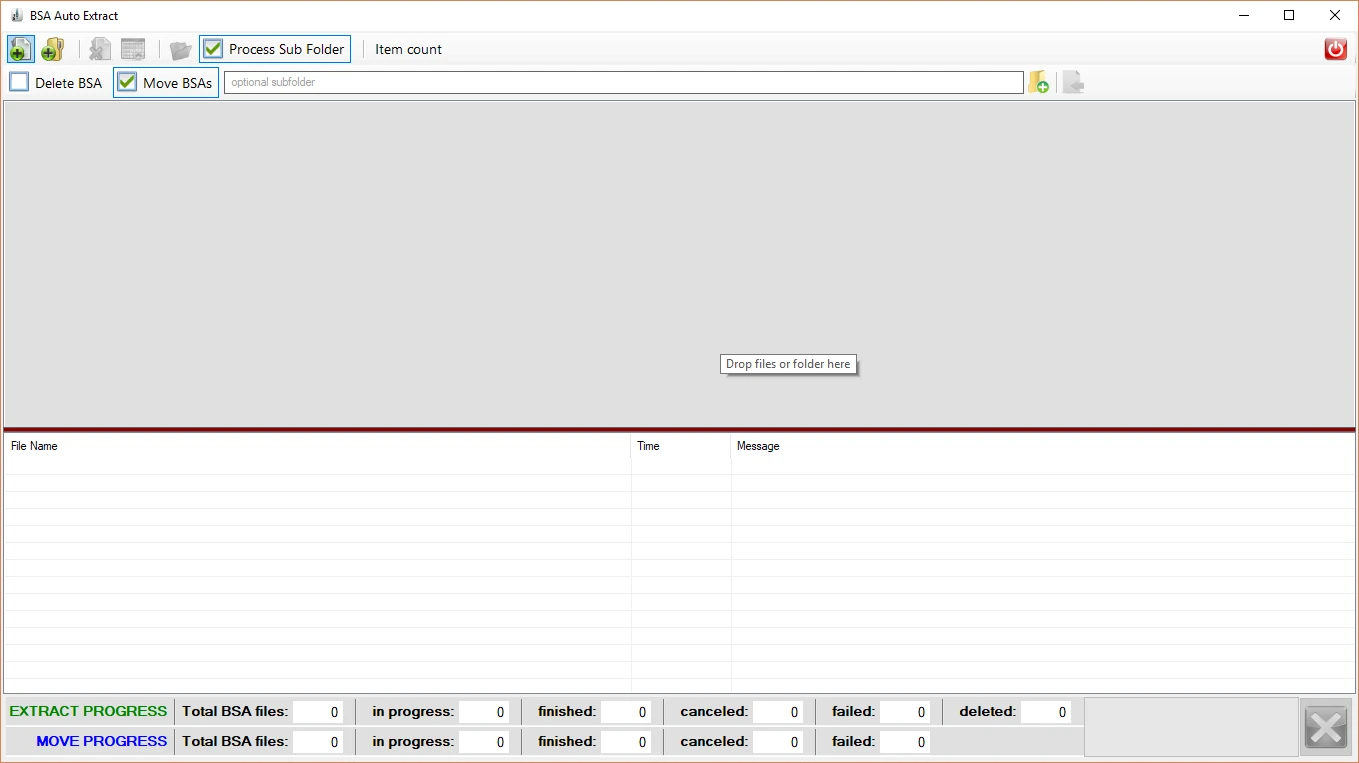
The application is very simple to use.
To add files or folder:
Click the add files button to display a dialog box to select BSA or BA2 files to add to the list.
Click the add folder button to display a dialog box to select folders to add to the list.
Drag files or folders into the items list.
To remove items from the list:
Click remove files button to remove any selected items from the list.
Click the clear list button to clear the list.
To control how subfolders are processed:
Check the "Process Sub Folder" box to have all BSA and BA2 files in all subfolder extracted
If the "Process Sub Folder" box is unchecked only the BSA and BA2
BSA Auto Extract is a utility that extracts all files from BSA or BA2 archives into the same folder, preserving the folder hierarchy. It's a straightforward tool for modders and players who need to unpack Bethesda game archives quickly. With 572 endorsements and 6,791 downloads, it's a niche but trusted utility.
✨ Key Features
📊 Pros & Cons
✅ Pros
- Community-approved utility with 572 endorsements and 6,791 downloads.
- Simple, focused tool that does one job well: extracting BSA/BA2 archives.
- Preserves folder structure, so extracted files land where you expect them.
⚠️ Cons
- Last updated in 2018, so it may not support the latest game versions or archive formats.
- No mention of a GUI or batch processing, so it might be command-line only.
- Potential compatibility risk with newer Bethesda games or mods that use updated archive formats.
For modders and players who need to unpack BSA or BA2 files quickly, especially when troubleshooting mod conflicts or extracting assets. Skip if you prefer a GUI-based tool or need support for the latest game updates.
💡 Beginner Tips
- Run the tool on a copy of your BSA/BA2 file first to see how it works before using it on your actual mod files.
- Make sure you have enough disk space for the extracted files, as they can be large.
- If you're extracting files from a mod, keep the original archive in case you need to reinstall the mod.
📊 Mod Details
- Game
- Skyrim Mods
- Author
- Ecotone
- Version
- 1.1.2
- Downloads
- 6,791
- Endorsements
- 572
- Category
- Utilities
- Created
- 11/12/2017
- Updated
- 3/10/2018
🔧 How to Install Skyrim Mods
Download from Nexus.
📖 Full step-by-step install guide for Skyrim →
Visit the official mod page for specific installation instructions for this mod.
🎮 Need cheat codes or console commands? Check ur gaming wiki for Skyrim commands, item IDs, and more.
Keep browsing — more Skyrim mods await