Blocking Animation Pack SSE
⚪ Last updated 2016⚠️ Install Order · 5 steps
Install in this order, then this mod last — most mods fail to load without their framework and dependencies in place.
Preview
🔍 Analysis
- 👍 2.7% endorsement rate — high engagement, a strong quality signal
- 🏆 #83 of 123 Animation mods in this game by downloads
📋 About This Mod
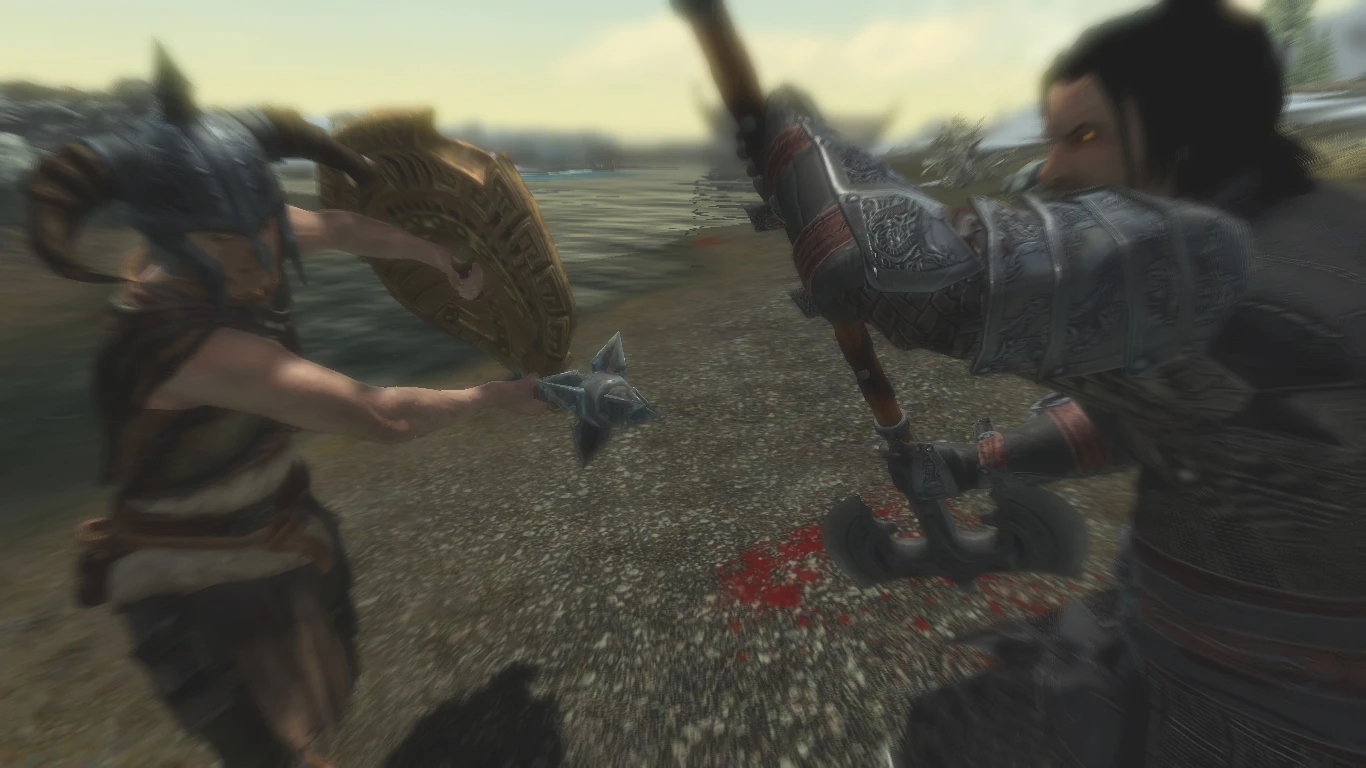
Blocking animation replacer for all melee weapon greatsword, battleaxe, warhammer, one-handed. Works both in first person and third person view. This mod make it looks like we avoid and deflected the attack, push it aside to left or right. Blocking animation for third person view, comes with three different variants for each state. Whether we push the incoming attacks aside to left, to right, downwards, upwards - every weapon have its own style.
I dont know why that three states triggers the same single looks in vanilla. Actually there is 3 files in Skyrim Bsa, but all was absorbing style - pull the weapon backwards only with different speed. Thats what i change, make it go different angles and make it looks like we are deflecting the hit and push it away.
Version 1. 3 add stabbing bash. Version 1. 4 add first person parrying animation. I didn`t make this new first person animation, i found it hidden in "recoil animation". Im guessing this recoil animation only plays when player get fatal blow or huge damage, so big chance you are dead already if you take that kind of hit, so its barely use or even seen in vanilla blocking.
Dont like the feels that vanilla blocking makes me take the damage willingly. I dont want to take dem attacks straight, i push it aside.
Videos:
One-handed https://www.youtube.com/watch?v=6J99g4-95Gc Two handed https://www.youtube.com/watch?v=wOs6qb0VXsA Two handed {Greatsword} https://www.youtube.com/watch?v=oaFewOqcE8g Stabbing bash https://www.youtube.com/watch?v=CssOmoIQ_G0
Original mod page in Skyrim32 http://www.nexusmods.com/skyrim/mods/64510/?
Available for Xbox version https://bethesda.net/en/mods/skyrim/mod-detail/3986942
2hw_blockhit 2hw_blockhita 2hw_blockhitb
2hm_blockhit 2hm_blockhita 2hm_blockhitb 2hm_blockidle
1hm_blockhit 1hm_blockhita 1hm_blockhitb 1hm_blockidle
Use installer manager or just copy to game folder Steam/Steamapps/Common/Skyrim/Data/
Folder structure 1. Data/meshes/actors/character/animations 2. Data/meshes/actors/character/_1stperson/animations
If you only want 3rd person view animation and dont like 1st person animation delete folder structure No. 2 - and vice versa.
Special Thanks
dnalloh1987 for porting to SSE See his Tutorial for converting http://www.nexusmods.
Blocking Animation Pack SSE replaces blocking animations for one-handed and two-handed weapons in both first and third person views. A popular animation mod with 4,592 endorsements and 169,399 downloads, last updated in November 2016.
✨ Key Features
📊 Pros & Cons
✅ Pros
- Huge community trust with 4,592 endorsements and 169k downloads.
- Covers both one-handed and two-handed weapons, so you get a complete blocking overhaul.
- Works in first and third person, so your character looks good from any angle.
⚠️ Cons
- Last updated in 2016, so it might not be compatible with the latest Skyrim SE patches.
- Only affects blocking animations—if you want a full combat overhaul, this won't do it.
- Potential conflicts with other animation mods that touch the same animation files.
For Skyrim Special Edition players who want more realistic or stylish blocking animations without changing combat mechanics. If you're a melee-focused character and tired of the vanilla block, this is a quick visual upgrade. Skip if you're looking for gameplay changes or if you use a comprehensive animation overhaul that already includes blocking.
💡 Beginner Tips
- Since it's a simple replacer, you can install it manually by dropping the files into your Data folder, but using a mod manager makes it easier to uninstall.
- If you use other animation mods, load this one after them to ensure its animations take priority.
- Check the mod's posts section for any compatibility patches or user reports about conflicts with popular combat mods.
📊 Mod Details
- Game
- Skyrim Mods
- Author
- 5poiler
- Version
- 1.5
- Downloads
- 169,399
- Endorsements
- 4,592
- Category
- Animation
- Created
- 11/16/2016
- Updated
- 11/16/2016
🧩 Commonly Used Together
Users add these mods to the same collections — a real compatibility signal, not an AI guess.
🔧 How to Install Skyrim Mods
Download from Nexus.
📖 Full step-by-step install guide for Skyrim →
Visit the official mod page for specific installation instructions for this mod.
🎮 Need cheat codes or console commands? Check ur gaming wiki for Skyrim commands, item IDs, and more.
Keep browsing — more Skyrim mods await