Auto Unequip Shield to Back - clipping patch for Cloaks of Skyrim
⚪ Last updated 2020⚠️ Install Order · 7 steps
Install in this order, then this mod last — most mods fail to load without their framework and dependencies in place.
Preview
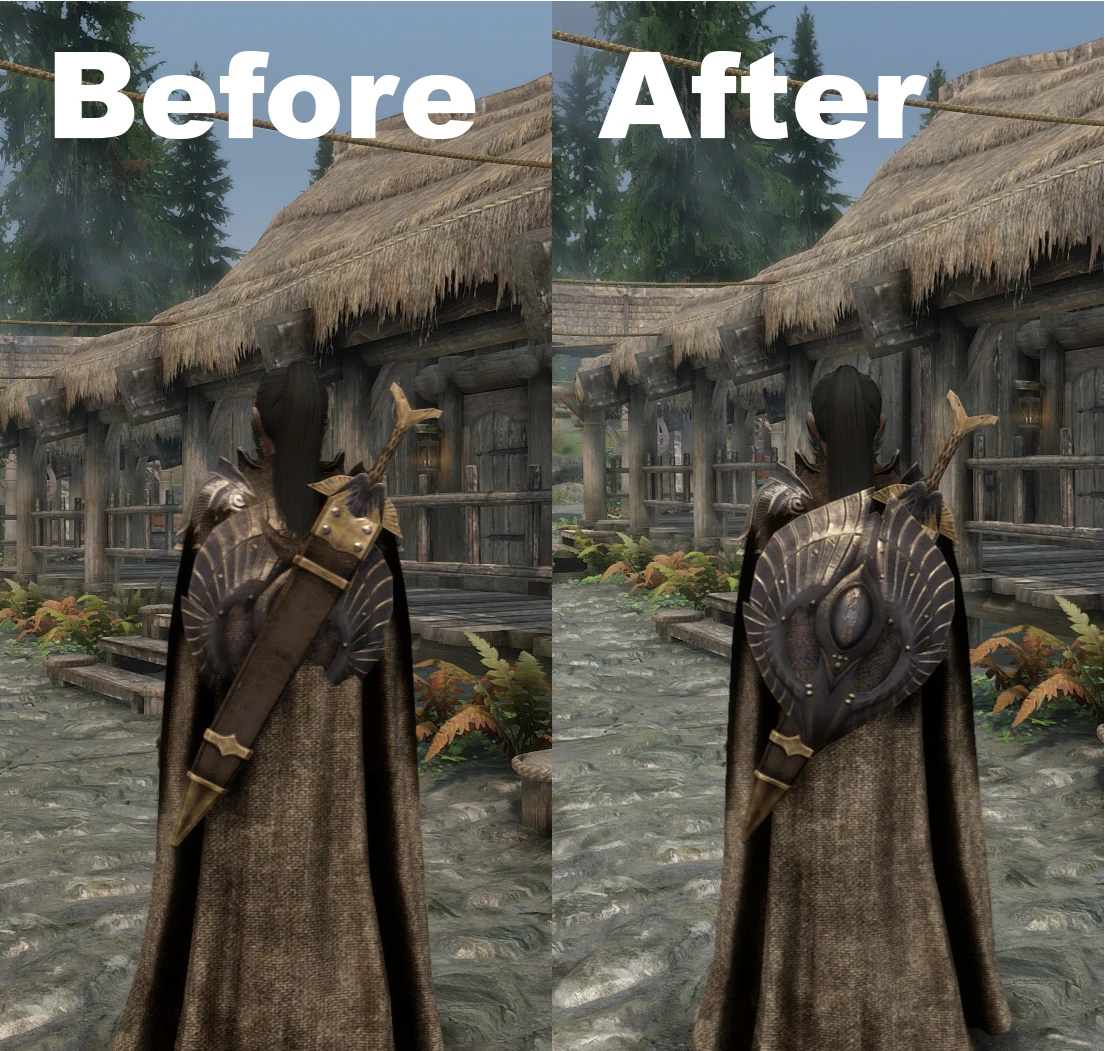
🔍 Analysis
- 👍 1.3% endorsement rate — high engagement, a strong quality signal
📋 About This Mod
I simply moved all the backshield meshes 5 units further away from the players body. It wasn't really hard to make but still took some hours of time to figure out as a complete noob in modding, so I thought I'd share it here for others with the same clipping issues :)
Credit goes to user 7StarC for making this amazing mod
If I was able to do this, anyone can! But here is a little heads up in form of a copy paste of how I explained to someone how to adjust the ranges if it doesn't suit your game:
If you wanna try yourself - it's pretty simple, just annoying.
- get latest version of NifSkope https://github.com/n...s/tag/v2. 0.dev6
- usually you would also need https://www.nexusmod.../974/?tab=files to extract the mesh files for the shields from the Backshields.bsa in the mod folder but you can just use my patch that already has the extracted .nif files of the shields under shield patch. 5>meshes>weapons>backshields
- make a folder for NifSkope and extract the .zip there > open NifSkope.exe
- Top left "File">Open>navigate to .nif files you want to edit
- then it shows the 3D model of the shield
- click it > you can then see all the elements in the drop down menu on the left > rightclick the element you want to move > transform > edit
- from there you have xyz coordinates, if you change the y coordinate you can move it closer/further away from skeleton
- some shields have more than one element, make sure you move them all (just the shield elements, nothing else in there)
---> save when done, rinse and repeat for all shields; I would recommend you to use ctrl+s to save and open more than one shield at once by shift+selecting when choosing files and just going click > transform > edit > ctrl+s > close > onto next one and repeat
I always had like 10 tabs of NifSkope opened at the same time, just don't open too many or it will crash. However opening more at the same time sped up the process for me significantly
When you're done just put all the .nif's in the patch folder (where you found them to begin with), replace them and rezip the patch folder. Then you have to fully delete the patch you had previously installed from your MO and install the new patch.zip in MO by pressing ctrl+M. If you just use the "Reinstall Mod" function of MO nothing will change in game. You have to properly delete the old installation and install the new one.
I hope this helps.
A compatibility patch for 7StarC's Backshields SE that adjusts shield positioning to reduce clipping with Cloaks of Skyrim, optimized for UNP bodies. With 1,807 endorsements and 140,810 downloads, it's a proven fix for players using both mods together.
✨ Key Features
📊 Pros & Cons
✅ Pros
- Community-approved fix with 1,807 endorsements and 140k downloads
- Solves a real visual annoyance for combo users
- Lightweight patch that does one job well
⚠️ Cons
- Only tested for UNP bodies—other body types may still clip
- Requires two other mods to function, adding setup steps
- Last updated in 2020, so may not be compatible with newer mod versions
For Skyrim players who use both Backshields SE and Cloaks of Skyrim and want to eliminate shield-cloak clipping. Skip if you don't use those mods or if you're on a non-UNP body and don't want to risk imperfect results.
💡 Beginner Tips
- Install with a mod manager and place this patch after both required mods in your load order.
- If you're not using a UNP body, test in-game and consider using BodySlide to adjust if needed.
- Check the mod page for any compatibility notes regarding other body mods or patches.
📊 Mod Details
- Game
- Skyrim Mods
- Author
- zegha
- Version
- 1.0
- Downloads
- 140,810
- Endorsements
- 1,807
- Category
- Armour - Shields
- Created
- 9/5/2020
- Updated
- 9/5/2020
🔧 How to Install Skyrim Mods
Download from Nexus.
📖 Full step-by-step install guide for Skyrim →
Visit the official mod page for specific installation instructions for this mod.
🎮 Need cheat codes or console commands? Check ur gaming wiki for Skyrim commands, item IDs, and more.
Keep browsing — more Skyrim mods await