XP32 Maximum Skeleton Katana Style
⚪ Last updated 2013⚠️ Install Order · 3 steps
Install in this order, then this mod last — most mods fail to load without their framework and dependencies in place.
Preview
🔍 Analysis
- 👍 4.5% endorsement rate — high engagement, a strong quality signal
- 🏆 #3 of 74 Animation mods in this game by downloads
📋 About This Mod
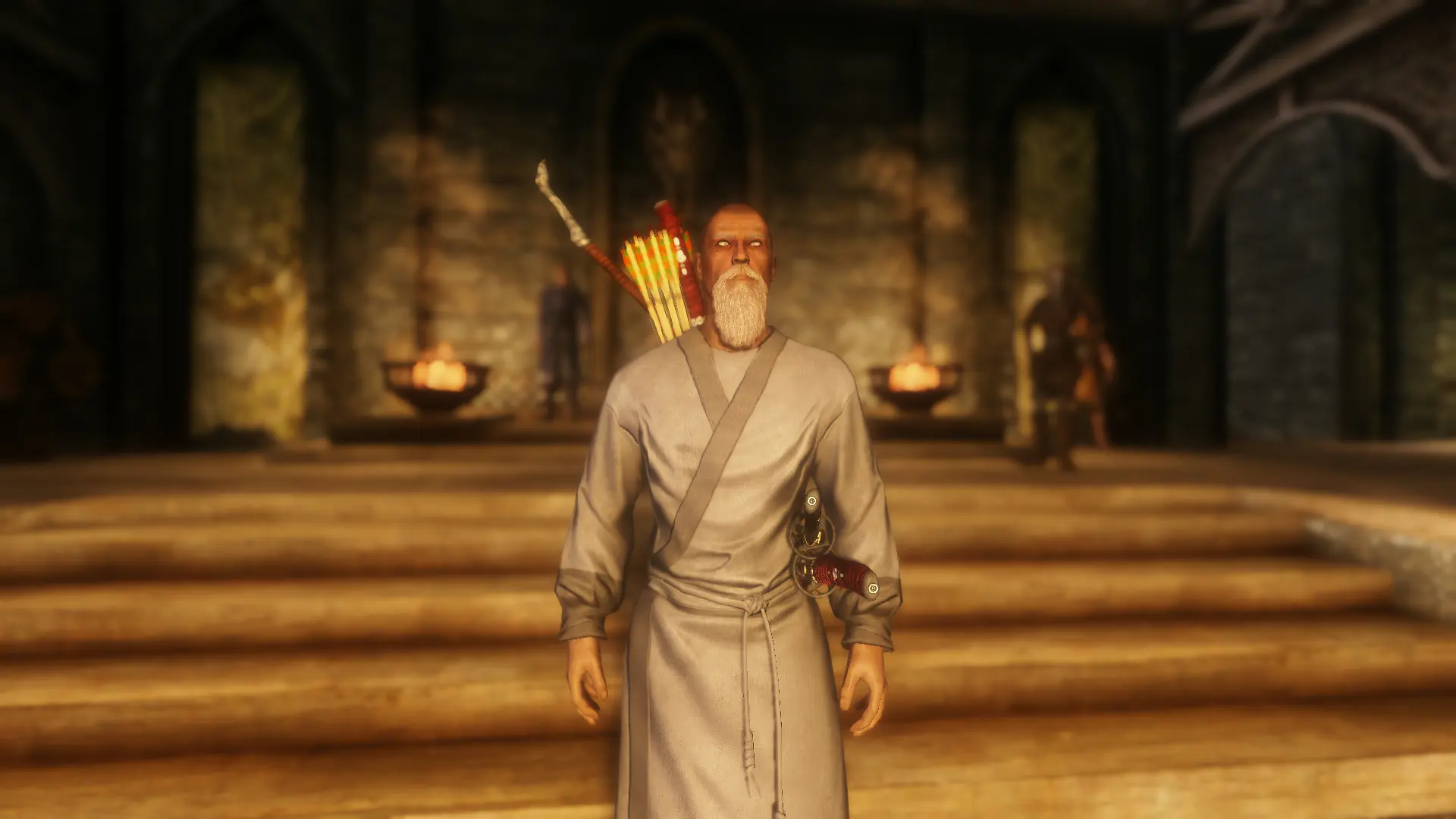
First thing is, this is not my creation. It belongs to XP32 = http://skyrim.nexusmods.com/mods/26800 v1. 4 Second thing is, because of the nature of this mod, any swords with scabbards and have an lanyard will cause the lanyard to face away from the body. As such, this is only intended for use with swords with scabbards without lanyards. It is also not recommended to use this without a custom race for the same reason. At a request of a friend I flipped the right hand sword and dagger sheath nodes upside down to give the \"Katana Style\" appearance. The 2h weapon, Quiver, and Bow nodes have also been adjusted to allow for minimum clipping. I reduced clipping as much as I could, while remaining close enough to make things appear not to float. In some cases small clipping was chosen in order to reduce more noticeable acts. Clipping worsens with movement, but reduced as much as possible. Required; XP32 Maximum Skeleton -XPMS = http://skyrim.nexusmods.com/mods/26800 These files only contain a single edited version of male or female skeletons. FNIS = http://skyrim.nexusmods.com/mo1ds/1181 or XP32\'s arm patch = http://skyrim.nexusmods.com/mods/26800 is also required. And everything else XP32\'s skeletons require (realistic rag dolls) Recommended; Custom race that uses a custom skeleton location Male Nodes were set using 50% weight slider Sundracon\'s meshes = http://skyrim.nexusmods.com/mods/2488 Female Nodes were set using 100% weight slider and UNPB body meshes in UNP female armors http://skyrim.nexusmods.com/mods/14899 http://skyrim.nexusmods.com/mods/6709 http://skyrim.nexusmods.com/mods/7305 Insanity\'s Celtic Katanas = http://skyrim.nexusmods.com/mods/15389 Insanity\'s Steel Bow = http://skyrim.nexusmods.com/mods/29647 Blades Samurai Armour and Kimonos = http://skyrim.nexusmods.com/mods/24704 Arrows (Caspian or Hero) = Ariyan Weapon Pack = http://skyrim.nexusmods.com/mods/13218 9601 Armed to the Teeth - easy version = http://skyrim.nexusmods.com/mods/26486 Other results will vary. Required Installation; Manual Installation only. Make a backup. 1) Install XP32\'s Skeletons http://skyrim.nexusmods.com/mods/26800, 2) Install the XP32 Arm Patch fix or FNIS = http://skyrim.nexusmods.com/mo1ds/1181 3) Overwrite XP32 Skeletons with these Permissions; As I am not the author of these files I claim no credit. Any mistakes I claim in the name of Bootaka! Original Author\'s permissions = \"Permissions: You 100% have my full permission to use this skeleton to create custom clothing, animations, etc. In fact I\'m practically begging you to do so. So please, use it, publish it, and enjoy.\"
This mod adjusts the sheathed position of katanas and tantos in Skyrim so the blade edge faces upward. It's a simple animation tweak for players who want more realistic sword placement. With 1,040 endorsements and 23,039 downloads, it's a niche but popular fix from 2013.
✨ Key Features
📊 Pros & Cons
✅ Pros
- Community-approved with 1,040 endorsements
- Over 23,000 downloads show it's a trusted fix
- Does exactly what it says—no bloat, just the katana edge fix
⚠️ Cons
- Last updated in 2013—may not work with the latest Skyrim version or other skeleton mods
- Only affects katanas and tantos, so if you don't use those weapons, it's useless
For Skyrim players who care about the small details, like how weapons look when sheathed. If you're a katana enthusiast or a roleplayer who wants more realistic sword positioning, this is for you. Skip it if you don't use katanas or want more comprehensive animation overhauls.
💡 Beginner Tips
- Since this mod is from 2013, make sure you're using a compatible version of Skyrim (likely Oldrim) and check for conflicts with other skeleton mods like XPMSE.
- If you're using a mod manager, you can preview the file structure to see where the meshes go—usually under meshes/actors/character/animations.
- Test in-game by sheathing a katana to see the edge-up effect; if it doesn't work, try placing the files manually in your Data folder.
📊 Mod Details
- Game
- Skyrim LE Mods
- Author
- XP32 edit by Bootaka
- Version
- 0.01
- Downloads
- 23,039
- Endorsements
- 1,040
- Category
- Animation
- Created
- 1/31/2013
- Updated
- 1/31/2013
🔧 How to Install Skyrim LE Mods
Download from Nexus.
📖 Full step-by-step install guide for Skyrim LE →
Visit the official mod page for specific installation instructions for this mod.
🎮 Need cheat codes or console commands? Check ur gaming wiki for Skyrim LE commands, item IDs, and more.
Keep browsing — more Skyrim LE mods await