UNP Texture Blender
⚪ Last updated 2014⚠️ Install Order · 3 steps
Install in this order, then this mod last — most mods fail to load without their framework and dependencies in place.
Preview
🔍 Analysis
- 👍 3.4% endorsement rate — high engagement, a strong quality signal
- 🏆 #160 of 453 Models and Textures mods in this game by downloads
📋 About This Mod
Texture Blender only works if you have a complete Face/Body Mod installed. If you're missing one of the folders below and Blend the Faces, you will end up with a Black Face for that specific Race.
So make sure you have a complete Face/Body Mod installed, or stay away from this tool.
The folders are located in "skyrim|data|textures|actors|character".
bretonfemale
darkelffemale
highelffemale
imperialfemale
redguardfemale
========================================================================================
Blending the Body:
1) Navigate to your "skyrim|data|CalienteTools|UNP Texture Blender" folder.
2) Start TexBlender.exe.
3) Select "Body and Feet" from the first dropdown menu.
4) Select "Color" from the second dropdown menu.
5) Select "UNPBodyColor.png" from the middle.
6) Click on "Preview" to see the outcome. (If the preview shows a black image it will look the same ingame)
7) Click on "Blend Images" to blend it.
8) Repeat step 3 to 6 for "Normal" and "Specular" aswell.
Blending the Head:
1) Select "Head" from the first dropdown menu.
2) Select "Color" from the second dropdown menu.
3) Select "UNPNeckColor.png" from the middle.
4) Click on "Preview" to see the outcome. (If the preview shows a black image it will look the same ingame)
5) Click on "Blend Images" to blend it.
6) Repeat step 3 to 6 for "Normal" and "Specular" aswell.
========================================================================================
Failed to Save File or Black Body/Face:
Problem: Failed to Save File.
Cause: Skyrim installed in "Program Files (x86)".
Solution: Adjust "config.xml" as explained below.
Problem: Black Body/Face after blending.
Cause: No source textures found, unable to detect Skyrim Data folder (could be related to the Skyrim INI files)
Solution 1: Adjust "config.xml" as explained below.
Solution 2: Refresh your INI files.
1) Go to the folder where "TexBlend.exe" is located.
2) Open "Config.xml" with NotePad++.
There are two paths shown in Green (Line 6 and 10):
<!-- <GameDataPath>D:|steam|steamapps|common|skyrim|Data|</GameDataPath>
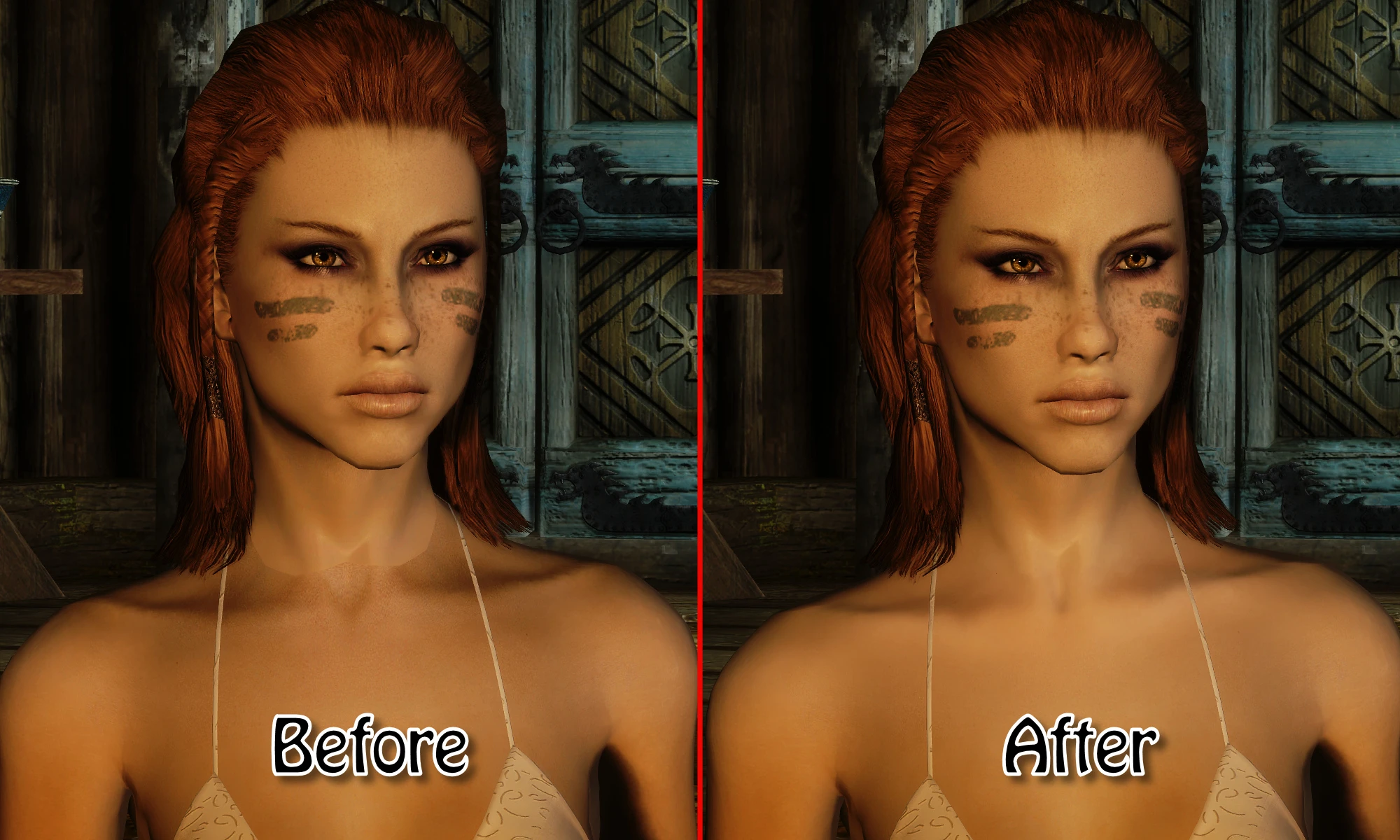
UNP Texture Blender is a texture mod for Skyrim that blends body and neck textures for the UNP body type. It has 9,299 endorsements and 276,451 downloads, last updated in 2014. This mod is for players who want to fix neck seams and improve texture consistency.
✨ Key Features
📊 Pros & Cons
✅ Pros
- Huge download count (276k) means it's a proven fix for neck seams
- Community-approved with 9,299 endorsements
- Simple texture mod that does one job well
⚠️ Cons
- Last updated in 2014 — may not be compatible with newer Skyrim versions or mods
- Requires UNP body mod to be useful, which isn't included
For Skyrim players using the UNP body type who are tired of visible neck seams. If you're a texture modder or want a quick fix for body texture mismatches, this is for you. Skip if you don't use UNP or want more than a texture blend.
💡 Beginner Tips
- Make sure you have the UNP body mod installed first, as this texture blend won't work without it.
- Use a mod manager like Vortex or Mod Organizer 2 to install and manage this mod easily.
- If you see seams after installing, try adjusting your load order so this mod loads after other texture mods.
📊 Mod Details
- Game
- Skyrim LE Mods
- Author
- Lunyra
- Version
- 2.0.1
- Downloads
- 276,451
- Endorsements
- 9,299
- Category
- Models and Textures
- Created
- 1/31/2013
- Updated
- 7/23/2014
🔧 How to Install Skyrim LE Mods
Download from Nexus.
📖 Full step-by-step install guide for Skyrim LE →
Visit the official mod page for specific installation instructions for this mod.
🎮 Need cheat codes or console commands? Check ur gaming wiki for Skyrim LE commands, item IDs, and more.
Keep browsing — more Skyrim LE mods await