Unfuzer CPP Edition
⚪ Last updated 2016⚠️ Install Order · 3 steps
Install in this order, then this mod last — most mods fail to load without their framework and dependencies in place.
Preview
🔍 Analysis
- 👍 7.5% endorsement rate — high engagement, a strong quality signal
- 🏆 #11 of 36 Utilities mods in this game by downloads
📋 About This Mod
Unfuzer is a utility that does mass extracting/inserting of xwm files from/into voice files (.fuz), with automatic xWMA <-> PCM transcoding. In other words:
1) it extracts xwm files from fuz files, and converts them to wav ("unfuz")
2) it converts the wav files produced by step 1) to xwm, and puts them inside the fuz files ("refuz")
The wav files don't HAVE to be produced by step 1), but they do have to have the same name as the fuz files you want them inserted into, otherwise the program will ignore them. An exception is made if "Process .lip files" is checked, in which case all .wav files will be converted to xwm and inserted into newly created fuz files, along with any .lip files.
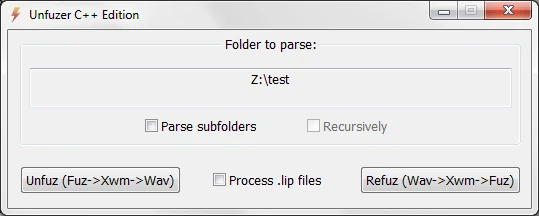
Unzip the files anywhere you want, run "Unfuzer.exe", and use the self-explanatory interface. Rather than selecting a group of files, you specify a folder, and all the .fuz or .wav files in that folder will be processed according to which button you'll press afterwards.
And finally, a little more about the "Process .lip files" option. If it's checked, the "refuz" operation will create new voice files from all wav and lip files. The presence of lip files is optional, as it's possible to have voice files containing audio only.
On the other hand, if "Process .lip files" is unchecked, "refuz" will NOT create new voice files, because it will rely on existing voice files to provide the lip data. In other words, it will simply replace the audio of existing voice files, keeping their current lip data (if any).
Try not to "unfuz" and "refuz" the same audio more times than absolutely necessary, because there will be audio quality degradation due to the repeated re-encoding into xWMA (a lossy compression format). I highly recommend making a backup copy of your files before performing the "refuz" operation on them.
About the C++ Edition
The C++ edition is a remake of the original Unfuzer (which was written in AutoHotkey and can be found at this link). It is faster by virtue of being compiled to machine code (as opposed to being interpreted), and also offers the option of using up to three concurrent xWMAEncode.exe instances when converting, which can speed up the processing
Unfuzer CPP Edition is a utility for mass extracting and inserting xwm audio files from and into voice files (fuz), with automatic transcoding between xWMA and PCM. It's a community favorite with nearly 3,000 endorsements, last updated in 2016.
✨ Key Features
📊 Pros & Cons
✅ Pros
- Community-approved with 2,963 endorsements and nearly 40k downloads.
- Automates a tedious process—no manual conversion needed.
- Essential for modders who need to edit voice files without breaking audio.
⚠️ Cons
- Last updated in 2016—may not work with newer game versions or modding tools.
- No detailed instructions or documentation provided by the author.
- Requires some technical know-how; not for casual users.
For Skyrim modders and voice replacers who need to batch-process fuz files. If you're just a player, you don't need this—it's a behind-the-scenes tool. Skip if you're not comfortable with command-line utilities or file extraction.
💡 Beginner Tips
- Make sure you back up your original fuz files before extracting or inserting—this tool modifies them directly.
- Use a mod manager or a separate folder for testing to avoid messing up your game's data.
- If you're new to modding, check out a tutorial on fuz files to understand the workflow.
📊 Mod Details
- Game
- Skyrim LE Mods
- Author
- greentea101
- Version
- 1.5
- Downloads
- 39,736
- Endorsements
- 2,963
- Category
- Utilities
- Created
- 6/22/2012
- Updated
- 8/30/2016
🔧 How to Install Skyrim LE Mods
Download from Nexus.
📖 Full step-by-step install guide for Skyrim LE →
Visit the official mod page for specific installation instructions for this mod.
🎮 Need cheat codes or console commands? Check ur gaming wiki for Skyrim LE commands, item IDs, and more.
Keep browsing — more Skyrim LE mods await