Swift Potion Reborn
⚪ Last updated 2016⚠️ Install Order · 3 steps
Install in this order, then this mod last — most mods fail to load without their framework and dependencies in place.
Preview
🔍 Analysis
- 👍 5.8% endorsement rate — high engagement, a strong quality signal
- 🏆 #6 of 140 Gameplay mods in this game by downloads
📋 About This Mod
SSE Version Available Here: https://www.nexusmods.com/skyrimspecialedition/mods/12293
Skyrim - 1. 9. 32. 0.* Skyrim Script Extender 1. 7. 2 - http://skse.silverlock.org/ SkyUI 4. 1 - http://skyrim.nexusmods.com/mods/3863 JContainers 3. 1. 1 - http://www.nexusmods.com/skyrim/mods/49743
Swift Potion Reborn has now itself been entirely re-written from scratch! Many new features are included, and a much more robust auto use system is in place. Here is a list of the current features:
- All Potions Will Be Used
- The system will keep track of all potions, alcohol excluded, including any effects created by other mods. There is no limit to the amount of potions that can be stored
- FOOD!!!!!
- Yes the system will now track food and will allow you to use food automatically or via hotkey.
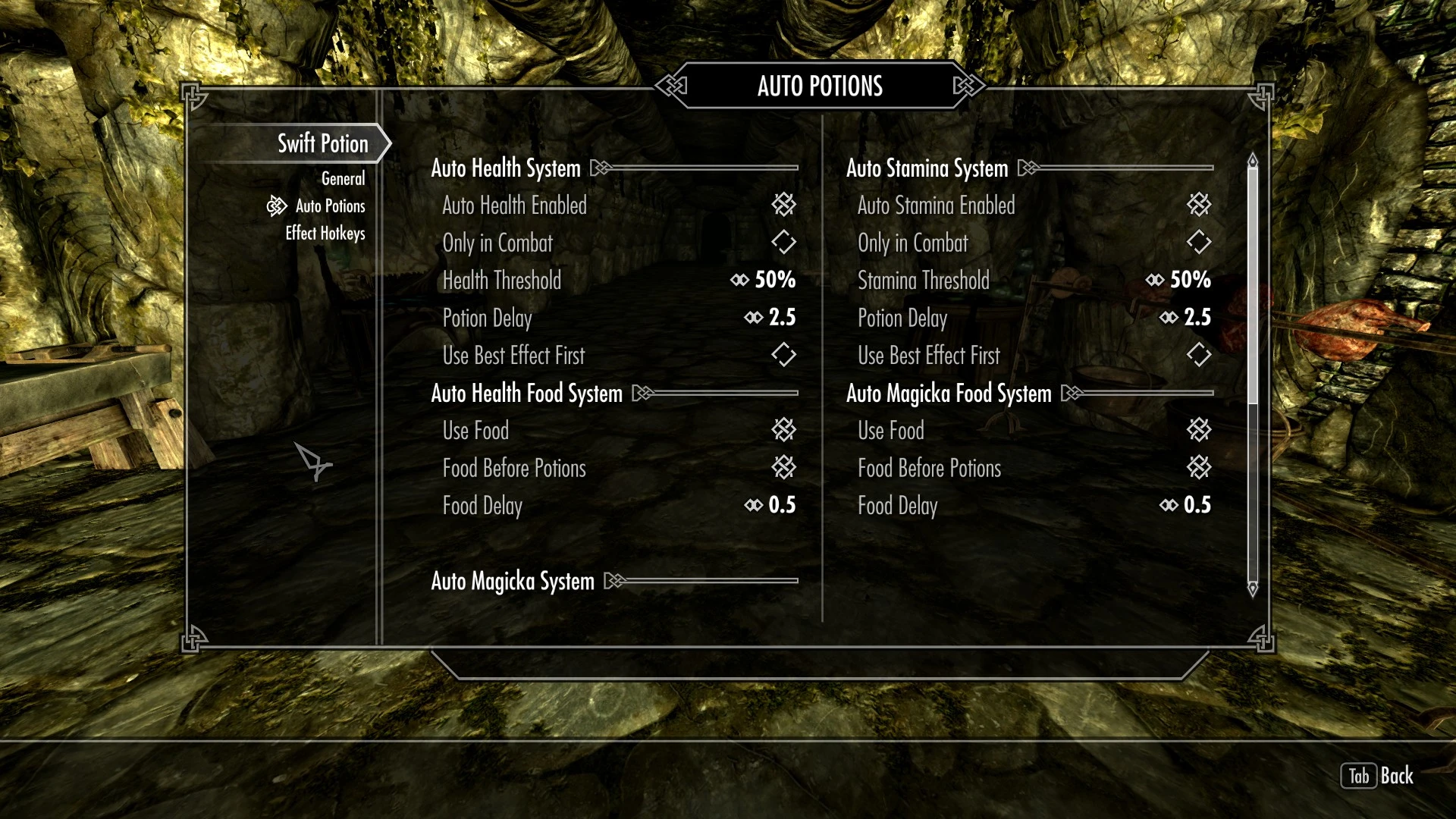
- Configurable interface via SkyUI
- A brand new interface has been designed with ease of use and customization in mind. You have much more control over all the little options when it comes to any setting in Swift Potion
- Potion/Poison Hotkeys
- 10 hotkeys have been made available that will allow you to bind any effect to a key. This also now includes the use of poisons!
- Potion/Food Delay
- You now have control over each effects delay. You also have a seperate delay for food. This will allow you to use food faster, and potions slower.
I want to put in a thanks for Chesko for originally getting me started on this mod. His auto potion system was an inspiration for me to expand upon.
Simply activate the mod and run the game! It's still pretty seamless and the potion system will start working right away.
In order for the system to recognize any potions/food/poisons you currently have you will need to remove and add them to your inventory. Going forward the system will monitor all potions/food/poisons that get added/removed from your inventory.
The hotkey system will only register the effects of potions/food/poisons that you have already picked up. So if you don't see an effect listed it is because you have not had a potion with that effect in your inventory.
The SkyUI menu will have many options when it comes to the details of potion use and potion hotkeys.
I suggest you do a clean save of any previous version of Swift Potion. Load order positioning does not matter as I do not alter anything.
~IMPORTANT~
In order for the system to recognize any potions/food/poisons you currently have you will need to remove and add them to your inventoryTo access the configuration menu Open
Swift Potion Reborn is an auto-potion system for Skyrim that automatically uses potions, food, and poisons during combat. With 3,011 endorsements and over 51,000 downloads, it's a popular utility mod for players who want hands-free healing and buff management. Last updated in 2016, it remains a solid choice for classic Skyrim setups.
✨ Key Features
📊 Pros & Cons
✅ Pros
- Community favorite with 3,011 endorsements and 51k downloads—clearly a trusted mod
- Auto-potion system saves you from pausing mid-fight to chug health potions
- Includes food and poisons, so it's not just healing—it's full consumable management
⚠️ Cons
- Last updated in 2016—might have compatibility issues with newer Skyrim versions or mods
- Requires a mod manager for proper installation, which might be a hurdle for beginners
For Skyrim players who hate pausing combat to manage potions and want a more fluid, action-oriented experience. Also great for alchemists who want to auto-use poisons and food buffs without micromanaging. Skip if you prefer manual control over your consumables or play on a heavily modded setup where compatibility could be a concern.
💡 Beginner Tips
- Use a mod manager like Nexus Mod Manager or Mod Organizer 2 to install this mod—it'll handle file placement and load order automatically.
- Check the mod's compatibility with your other gameplay mods, especially those that alter potion effects or combat mechanics, to avoid conflicts.
- Test the auto-potion behavior in a safe save before relying on it in tough fights—you might want to tweak settings to avoid wasting potions.
📊 Mod Details
- Game
- Skyrim LE Mods
- Author
- Sandman53
- Version
- 2.2
- Downloads
- 51,716
- Endorsements
- 3,011
- Category
- Gameplay
- Created
- 1/6/2013
- Updated
- 6/11/2016
🔧 How to Install Skyrim LE Mods
Download from Nexus.
📖 Full step-by-step install guide for Skyrim LE →
Visit the official mod page for specific installation instructions for this mod.
🎮 Need cheat codes or console commands? Check ur gaming wiki for Skyrim LE commands, item IDs, and more.
Keep browsing — more Skyrim LE mods await