SKYRIM Quest Deleter
⚪ Last updated 2013⚠️ Install Order · 3 steps
Install in this order, then this mod last — most mods fail to load without their framework and dependencies in place.
Preview
🔍 Analysis
- 👍 5.3% endorsement rate — high engagement, a strong quality signal
- 🏆 #14 of 41 Utilities mods in this game by downloads
📋 About This Mod
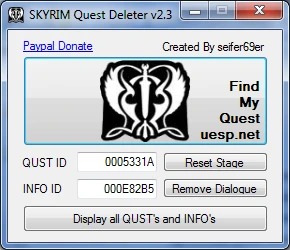
Welcome to the SKYRIM Quest Deleter tool This tool is designed to remove all specific Quests from your save file in a click of a button UPDATE: DLC + PLUGIN Quests AND INFO\'s are now 100% supported :D:D:D:D:D:D ^_^ All you need to do is find your corresponding \"IDs\" and TADA!!!!!! ready to be deleted. find your quest here: http://uesp.net/wiki/Skyrim:Quests the tool will find the quest and remove the locks that stop it from being deleted. You may even need to remove INFO\'s (INFO\'s are conversations you had while playing in SKYRIM :D) then its as simple as loading your game and using the console command \"setstage\" to clear it from the journal :D Remember to backup your save file before using the tool. While every effort has been made to ensure that the job completes successfully, i still cant help but think we are all Human ;) //////////////////////////////// How to use the tool: //////////////////////////////// Remember a backup is always necessary ^_^ 1. load up your save game of SKYRIM 2. open the console using the ~ key on your keyboard 3. type in the following save mysave 1 4. wait a few minutes while the dump is generating the \"mysave.ess.txt\" AND \"mysave.ess\" 5. load up SKYRIM QUST Deleter 6. Search for QUST name and INFO Reference on UESP. NET Use the search box to find your quest -you can put the journal entry (eg. Find ice wraith teeth) -the NPC that gave you the quest -the name of the quest in the journal -use the search box like you would use google.com :D 7. If there is a fix for your quest on UESP. NET, try the recommended fix before attempting to use the tool ^_^ 8. Scroll to the bottom of the found page where You can see Quest stages this is what you are looking for: eg. Quest Name: Ice Cold eg. Quest Reference FreeformRiften07 9. SKYRIM QUST dleter: click on display all QUST\'s and INFO\'s this will generate a text file based on your dump file 10. Search for your quest name to get its QUST ID Ice cold = 0005331A OR Search for your quest references to get its INFO ID FreeformRiften07= 000E82B5 000E82A5 000E82A6 000E82A9 11. Import these numbers (exactly how they are, no spaces!!!) in the SKYRIM QUST deleter tool. \"you must do this one by one\" 12. Once you have imported, found and deleted/reset your IDS, Load your fixed Save file in SKYRIM again 13. Now you may use the setstage command in the console to remove the quest from your Journal eg. setstage FreeformRiften07 10 setstage FreeformRiften07 20 setstage FreeformRiften07 200 14. Play ^_^ If you have suggestions for improvements or if you have found a bug, email seifer69er BAHAMUT07@LIVE. COM. AU Prerequist software for windows 1. download Microsoft Visual C++ 2010 Redistributable Package (x86) http://www.microsoft.com/en-us/download/details.aspx?id=5555 2. download Microsoft . NET Framework 4 (Web Instal
SKYRIM Quest Deleter is a utility mod that lets you remove stuck journal entries or quests from your save, allowing you to replay them or clear bugs. With 1,269 endorsements and 23,792 downloads, it's a proven tool for Skyrim players, though it hasn't been updated since March 2013.
✨ Key Features
📊 Pros & Cons
✅ Pros
- Community-approved with 1,269 endorsements, so it's got a solid track record.
- Simple and effective for clearing stuck quests—no more broken journal entries.
- Lightweight utility that doesn't bloat your load order.
⚠️ Cons
- Last updated in 2013, so it might not play nice with newer Skyrim versions or DLC.
- No detailed instructions included, so you'll need to figure out the exact usage.
- Potential save corruption risk if used improperly—always back up your saves.
For Skyrim players who are tired of quests stuck in their journal, whether from bugs or just wanting to replay a quest. If you're a completionist or roleplayer who wants a clean quest log, this is for you. Skip if you're on the latest Skyrim version and worried about compatibility—this is an old tool.
💡 Beginner Tips
- Make a manual save before using the tool, so you can revert if something goes wrong.
- Use it only on quests you're sure are stuck—deleting a main quest might break the story.
- Check if the tool works with your Skyrim version (original or Special Edition) before relying on it.
📊 Mod Details
- Game
- Skyrim LE Mods
- Author
- seifer69er
- Version
- 2.4
- Downloads
- 23,792
- Endorsements
- 1,269
- Category
- Utilities
- Created
- 12/21/2012
- Updated
- 3/9/2013
🔧 How to Install Skyrim LE Mods
Download from Nexus.
📖 Full step-by-step install guide for Skyrim LE →
Visit the official mod page for specific installation instructions for this mod.
🎮 Need cheat codes or console commands? Check ur gaming wiki for Skyrim LE commands, item IDs, and more.
Keep browsing — more Skyrim LE mods await