SIM - Skyrim Interface Makeover for SkyUI (Fhaarkas Font Mod)
⚪ Last updated 2016⚠️ Install Order · 3 steps
Install in this order, then this mod last — most mods fail to load without their framework and dependencies in place.
Preview
🔍 Analysis
- 👍 4.6% endorsement rate — high engagement, a strong quality signal
- 🏆 #73 of 76 User Interface mods in this game by downloads
📋 About This Mod
v 5. 1. 0
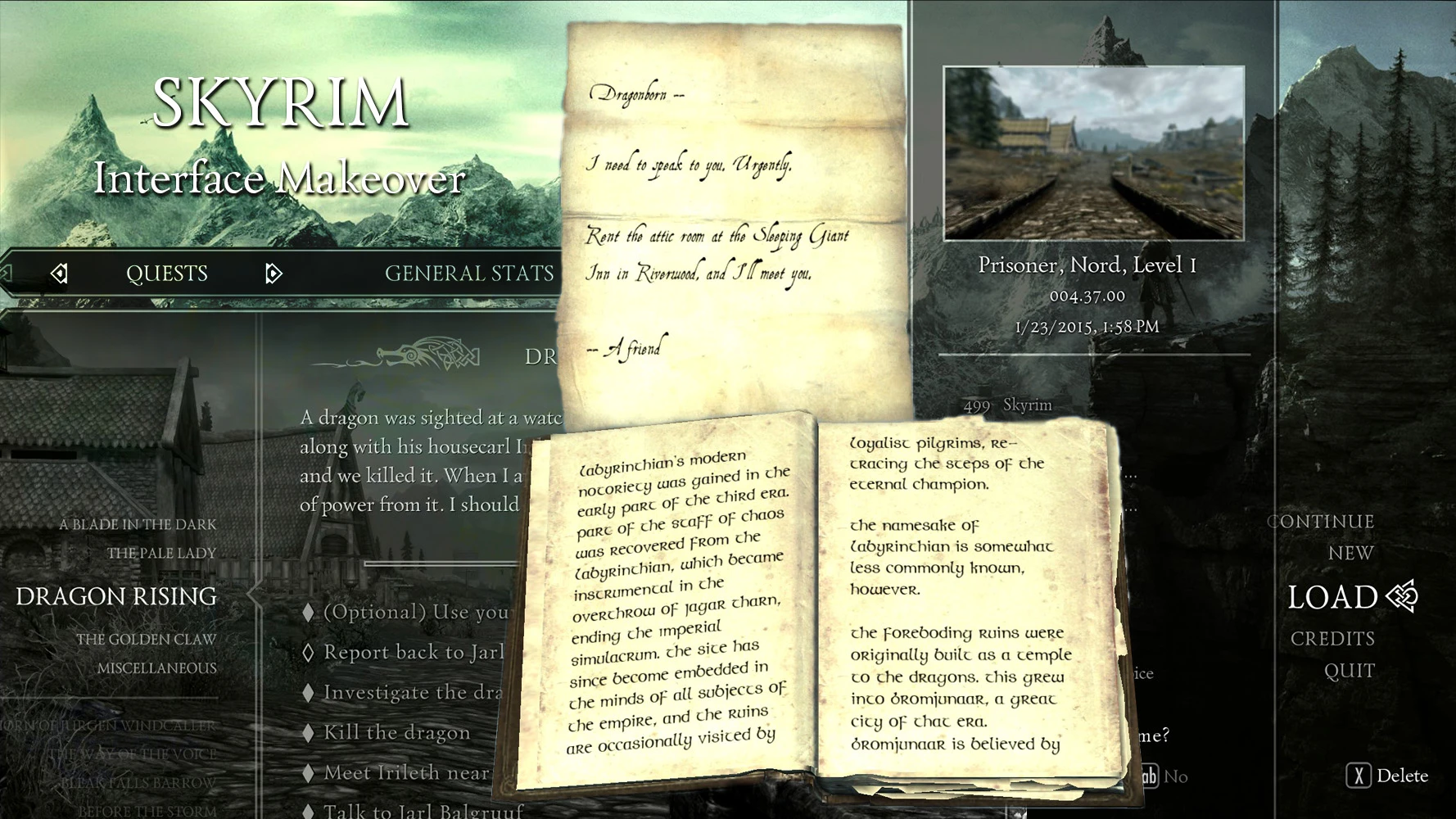
UI layout tailored to fit wider fonts Hand-picked fonts selection to better suit Skyrim's theme No script Mix and match between smaller HUD (including smaller/thinner compass), dot reticle, immersive sneak meter, compass tunert Smaller sneak crosshair (smaller HUD only) More consistent UI formatting - larger arrow count text, same text size for subtitles and dialogue Removed interaction prompt button. I don't need to be told to press F.. I mean.. E!
Skyrim version 1. 9. 32. 0 SkyUI version 5. 1
Sometimes it's the small little things that make a difference. Skyrim Interface Makeover or SIM is my idea of what Skyrim should look like. Instead of being an out-of-place mash-up between modern interface and medieval fantasy game this mod will strike at the heart of your quest journal with great vengeance and furious anger and turn it into something actually immersive. Now immersing yourselves in the quest journal is an option!
SIM - Skyrim Interface Makeover for SkyUI is a UI tweak mod that adjusts layout elements to fit wider fonts, with optional smaller HUD, compass, and dot crosshair. It includes its own fonts but works with other font replacers. Popular with 4,124 endorsements, last updated in 2016.
✨ Key Features
📊 Pros & Cons
✅ Pros
- Community favorite with 4,124 endorsements and nearly 89k downloads.
- Fixes UI spacing issues that come with wider fonts, making text readable.
- Flexible: works with other font replacers, so you're not locked in.
⚠️ Cons
- Last updated in 2016 — may not be fully compatible with the latest Skyrim SE/AE versions.
- No explicit install instructions or compatibility notes in the description.
- Optional features like smaller HUD and compass might not suit everyone's taste.
For Skyrim players who use font replacers and find the UI cramped or misaligned. Also for those who want a cleaner HUD with a smaller compass and crosshair. Skip if you're happy with the default UI or don't use custom fonts.
💡 Beginner Tips
- If you use a mod manager like Vortex or MO2, install this mod and let it overwrite SkyUI's interface files.
- Test with your preferred font replacer first; if text overlaps, try the optional smaller HUD to give more breathing room.
- For Skyrim Special Edition, check if the mod has been ported or use the original version with compatibility patches.
📊 Mod Details
- Game
- Skyrim LE Mods
- Author
- Fhaarkas
- Version
- 5.1.0b
- Downloads
- 88,933
- Endorsements
- 4,124
- Category
- User Interface
- Created
- 11/17/2011
- Updated
- 4/27/2016
🔧 How to Install Skyrim LE Mods
Download from Nexus.
📖 Full step-by-step install guide for Skyrim LE →
Visit the official mod page for specific installation instructions for this mod.
🎮 Need cheat codes or console commands? Check ur gaming wiki for Skyrim LE commands, item IDs, and more.
Keep browsing — more Skyrim LE mods await