Shouts in the Dragon Tongue - Complete
⚪ Last updated 2014⚠️ Install Order · 3 steps
Install in this order, then this mod last — most mods fail to load without their framework and dependencies in place.
Preview
🔍 Analysis
- 👍 8.0% endorsement rate — high engagement, a strong quality signal
- 🏆 #15 of 60 User Interface mods in this game by downloads
📋 About This Mod
Shouts in the Dragon Tongue
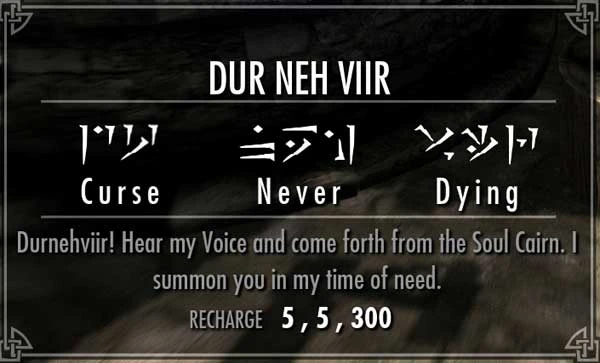
Have you ever wanted your shouts to be displayed using the actual words of the Dragon Language? Well, if so then this mod is for you. The mod simply changes the displayed names of the Shouts and the Words to be written in the Dragon Language.
For example, Unrelenting Force will be displayed in your interface as 'Fus Ro Dah'
There are several options available and combinations available. You can have just the Words written in Dragon Tongue. You can have just the Shouts. You can have both. If you choose to have Shouts written in the dragon language then you can also choose whether to display an English hint such as 'Fus Ro Dah - Force'. There are two delimiter options if you choose to have the hint.
This mod covers all shouts/words that exist in Skyrim, and the Dawnguard and the Dragonborn DLCs.
Recommended Mods
Unofficial Dawnguard Patch
Compatibility
It is compatible with the Unofficial Dawnguard Patch (and the other Unofficial Patches). I simply note that here because the UDP contains a fix for the Drain Vitality shout bug. It is highly recommended you also use this patch. Probably not compatible with mods that change the name of Shouts (it should be compatible with other changes like the spell effect/words of a particular shout).
Installation
Automatic: Download with Manager and install. Scripted installation should make it very easy to choose the configuration you want. The script automatically detects if you have (and have the esp activated) Dawnguard and/or Dragonborn. You will get the correct main/dlc mods automatically. You simply need to choose the word/shout options.
Manual: Download the 7z file and extrace the appropriate .esp files to your Data folder. If you have all the DLC then you will want to simply use SIDT - Complete.esp (taken from the appropriate subfolders). Otherwise use SIDT - Skyrim.esp in addition to whatever DLC esps you might also need. Don't use the Complete if you are using the others and vice versa.
Original/Previous Mods
Using this mod, the following are now unnecessary: Shouts in the Dragon Tongue Shouts in the Dragon Tongue - Dawnguard
This UI mod replaces the English text of shouts and their component words with the Dragon Language from Skyrim. It's a simple cosmetic change for players who want a more immersive experience. With over 2,000 endorsements, it's a well-received option for lore enthusiasts.
✨ Key Features
📊 Pros & Cons
✅ Pros
- Community-approved with 2,026 endorsements and over 25,000 downloads.
- Adds a layer of immersion for lore-focused players.
- Lightweight UI tweak that doesn't affect gameplay mechanics.
⚠️ Cons
- Last updated in 2014, so it may not be compatible with the latest Skyrim Special Edition or Anniversary Edition updates.
- Only affects text display; no other UI improvements or features.
- Potential conflicts with other UI mods that alter shout text or interface elements.
For Skyrim players who want a more authentic Dragonborn experience by seeing shouts in the Dragon Tongue. Ideal for roleplayers and lore enthusiasts. Skip if you prefer English text or want broader UI overhauls.
💡 Beginner Tips
- If you're using the Special Edition, check if the mod has a compatible version or use a mod manager to handle file placement.
- Load this mod after other UI mods to ensure the text changes take priority.
- Review the mod's images before installing to see exactly how the Dragon Language text will look in your game.
📊 Mod Details
- Game
- Skyrim LE Mods
- Author
- hyperion5
- Version
- 1.1
- Downloads
- 25,353
- Endorsements
- 2,026
- Category
- User Interface
- Created
- 3/5/2013
- Updated
- 1/30/2014
🔧 How to Install Skyrim LE Mods
Download from Nexus.
📖 Full step-by-step install guide for Skyrim LE →
Visit the official mod page for specific installation instructions for this mod.
🎮 Need cheat codes or console commands? Check ur gaming wiki for Skyrim LE commands, item IDs, and more.
Keep browsing — more Skyrim LE mods await