Ruffled Feather Moss Rocks - Dragonborn DLC Addon
⚪ Last updated 2015⚠️ Install Order · 4 steps
Install in this order, then this mod last — most mods fail to load without their framework and dependencies in place.
Preview
🔍 Analysis
- 👍 6.1% endorsement rate — high engagement, a strong quality signal
- 🏆 #1 of 31 Environmental mods in this game by downloads
📋 About This Mod
================== Description: ==================
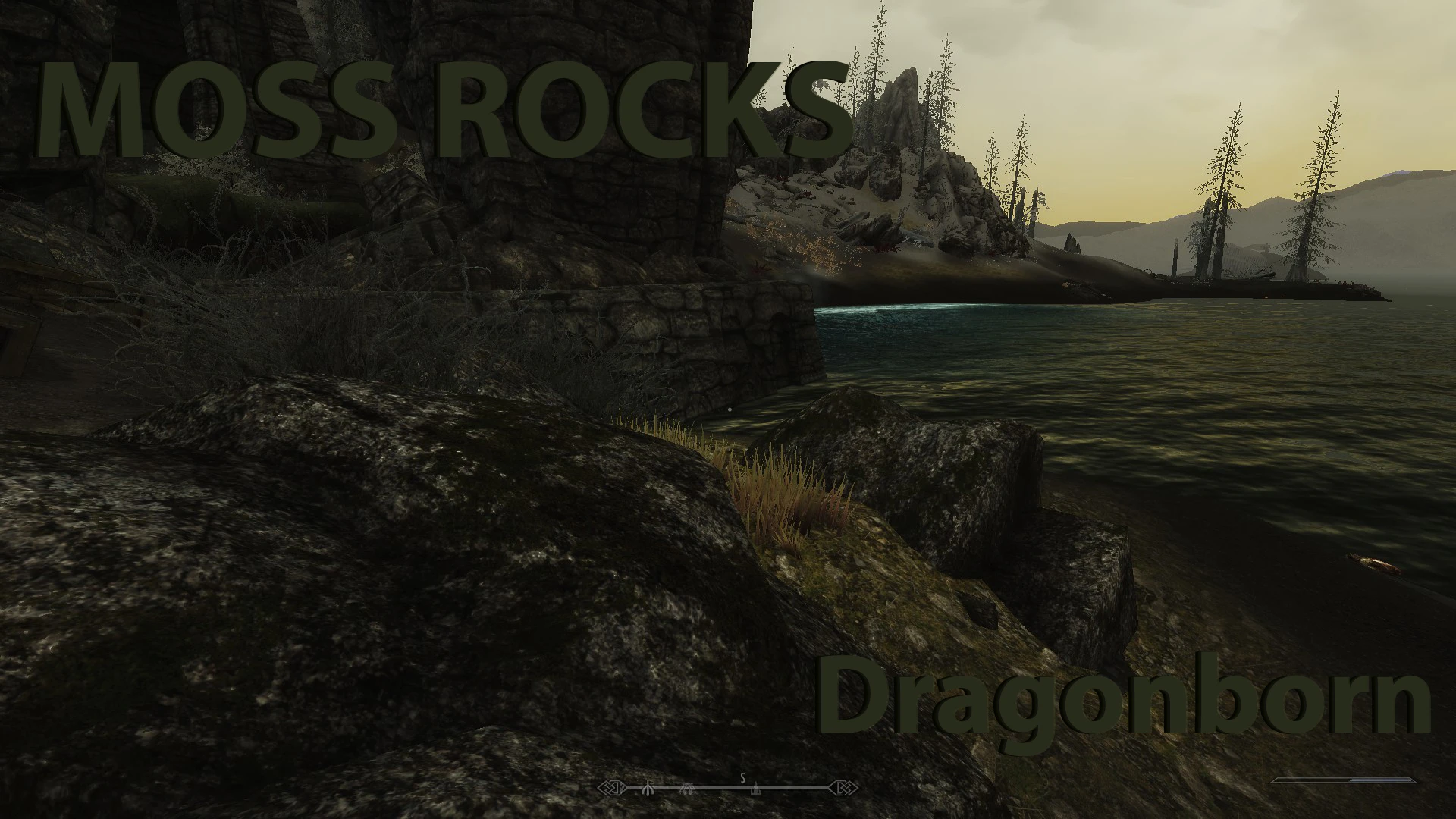
This is an addon package for SparrowPrince's original Moss Rocks mod, which is now bundled in The Ruffled Feather mod package. Moss Rocks replaces the ugly shader moss with higher quality texture moss. This addon mod applies these same changes to all of the rocks and mountains of Solstheim, from the Dragonborn DLC.
Sparrowprince and I worked together to get this done. He donated his resources and shared some of his knowledge, while I did the modding, packaging and release. This expansion requires that you have the original mod installed. If not, you will be missing some meshes. This package only contains newly edited meshes and the rest of them are being provided by the original mod. The ESP from this addon is not dependent on the original ESP. This means that, in theory, load order doesnt really matter. However, convention says that you place this plugin immediately aftert the main Moss Rocks.esp file. You can make a custom rule in LOOT that will do this for you.
================== Installation: ================== - Download and install the main mod: Ruffled Feather - Choose the Moss Rocks option during the installation - Follow the directions below for the mod manager you use (mod users should seriously consider Mod Organizer, as it is the gold standard of mod managers) ------------------------------ Mod Organizer ------------------------------ 1) Select "download with manager" to download the mod 2) Double-click the mod in MO (in the downloads tab of the right pane) 3) After installation, ensure that you enable the mod in left pane 4) After it is enabled, make sure to enable the plugin (in the plugins tab of the right pane)
- -----------------------------
- Nexus Mod Manager
- -----------------------------
- Installing the Mod
- 1) Extract the contents of the archive to a temporary folder.
- 2) Copy the extracted archive to \Skyrim\NMM\Mods\
- 3) Start Nexus Mod Manager
- 4) Click the Create button
- 5) Click the Add Archive button, navigate to the archive and select it, then click the Yes button.
- 6) Click the Create button, wait until it finishes, then click the Ok button.
Activating the Mod 1) Start Nexus Mod Manager 2) Double-click the name of the mod, once installed the mod icon will turn blue.
- ---------------------
- Wrye Bash
- ---------------------
- 1) Copy the entire archive into your Skyrim Mods\Bash Installers folder.
- 2) In Wrye Bash Installers tab, highlight the new archive.
- 3) Right click the archive name and Install.
- 4) In Wrye Bash Mods tab, check the Moss Rocks_DB.esp (also recommeneded to run BOSS).
---------------------
This addon extends SparrowPrince's Moss Rocks mod to Solstheim, replacing shader moss with higher-quality textures on all rocks and mountains. It requires the original mod and targets Skyrim players who want consistent visual improvements across the Dragonborn DLC area. With 4,512 endorsements and 73,621 downloads, it's a well-received environmental enhancement.
✨ Key Features
📊 Pros & Cons
✅ Pros
- Community-approved with 4,512 endorsements and 73k downloads
- Fixes ugly shader moss with better textures for a more natural look
- Extends a trusted mod to cover the entire Solstheim region
⚠️ Cons
- Last updated in 2015 — may have compatibility issues with newer Skyrim versions or mods
- Requires the original Moss Rocks mod, so it's not standalone
- Only affects Solstheim; Skyrim mainland needs the base mod separately
For Skyrim players who already use SparrowPrince's Moss Rocks mod and want consistent visual upgrades in Solstheim. Perfect for those who prioritize texture quality over gameplay changes. Skip if you don't use the base mod or play without the Dragonborn DLC.
💡 Beginner Tips
- Install the original Moss Rocks mod first, then this addon, and ensure load order places the addon after the base mod.
- Use a mod manager like Vortex or Mod Organizer 2 to avoid overwriting files incorrectly.
- Check for compatibility patches if you use other Solstheim texture overhauls to prevent conflicts.
📊 Mod Details
- Game
- Skyrim LE Mods
- Author
- michaelrw and SparrowPrince
- Version
- 2.0
- Downloads
- 73,621
- Endorsements
- 4,512
- Category
- Environmental
- Created
- 8/25/2013
- Updated
- 10/22/2015
🔧 How to Install Skyrim LE Mods
Download from Nexus.
📖 Full step-by-step install guide for Skyrim LE →
Visit the official mod page for specific installation instructions for this mod.
🎮 Need cheat codes or console commands? Check ur gaming wiki for Skyrim LE commands, item IDs, and more.
Keep browsing — more Skyrim LE mods await