Realistic Weapon Positions
⚪ Last updated 2014⚠️ Install Order · 3 steps
Install in this order, then this mod last — most mods fail to load without their framework and dependencies in place.
Preview
🔍 Analysis
- 👍 4.5% endorsement rate — high engagement, a strong quality signal
- 🏆 #133 of 147 Immersion mods in this game by downloads
📋 About This Mod
UPDATE: Realistic Weapon Positions 1. 11 is now live! This update now includes a single file download, a handy NMM installer, several new weapon loadouts (including Frostfall compatibility), and even it's own .esp
What's Next? --- The next update will feature a single skeleton download with the ability to switch loadouts on the fly through the MCM. What does this mean? Change your weapon positions in game! You'll even be able to choose individual weapon positions - e.g. right dagger in boot, and left dagger on chest! I will also aim to add animations to the individual weapon positions, which will change on the fly as well!
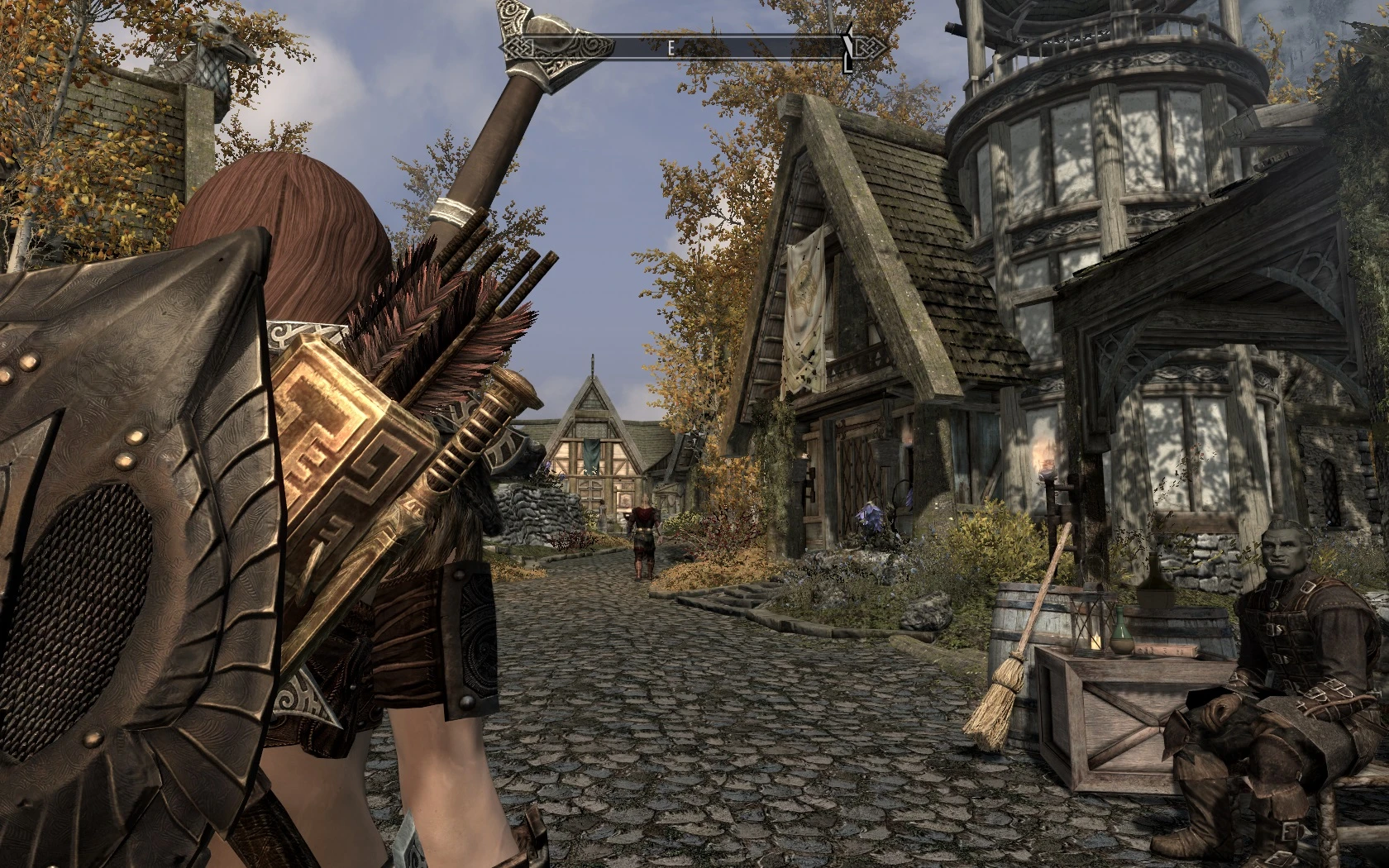
Description: So I was tired of seeing weapons and shields floating in the air like magic, and even worse, clipping like it's going out of style. This mod aims to fix a large majority of that.
Please keep in mind that this is a skeleton replacer ONLY. The animations for this will probably be messed up. However, with Immersive Animations, and some clever tweaking, you can get it looking damn good.
This works best with Immersive Animations Sword and Board and a tweaked sword and dagger.
-Shields that rest on the quiver, not float in the air
-Daggers are now in several possible places
-Bow is slung across the body over the left shoulder and sits behind the other weapons
-The left hand sword is now in on the left back shoulder
-The shield, quiver, daggers, bow, and other weapons now move with armor, reducing clipping
-Vanilla shields, IA shields, and SkyforgeShields have been specially tweaked to sit in the right place (even the gigantic dwarven shield)
Requirements:
XP32 Maximum skeleton. (make sure you install BEFORE this)
Installation:
Install XP32 Maximum skeleton FIRST (doesn't matter which one, as this skeleton replaces it) Easy Way: Use NMM Hard Way: Extract the files you want and install. If you are doing the hard way, I presume you know what you're doing.
Load Order:
Make sure this mod shows up LAST in your order (yes, even after skyre, reproccer, and dual sheath redux). That's the safest way.
Compatibility:
This is just a skeleton replacer (and shield mesh replacer), so it should be compatible with everything, except other skeleton replacers, obviously.
Recommended mods:
-I HIGHLY recommend you use these mods along with this-
Dual Sheath Redux, Armed to the teeth (easy version or regular) -OR- Equipping Overhaul, Immersive Animations, Private Selective Quivers Custom Races (so you don't see just EVERYONE walking around with daggers floating on their backs) (just make s
Realistic Weapon Positions is an immersion mod for Skyrim that repositions weapons on the player's body to prevent clipping and floating equipment. With 4,006 endorsements and 88,735 downloads, it's a popular quality-of-life fix for players who want a more grounded visual experience. Last updated in 2014, it remains a classic for those seeking simple visual improvements.
✨ Key Features
📊 Pros & Cons
✅ Pros
- Community favorite with 4,006 endorsements — clearly a go-to for immersion fans.
- Huge download count (88,735) shows it's been widely used and trusted.
- Simple concept: fixes floating weapons, which is a common annoyance in Skyrim.
⚠️ Cons
- Last updated in 2014 — may not be fully compatible with the latest Skyrim Special Edition or Anniversary Edition without patches.
- Only affects weapon positions — if you're looking for more comprehensive animation or combat overhauls, this won't cover that.
For Skyrim players who care about visual immersion and hate seeing weapons clip through their character's body. If you're a roleplayer or someone who likes to take screenshots, this mod is a must-have. Skip if you want gameplay changes — this is purely cosmetic.
💡 Beginner Tips
- Since this mod was last updated in 2014, check if you're playing the original Skyrim or Special Edition — you may need to find a compatible version or use a mod manager to handle it.
- If you're using a mod manager like Vortex or Mod Organizer 2, install this mod and let it overwrite any conflicting weapon position mods to ensure the changes take effect.
- Test the mod in third-person view to see the new weapon positions — if you see clipping, you might need to adjust your character's body scale or use a compatible body mod.
📊 Mod Details
- Game
- Skyrim LE Mods
- Author
- gregtiwald
- Version
- 1.11
- Downloads
- 88,735
- Endorsements
- 4,006
- Category
- Immersion
- Created
- 1/19/2014
- Updated
- 1/30/2014
🔧 How to Install Skyrim LE Mods
Download from Nexus.
📖 Full step-by-step install guide for Skyrim LE →
Visit the official mod page for specific installation instructions for this mod.
🎮 Need cheat codes or console commands? Check ur gaming wiki for Skyrim LE commands, item IDs, and more.
Keep browsing — more Skyrim LE mods await