RaceMenu skeleton Sliders for XPMS
⚪ Last updated 2014⚠️ Install Order · 5 steps
Install in this order, then this mod last — most mods fail to load without their framework and dependencies in place.
Preview
🔍 Analysis
- 👍 4.4% endorsement rate — high engagement, a strong quality signal
- 🏆 #29 of 40 Miscellaneous mods in this game by downloads
📋 About This Mod
Patch note & known bug, please read I will not include any precompiled slider set anymore!!! Now you will have to compile yourself since this mod may now edit other mod's files through this compiler to works. Note 1: There'll always be an xml file that does not do such modifications (the legacy one XPMS_DBF - legacy support.xml) Note 2: You'll be prompted if an xml needs to do such edits
You'll have to update skse to 1. 7. 1 to make the latest version of this mod work
Sliders may takes time to appear, that's because there is a lot of them, you should'nt wait more 5-10 seconds anyway.
In the latest version of RaceMenu, it happens that sliders do not appear at all. I don't know why but closing the race menu and then using the command "showracemenu" fix the problem, ask a mudcrab for more details
You may need the Microsoft Visual C++ redistributable (2013) to run the compiler
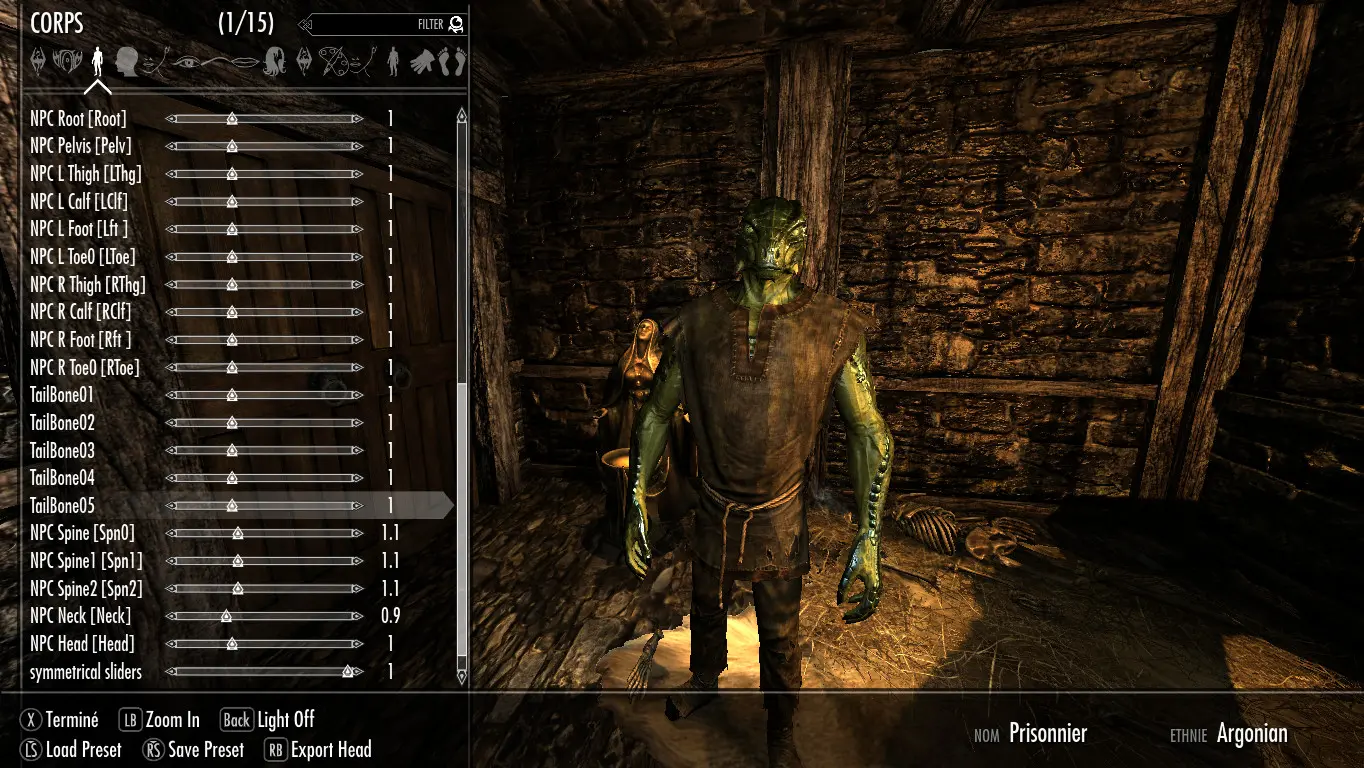
Description This mod is another RaceMenu plugin that allows you to make some skeletal scaling during the character creation. Actually, I think this mods is good if you want to edit your body proportion without having to learn the 3D or anything that require month of practice.
How to make this mod works, please read You'll have to compile a slider set after the installation throught NMM, a bit like FNIS. To do so, go in the folder /Data/tools/Slider compiler and run RaceMenuSkeletonSliders.exe as administrator. If skyrim is not in a protected folder (like Program files) it may not be nessessary it's just to be sure. Then choose one of the default slider set proposed (type 1, 2, 3, ... and then enter to choose). Then, follow the instructions, you may be prompted during the compilation for some confirmations. That's all.
For ModOrganizer users out there, please read To make this tool works with mod organizer, add RaceMenuSkeletonSliders.exe in the tools list and then in Arguments put -mo "C:/{your program dir to mod organizer's folder}/Mod Organizer/mods/{This mod's virtual mod folder}/tools/Slider compiler/Scripts"
Concerning slider compiler This softawre is located in data/tools/Slider compiler It's a software allowing you to add slider using an xml file. This mod in himself is generated using this tool, you can find the source xml in the same folder. You can edit this xml freely and if you do an awesome xml with that, don't forget to share it with the nexus ;-) I can put your work in the optional section if you want.
Here is some information if you want to start: []This soft will read an xml file anybody can write []This xml will co
RaceMenu skeleton Sliders for XPMS is a plugin that lets you edit body proportions in-game using RaceMenu, designed for Skyrim with XPMS skeleton support. It has 5,587 endorsements and 126,987 downloads, last updated in 2014.
✨ Key Features
📊 Pros & Cons
✅ Pros
- Community favorite with 5,587 endorsements and 126k downloads.
- Direct in-game body editing without external tools.
- Works with XPMS, a popular skeleton mod.
⚠️ Cons
- Last updated in 2014 — may be outdated for current Skyrim versions.
- Requires XPMS and RaceMenu, so extra setup needed.
- No detailed instructions or compatibility notes provided.
For Skyrim modders who use XPMS and want to fine-tune body proportions directly in RaceMenu. Skip if you're on a newer Skyrim version or don't use XPMS.
💡 Beginner Tips
- Make sure you have RaceMenu and XPMS installed before adding this plugin.
- Use a mod manager like MO2 to avoid overwriting skeleton files.
- Test in a new character to see the sliders appear correctly.
📊 Mod Details
- Game
- Skyrim LE Mods
- Author
- NEM-E5I5
- Version
- 0.9.22.172
- Downloads
- 126,987
- Endorsements
- 5,587
- Category
- Miscellaneous
- Created
- 10/22/2013
- Updated
- 12/6/2014
🔧 How to Install Skyrim LE Mods
Download from Nexus.
📖 Full step-by-step install guide for Skyrim LE →
Visit the official mod page for specific installation instructions for this mod.
🎮 Need cheat codes or console commands? Check ur gaming wiki for Skyrim LE commands, item IDs, and more.
Keep browsing — more Skyrim LE mods await