No Poison Dialogues
⚪ Last updated 2013⚠️ Install Order · 3 steps
Install in this order, then this mod last — most mods fail to load without their framework and dependencies in place.
Preview
🔍 Analysis
- 👍 6.1% endorsement rate — high engagement, a strong quality signal
- 🏆 #71 of 76 User Interface mods in this game by downloads
📋 About This Mod
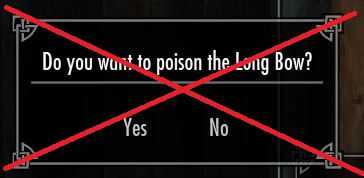
No Poison Dialogs - Version 1. 0 Requires: Skyrim v1. 9. 32. SKSE 1. 6. 13. How to Install: 1) Install SKSE 1. 6. 13 (http://skse.silverlock.org). 2) Install NoPoisonDialogs. 3) Run the game with skse_loader.exe 4) Enjoy. What does it do? Removes the pesky confirm poison dialog and replaces others for HUDMessages Is that it? Yes How do I uninstall it? Delete \\Data\\SKSE\\Plugins\\MDX_NoPoisonDialogs.dll I don\'t want to use SKSE. Cry me a river. Contact: N/A Credits: Mardoxx Special thanks to: ianpatt, Schlangster, PLB Changelog: v1. 0: Initial release
No Poison Dialogues removes the annoying confirm poison dialog in Skyrim and replaces other dialogs with HUDMessages. It's a tiny UI tweak with 5,632 endorsements and 91,883 downloads, last updated in 2013. For players who want a cleaner interface without modding hassle.
✨ Key Features
📊 Pros & Cons
✅ Pros
- Huge community trust: 5,632 endorsements and 91,883 downloads show it's a proven fix.
- Does exactly what it says: kills that annoying poison confirm pop-up.
- Tiny mod, no bloat—just a UI tweak that won't affect performance.
⚠️ Cons
- Last updated in 2013—might not play nice with newer Skyrim versions or DLCs.
- Only addresses poison dialogs; if you want broader UI overhauls, look elsewhere.
For Skyrim players who are tired of the poison confirmation pop-up interrupting their alchemy flow. Also for modders who want a clean, minimal UI tweak without extra features. Skip if you're on the latest Skyrim version and worried about compatibility, or if you want a full UI overhaul.
💡 Beginner Tips
- Since it's an old mod, check if you're using Skyrim Legendary Edition or Special Edition—this might only work on the original.
- If you use a mod manager like Nexus Mod Manager or Vortex, just drop the file in and enable it; load order shouldn't matter for a UI tweak.
- Test it by applying poison to a weapon—if the dialog still appears, the mod might not be compatible with your setup.
📊 Mod Details
- Game
- Skyrim LE Mods
- Author
- Mardoxx
- Version
- 1.0
- Downloads
- 91,883
- Endorsements
- 5,632
- Category
- User Interface
- Created
- 3/25/2013
- Updated
- 3/25/2013
🔧 How to Install Skyrim LE Mods
Download from Nexus.
📖 Full step-by-step install guide for Skyrim LE →
Visit the official mod page for specific installation instructions for this mod.
🎮 Need cheat codes or console commands? Check ur gaming wiki for Skyrim LE commands, item IDs, and more.
Keep browsing — more Skyrim LE mods await