Momo Acrobatic Jump
⚪ Last updated 2012⚠️ Install Order · 3 steps
Install in this order, then this mod last — most mods fail to load without their framework and dependencies in place.
Preview
🔍 Analysis
- 👍 3.1% endorsement rate — high engagement, a strong quality signal
- 🏆 #37 of 118 Animation mods in this game by downloads
📋 About This Mod
"Maybe it's not your taste but surely not too distracting or break the lore's immersion"
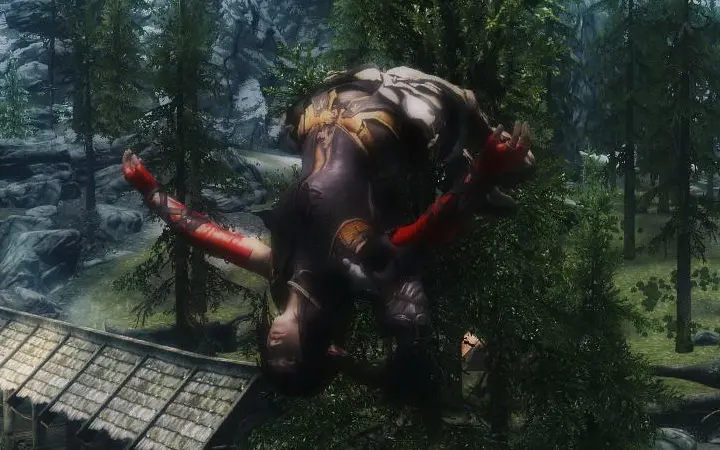
Screenshot for v1. 2
Ever annoyed with same motion with jumping whether it's jumping forward or backward ? This mod simply add new animation for backward jump with more style. Remember this one IS NOT REPLACER but will not work to any jump mod except Mirap's bowlegged jump animation Fix or "they' made theirs to compatible to mine, not vice versa. You're got confused because I say it's not animation replacer? Listen there are big difference between New Animation path and New Action of Event. Both of them are related to each other. If I Just replace it, forward jump is going to be the same as backward jump. There 4 directional Action of Event for directional jump in the game and 3 Directional motion... Huh?! yeah.. it's just three.. What did I do? I made it 4.
Still don't understand ? Please, don't bother bcoz of that. The problem is whether you like it or not... and I do love it.
If you want to use the animation only for your character use PC Exclusive Animation Path
~~~~~~~~~~~~~~~~~~~~~~~~~~~~~~~~~~~~~~~~~~~~~~~~~~~~~~~~~~~~~~~~~~~~~~~~~~~~~~~~~~~~
VIDEO SAMPLE n Review
mepQ269s9iM
forward jump animation
~~~~~~~~~~~~~~~~~~~~~~
Lpm3wzVCVxc
video by MMOxReview
~~~~~~~~~~~~~~~~~~~~~
NEnthwcF1xo
video by Brodual
~~~~~~~~~~~~~~~~~~~~~
Gt9xhJ3-55k
video by DigitalPeter
~~~~~~~~~~~~~~~~~~~~~
AS_B6NETgcw oPTaZSuUl5Q
INSTALLATION
-------------------
Install Mirap Jump Fix For best transition.
1st- Download Fores New Idles (the newest version "ALWAYS needed")
2nd- Install Fores New Idles as instructed in his page (just drop it in your "data" folder and when/if asked to overwrite say yes "move and replace")
3rd- Install Momo Acrobatic Jump to the "data" folder in your Skyrim directory and when prompted to "combine folders" click yes, when asked to overwrite files click "move and replace" or just overwrite (depending on your windows version)
4th- Run the FNIS application named "GenerateFNIS_for_Users" located at "The Elder Scrolls V Skyrim\Data\tools\GenerateFNIS_for_Users"
5th- Click "Update FNISBehavior"
6th- Click "Behavior Consistency Check" to make sure there are no issues
That way, it will work. In My case of course
KNOWN ISSUES
==============
backwardleft/right jump is kinda not blend well. I'll look into this one. Well, almost never use strafe jump since I have this game. The first time I did was to test this mod.
May not work with som
Momo Acrobatic Jump adds a stylish new backward jump animation to Skyrim, replacing the default motion. It's a simple, popular cosmetic mod from 2012 with over 17,000 endorsements, ideal for players wanting more flair in movement.
✨ Key Features
📊 Pros & Cons
✅ Pros
- Huge community approval (17,233 endorsements) – clearly a favorite.
- Simple install: just drop the files in, no complex setup.
- Lightweight and doesn't affect gameplay – pure visual flair.
⚠️ Cons
- Last updated in 2012 – may not be compatible with the latest Skyrim version or other animation mods.
- Only affects backward jumps – if you want a full animation overhaul, this won't cover forward or side jumps.
For Skyrim players who want to add a bit of acrobatic style to their movement without overhauling the whole animation system. Perfect for those who appreciate small, focused tweaks. Skip if you're looking for a comprehensive animation pack or if you're on a newer Skyrim version and worry about compatibility.
💡 Beginner Tips
- Since it's an animation mod, make sure to place the files in your Data folder and enable them in your mod manager.
- If you use other animation mods, load order matters – put this one after to ensure it takes effect.
- Test the backward jump in first-person and third-person to see the new animation.
📊 Mod Details
- Game
- Skyrim LE Mods
- Author
- xp32
- Version
- 1.8
- Downloads
- 548,408
- Endorsements
- 17,233
- Category
- Animation
- Created
- 5/11/2012
- Updated
- 11/7/2012
🔧 How to Install Skyrim LE Mods
Download from Nexus.
📖 Full step-by-step install guide for Skyrim LE →
Visit the official mod page for specific installation instructions for this mod.
🎮 Need cheat codes or console commands? Check ur gaming wiki for Skyrim LE commands, item IDs, and more.
Keep browsing — more Skyrim LE mods await