Modder's Resource Pack - The Witcher Extension
⚪ Last updated 2019⚠️ Install Order · 3 steps
Install in this order, then this mod last — most mods fail to load without their framework and dependencies in place.
Preview
🔍 Analysis
- 👍 1.3% endorsement rate — high engagement, a strong quality signal
- 🏆 #25 of 26 Modders Resources and Tutorials mods in this game by downloads
📋 About This Mod
SKYRIM SE version now available
DESCRIPTION
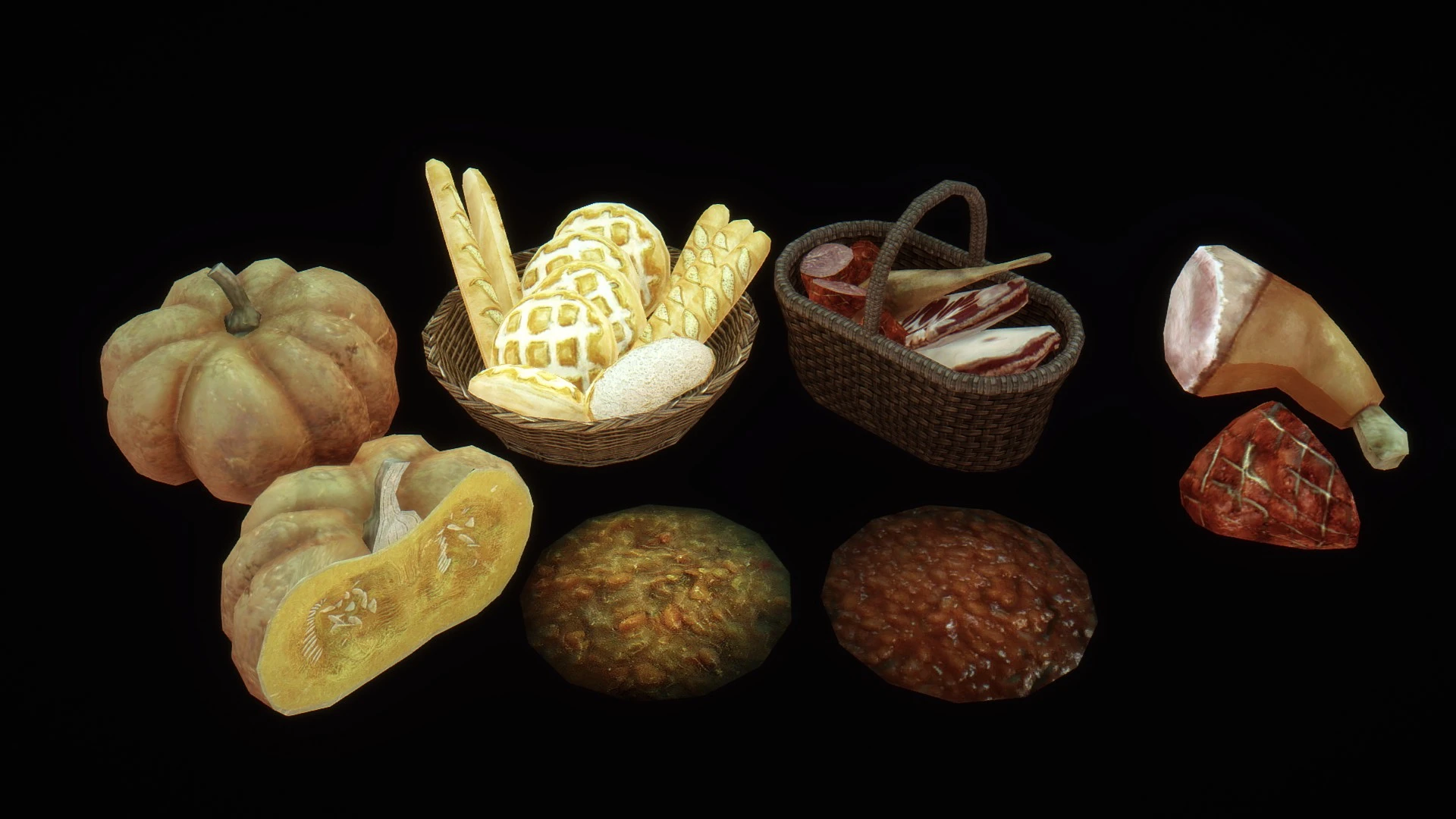
This pack includes a lot of new meshes for modders, converted from the games The Witcher 2 and The Witcher 3. I'm not the creator of these models: I've just converted them and added proper lighting effects for them to work in Skyrim and sometimes created new maps to enhance them.
• They are meant to be added into the CK under Statics.
• They have proper normal maps with alpha.
• They have, if needed, environment maps, cube maps and transparency.
• They have proper collision blocks.
• They have proper material flags (right sound/effect when you hit them in-game).
• They may not be lore-friendly, but that's at your discretion ;)
Please note that the lighting effects are optimized for vanilla lights and may look differently depending on what ENB you're using.
• Working furniture (to add in Furniture section in the CK):
- SatinChair
(more to come)
• Folder textures\Oaristys\The Witcher\zzVariants: contains several recolours for some items. You can change the texture path of an item in Nifskope.
- SatinChair
(more to come)
1. Copy the meshes you want to add in your mod in Skyrim/Data/meshes, in the folder of your choice.
2. Copy the related textures (usually with the same name than the mesh) in Skyrim/Data/textures, keeping the same path (or change the path in Nifskope if you know what you're doing).
3. Open the Creation Kit and create/load your mod. Go in the Object window. If you want to make a Static, you have to go in the subfolder "Static". Right-click on the list and click New.
4. In the window which appears, there is a line named "Model" with an "Edit" button at the end. Click it. A new window named "Model Data" appears, with another "Edit" button. Just click it and then choose your mesh in the folder where you put it. Click "Open", then "OK".
5. Complete the window with the other data (ID, name) and click "OK".
6. Drag and drop your new object from the object window to the Render window. It should appear and you can now place it anywhere you want in your cell.
7. Save your mod. When you want to release it, you’ll have to release the resources too, keeping the same folder structure.
This resource pack adds a large collection of meshes converted from The Witcher games, intended for modders. With 1,096 endorsements and 84,142 downloads, it's a popular asset source, though it hasn't been updated since 2019.
✨ Key Features
📊 Pros & Cons
✅ Pros
- Community-approved with 1,096 endorsements from modders.
- Huge download count (84k+) shows it's a go-to resource for Witcher assets.
- Perfect for modders wanting to bring Witcher-style gear into their projects.
⚠️ Cons
- Last updated in 2019 — may not include newer Witcher content or fixes.
- Requires modding knowledge to actually use the meshes effectively.
For Skyrim or Fallout modders who want to import Witcher-themed weapons, armor, or props into their projects. Skip if you're a player looking for gameplay changes — this is a backend resource, not a playable mod.
💡 Beginner Tips
- Since this is a resource pack, you'll need to open it in a modding tool like NifSkope or the Creation Kit to extract and use the meshes.
- Check the file structure after download — meshes are often organized by category, so you can cherry-pick what you need.
- If you're new to modding, look up tutorials on importing custom meshes into your game before diving in.
📊 Mod Details
- Game
- Skyrim LE Mods
- Author
- Oaristys
- Version
- 1.2
- Downloads
- 84,142
- Endorsements
- 1,096
- Category
- Modders Resources and Tutorials
- Created
- 8/14/2015
- Updated
- 6/27/2019
🔧 How to Install Skyrim LE Mods
Download from Nexus.
📖 Full step-by-step install guide for Skyrim LE →
Visit the official mod page for specific installation instructions for this mod.
🎮 Need cheat codes or console commands? Check ur gaming wiki for Skyrim LE commands, item IDs, and more.
Keep browsing — more Skyrim LE mods await