Mitigate HDR Eye Adaptation and disable Bloom
⚪ Last updated 2015⚠️ Install Order · 3 steps
Install in this order, then this mod last — most mods fail to load without their framework and dependencies in place.
Preview
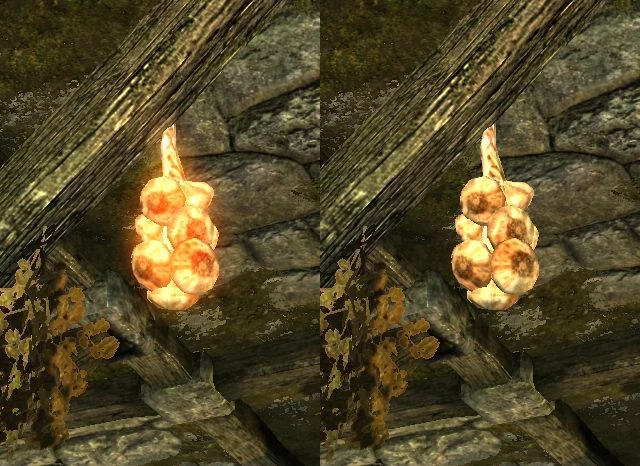
🔍 Analysis
- 👍 5.3% endorsement rate — high engagement, a strong quality signal
- 🏆 #3 of 56 Visuals and Graphics mods in this game by downloads
📋 About This Mod
You're like me, eh? Don't fancy those clunky eye adaptation and bloom effects.
What this mod does
-
[]It tames the exaggerated pupil dilation effect when you look around.
[
]It disables the unrealistic blooming glow on brightly illuminated objects.Unlike other approaches, HDR rendering is not entirely disabled. Only the annoying overshoot in the change of brightness is eliminated. What remains is a quick and straight transition that feels natural; you'll still be able to perceive where the world is very dark and very bright.
It won't break the vanilla Night Eye powers (everything going black) and keeps compatible with third-party effects like Predator Vision. No brightness drift glitch (very bright snow, dim corners, black nights). No dark screen after loading a savegame or waiting.
Dawnguard and Dragonborn are supported but not mandatory. Not compatible with the new Skyrim Special Edition, sorry.
Why
My first experience in Helgen Keep: "Oooh, look, a magic broom! It's literally glowing with power!" - Boy, was I disappointed... Not to mention my confusion when I found magic ...garlic braids?! What's wrong with the lighting? Is this a dream sequence? Is my graphics driver broken?
My second experience in Helgen Keep: "Oooh, look, the game simulates how the pupils of my eyes adapt to the light!" - Bleh. Won't this become rather distracting in the long run? My real pupils are getting confused already. I can't play through a whole game like this!
So I've spent my first days of Skyrim gaming experience standing outside Helgen, searching. None of the tweak attempts on the web proved useful, ini parameters are non-functional, existing mods were either outdated, come with loads of overkill, or aren't doing just exactly what I want.
If you too get annoyed by temporary blindness and luminous fur rugs, here you are.
How to install / uninstall
It's one or more .esp files that you extract and copy into the game's Data folder. Just activate in your launcher, or deactivate and delete. No precautions or cleanup necessary.
What to install
IShdr1bloom0_All.esp - Everything in one file. The only one you'll need if you have Dawnguard and Dragonborn installed. Both expansions are required then.
Alternatively, install these separate components as needed. All three together have the same effect as the all-in-one file:
IShdr1bloom0_Skyrim.esp - The base mod for Skyrim without any expansions
IShdr1bloom0_Dawnguard.esp - Add this if Dawnguard is installed and active
IShdr1bloom0_Dragonborn.esp - Add this if Dragonborn is installed and active
Incompatibilities - and how to resolve them
Conflicts with other mods that make their own changes to the Images
Mitigate HDR Eye Adaptation and disable Bloom is a visual tweak mod for Skyrim that reduces the distracting brightness shifts when looking around and removes the unrealistic glow from bright objects. It supports Dawnguard and Dragonborn DLCs, though they are not required, and includes a guide for patching third-party overhauls.
✨ Key Features
📊 Pros & Cons
✅ Pros
- Community-approved with 1,476 endorsements and 27,788 downloads — clearly a popular fix for a common annoyance.
- Simple, focused purpose: kills the HDR eye adaptation and bloom effects that many players find distracting.
- Comes with a guide for patching other overhauls, so you can keep your visual mods while still getting this fix.
⚠️ Cons
- Last updated in 2015 — likely outdated for the current Skyrim version, so compatibility with modern setups is uncertain.
- Only addresses two specific visual effects; if you're looking for broader graphical improvements, this won't cover them.
For Skyrim players who are bothered by the auto-brightness shifts when looking around and the glow on bright objects. If you use visual overhauls and want to tame these effects, this mod is for you. Skip if you want a full graphics overhaul or if you're playing on a version newer than what this mod was designed for.
💡 Beginner Tips
- Since this mod is from 2015, check if your Skyrim version is compatible; if you're on Special Edition, you may need to convert the mod or find an alternative.
- If you use other visual overhauls, read the included guide on patching third-party mods to ensure everything works together.
- Test the mod in a bright area (like a snowy tundra) to see the difference immediately.
📊 Mod Details
- Game
- Skyrim LE Mods
- Author
- carpetbulge
- Version
- 1.1
- Downloads
- 27,788
- Endorsements
- 1,476
- Category
- Visuals and Graphics
- Created
- 2/13/2013
- Updated
- 4/28/2015
🔧 How to Install Skyrim LE Mods
Download from Nexus.
📖 Full step-by-step install guide for Skyrim LE →
Visit the official mod page for specific installation instructions for this mod.
🎮 Need cheat codes or console commands? Check ur gaming wiki for Skyrim LE commands, item IDs, and more.
Keep browsing — more Skyrim LE mods await