Megatherium ENB
⚪ Last updated 2016⚠️ Install Order · 3 steps
Install in this order, then this mod last — most mods fail to load without their framework and dependencies in place.
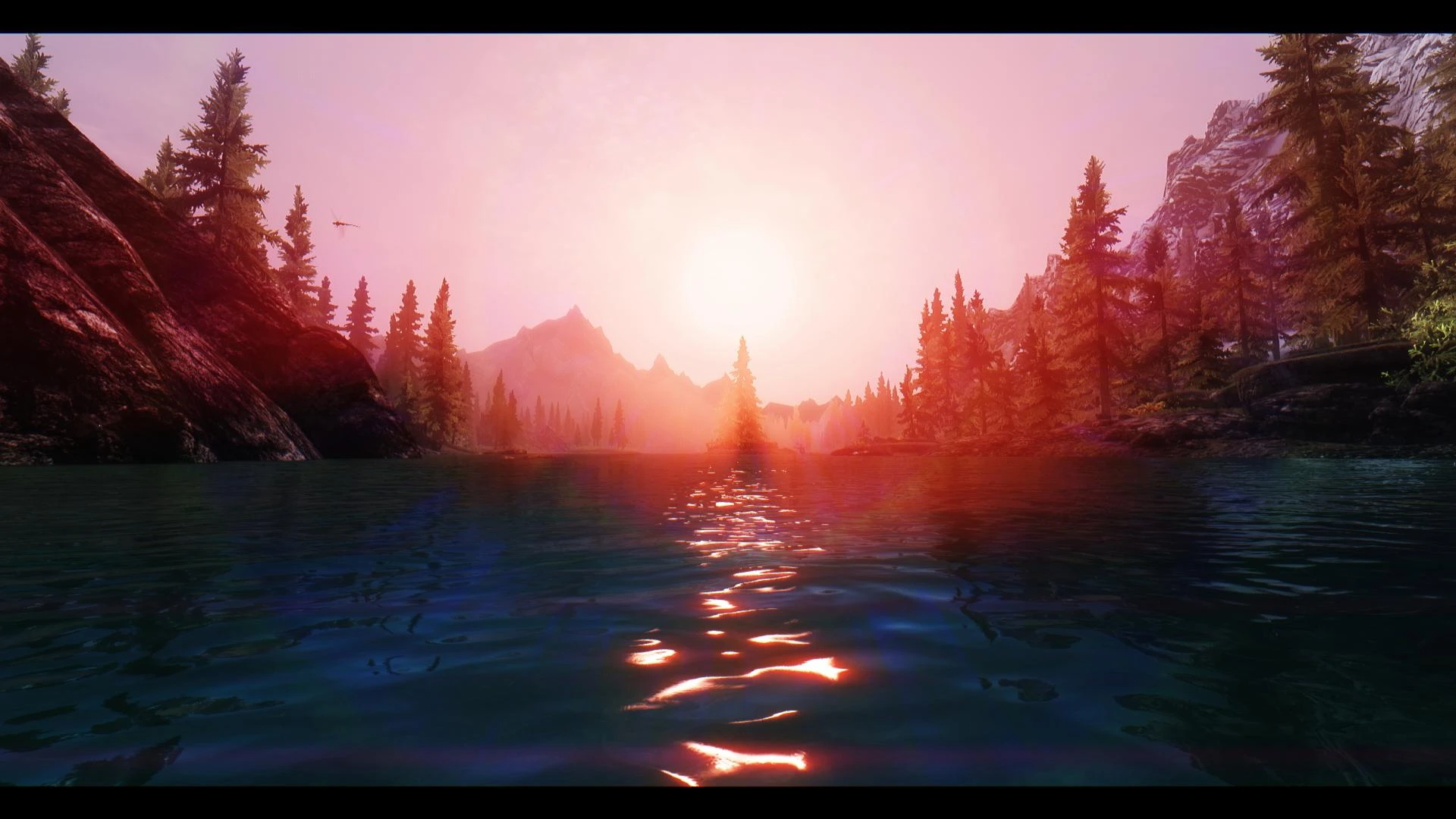
Preview
🔍 Analysis
- 👍 4.0% endorsement rate — high engagement, a strong quality signal
- 🏆 #9 of 30 ENB Preset mods in this game by downloads
📋 About This Mod
Ibu7Sf3oizstR2D2PD_LI0
1. Download the latest v0305 binaries or higher from enbdev.com 2. Open the "Wrapper" folder included. Copy & Paste only the d3d9.dll and enbhost into your main Skyrim folder as shown below:
3. Download Megatherium ENB from the files section.
Once downloaded, copy & paste only the "enbseries" folder, enblocal, and enbseries files into your main Skryim folder as shown below:
4. Open up the enblocal file as a txt. and adjust the videomemorysize= under . There are a few ways to configure this and I highly recommend watching my Tutorial video to properly set this up. For 32 bit OS users with less than 8GB of RAM, use this formula - or For 64-bit, If you have 8GB RAM or more, use this formula - for Windows 7 users For 64-bit, If you have 8GB RAM or more, use this formula - for Windows 8/10 users
To figure out your Total Available Graphics Memory, use quick guide that takes less than a minute.
There is also an autodetect setting in here as well if you are really unsure how to do this, which is the easiest way but not recommended. Watch my tutorial video or check out the S. T. E. P. Wiki on ENBoost for more information.
5. If you want beautiful custom ENB Snow FX, now is the time to download the optional ENB Data files from the files section of the mod page. This is Nexus Mod Manager compatible for simple installation. It contains a single ESP you can activate for Mindflux's amazing falling snow FX to work.
6. Make the following adjustments in your Skyrim pref inis: (You can find this under Documents/Games/Skyrim) If these values are not there, you can write them in yourself as long as they are under the section.
- -----------------------------------
- bFloatPointRenderTarget=1
- bShadowsOnGrass=1
- bTreesReceiveShadows=1
- bDrawShadows=1
7. Turn off hardware anti-aliasing & anisotropic filtering. ENB handles both of these. You can also do this in the Skyrim Launcher OR the Skyrim Pref files as well (recommended) You are better off doing them while you are in the Skyrim Pref inis anyway.
-----------------------------------
iMultisample=0 (Antialiasing) iMaxAnisotropy=1 (Anisotropic Filtering)
8. Launch the game and enjoy. I'd love to see your lovely screenshots :).
Megatherium ENB is a colorful and performance-friendly ENB preset for Skyrim, compatible with binaries v305 and up with Dusk & Dawn enabled. With over 1,600 endorsements and 40k downloads, it's a popular choice for players seeking vibrant visuals without heavy performance hits.
✨ Key Features
📊 Pros & Cons
✅ Pros
- Community-approved with 1,616 endorsements and 40k downloads
- Performance-friendly—great for mid-range rigs
- Colorful look that stands out from dull presets
⚠️ Cons
- Last updated in 2016—may not work with latest Skyrim patches or ENB versions
- Dusk & Dawn must be enabled, which might not suit all playstyles
For Skyrim players who want a vibrant, colorful look without sacrificing FPS. If you're on a mid-range PC and tired of washed-out presets, this is a solid pick. Skip if you prefer realistic or dark tones—this is all about saturation.
💡 Beginner Tips
- Make sure your ENB binaries are v305 or higher, and enable Dusk & Dawn in the ENB settings.
- Use a mod manager like Mod Organizer 2 to keep your ENB files organized and easy to remove.
- Test in different weathers and times of day—Dusk & Dawn affects lighting, so adjust in-game brightness if needed.
📊 Mod Details
- Game
- Skyrim LE Mods
- Author
- Slothability
- Version
- v0305
- Downloads
- 40,340
- Endorsements
- 1,616
- Category
- ENB Preset
- Created
- 11/4/2013
- Updated
- 3/24/2016
🔧 How to Install Skyrim LE Mods
Download from Nexus.
📖 Full step-by-step install guide for Skyrim LE →
Visit the official mod page for specific installation instructions for this mod.
🎮 Need cheat codes or console commands? Check ur gaming wiki for Skyrim LE commands, item IDs, and more.
Keep browsing — more Skyrim LE mods await