Main Font Replacement
⚪ Last updated 2011⚠️ Install Order · 3 steps
Install in this order, then this mod last — most mods fail to load without their framework and dependencies in place.
Preview
🔍 Analysis
- 👍 3.3% endorsement rate — high engagement, a strong quality signal
- 🏆 #17 of 76 User Interface mods in this game by downloads
📋 About This Mod
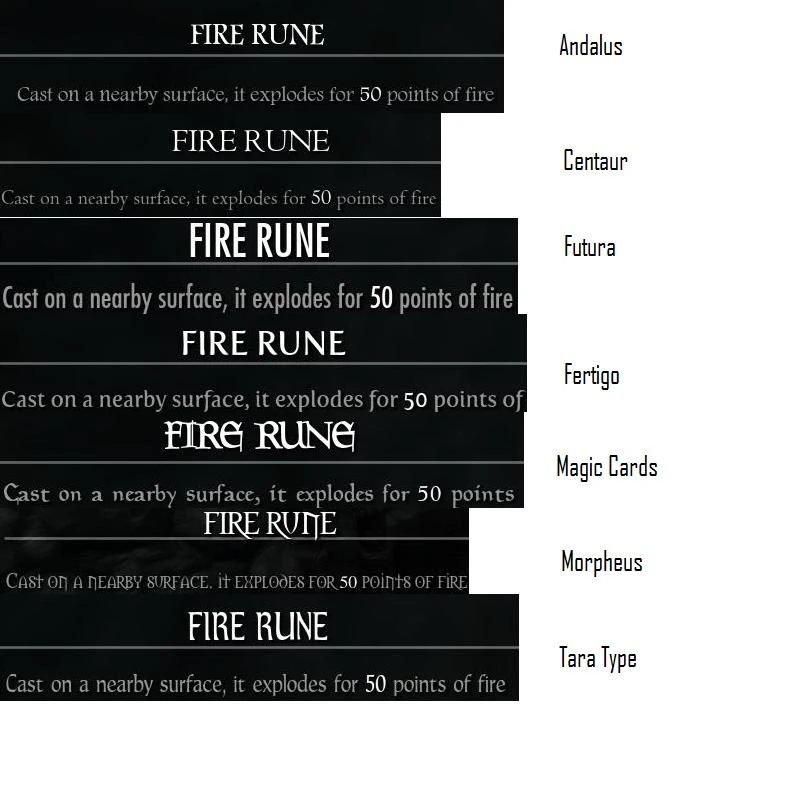
Drop the files (for one font only) in your Data/Interface folder. Naturally, if you\'re using a modified fontconfig.txt already you\'ll have to manually merge the old and the new. Delete them to go back to the default font, no game files are modified. Replaces the font used for the main UI elements with a selection of less modern fonts. Some are a bit less condensed and bigger. There may be clipping or run off issues. The only place I am certain font gets cut off is the second line of shouts, Unrelenting Shout, for some fonts. For smaller fonts, \"lockpicks remaining\" and the journal font are relatively small. At this point I dont really plan to try and fix anything. Basically with some fonts you wont get all of the shouts description, and the journal font is pretty small. These bother me little enough that I\'ve beat the game, so it appears I\'ve moved on. I\'m sure Darn and Co. will release a complete UI revamp eventually, once its done. Suggestions are still welcome though, who knows. Definitely not creating new fonts though. If you want to use your own font, embed it in a .swf file and set the font name in fontconfig.txt. In Adobe Flash Pro you just insert a text box, select the font, and hit \"Embed Font\", basically. I may have gone a bit overboard with shrinking Morpheus and Centaur for the new batch, not sure. The - Large variants are still available. My comments on each font: Andalus: Generic. Very small. Should be absolutely minimal clipping, but potentially hard to read for some. Shout does clip. Centaur: Generic. Small. Should be minimal clipping, but again, potentially hard to read. Shout does not clip. The \"Old Centaur\" is a bit bigger. Fertigo: Generic, bolder/blockier. Should be easy to read. Shout does not clip. Magic Card: Fantasy-esque, fairly large. May be clipping in some places. Shout does not clip. Morpheus: Fantasy-esque, somewhat small. Might clip in places, this font seems to like doing that. Shout does clip. TaraType: Generic with a funky A. Might clip some. Shout does clip. The lack of manly-nordic font is due the Skyrim\'s grumpy character scaling. The characters just dont fit and I\'m not about to manually resize every UI element. Tried everything I can imagine to make half a dozen fonts behave \'correctly\'. How Skyrim scales them appears to have little to do with glyph size, with Unrelenting Force being a good example. No amount of font shrinkage will make the second line of the description appear with some fonts. I\'ve fiddled with every property and table I could find, no luck.
Main Font Replacement swaps Skyrim's default Futura font for a cleaner alternative, reducing text runoff in the UI. With over 22,000 endorsements and 671,000 downloads, it's a popular, lightweight cosmetic tweak for players who find the default font hard to read. Last updated in 2011, it remains a classic for the original Skyrim.
✨ Key Features
📊 Pros & Cons
✅ Pros
- Huge community trust: 22,049 endorsements and 671,980 downloads prove it's a go-to font fix.
- Does exactly what it says—swaps the font and cuts down on runoff, no bloat.
- Lightweight and easy to install, perfect for a quick UI polish.
⚠️ Cons
- Last updated in 2011—likely incompatible with Skyrim Special Edition or Anniversary Edition without tweaks.
- Only changes the main UI font; other fonts (like in books or subtitles) remain untouched.
- No screenshots or detailed description, so you can't preview the new font before installing.
For classic Skyrim players who find the default Futura font hard to read and want a cleaner UI without overhauling the whole interface. Skip if you're on Skyrim SE/AE or want a more comprehensive font overhaul.
💡 Beginner Tips
- Since this mod targets the original Skyrim, make sure you're not using Skyrim Special Edition—it won't work there without manual conversion.
- If you're using a mod manager like Nexus Mod Manager or Vortex, install it through there to keep your Data folder clean.
- Pair this with a UI overhaul like SkyUI for a more modern look, but test for conflicts if you use other font mods.
📊 Mod Details
- Game
- Skyrim LE Mods
- Author
- Valistar
- Version
- 2.0
- Downloads
- 671,980
- Endorsements
- 22,049
- Category
- User Interface
- Created
- 11/13/2011
- Updated
- 11/19/2011
🔧 How to Install Skyrim LE Mods
Download from Nexus.
📖 Full step-by-step install guide for Skyrim LE →
Visit the official mod page for specific installation instructions for this mod.
🎮 Need cheat codes or console commands? Check ur gaming wiki for Skyrim LE commands, item IDs, and more.
Keep browsing — more Skyrim LE mods await