Lockpick graduation by Lilyu
⚪ Last updated 2012⚠️ Install Order · 3 steps
Install in this order, then this mod last — most mods fail to load without their framework and dependencies in place.
Preview
🔍 Analysis
- 👍 4.8% endorsement rate — high engagement, a strong quality signal
- 🏆 #38 of 76 User Interface mods in this game by downloads
📋 About This Mod
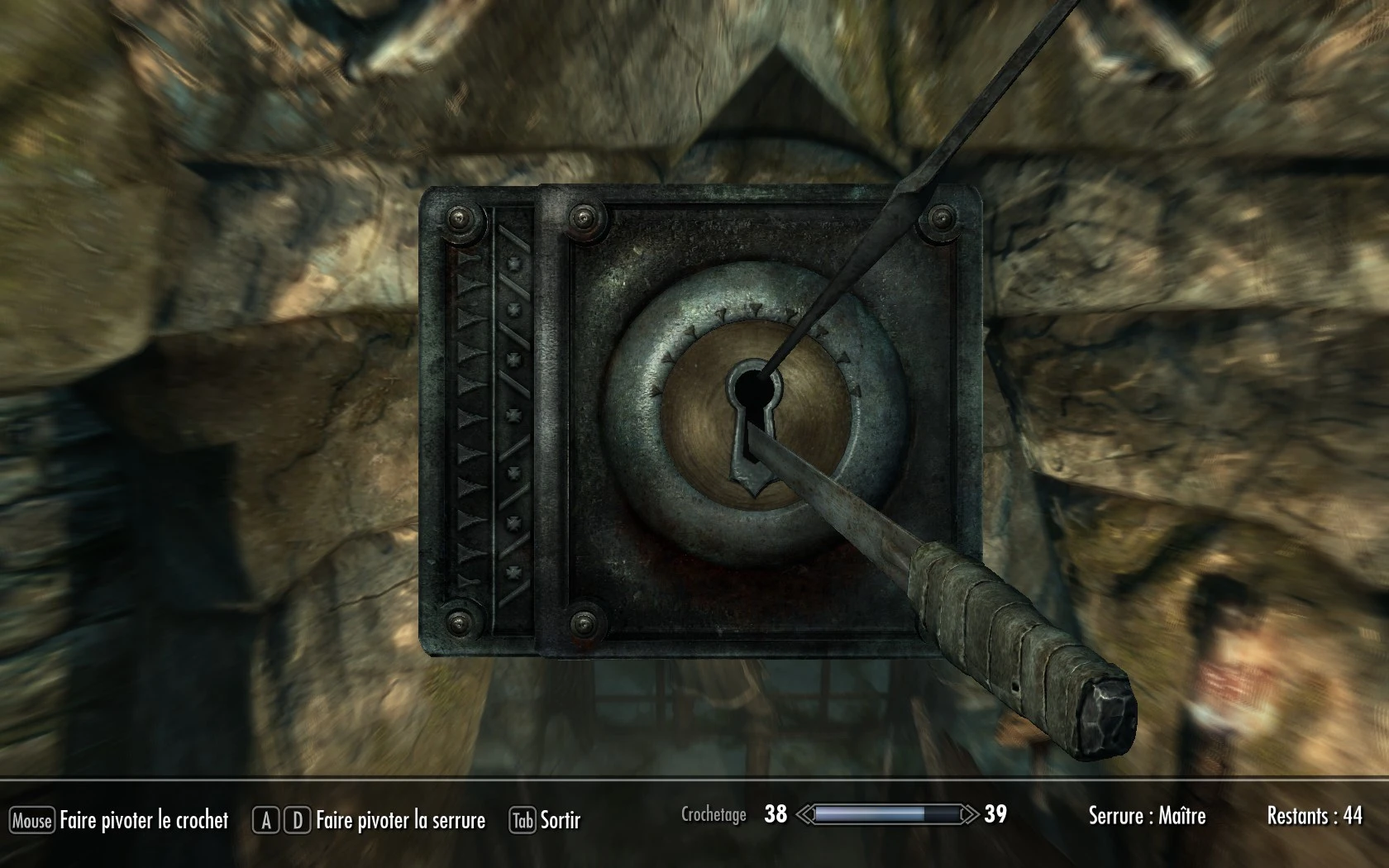
Name: Lockpick graduation by Lilyu Version: 1. 0 Date: 1/20/2012 Category: User Interface Author: Lilyu Source: http://www.skyrimnexus.com/downloads/file.php?id=6594 01/09/2012 UPDATE : If this mod doesn\'t work with the Official HR Texture pack, please read the troubleshooting section Description =========== This mod add a little graduation encrusted in the lock texture of chest. There are 3 possible graduations, pick up the one you prefer. I wanted it to be discrete and that it doesn\'t break the gameplay : the graduation only provides a visual reference point on where was your picklock when it broke. Option A : Loose graduation with arrows and large steps. Option B : More detailed graduation with smaller steps Option C : Vex\'s gift, best detailed graduation, the most efficient version for lockpicking Please, download, test, comment for feedback and endorse it if you like it :) NOTE : if you prefer a more powerfull mod about lockpicking, try : KenMOD - Lockpick Pro - Cheat by Kenney Watch this mod in action on Youtube : 9fG7ROp0KSw Install ======= 1. Choose which option you prefer and download the file manually or with the Nexus Mod Manager. Let the Nexus Mod Manager install it or : 2. Extract the files (7zip) 3. Put the file lock01.dds in your Steam folder : Steam > SteamApps > common > skyrim > Data > textures > interface > objects > lockpicking You\'re done. Uninstall ========= 1. Just delete the file lock01.dds in your Steam folder : Steam > SteamApps > common > skyrim > Data > textures > interface > objects > lockpicking The vanilla texture will be reactivated. Incompatibility =============== This mod conflicts with any mod that changed the lock01.dds texture. The last installed one will replace the previous one. If you find an interesting mod which conflict with this one, please inform me. I checked the mod Skyrim HD v1. 3 and it doesn\'t modifies this texture. Troubleshooting =============== When the official HR texture pack is installed, it overrides most of the custom textures added by your favorite mods. If you want your mods to work with this texture pack, please try this : 1. Disable the . ESP files : In Nexus Mod Manager, there is two tabs : Plugins and Mods. Open the Plugins tab and : uncheck HighResTexturePack01.esp uncheck HighResTexturePack02.esp If you don\'t have Nexus Mod Manager : start your game with steam, and wait for the little launcher window to open, than go to Data Files and : (NOTE : this launcher windows doesn\'t appear if you\'ve already played Skyrim and your Steam session is still active. If it doesn\'t appear, close Steam, restart Steam and than start Skyrim) uncheck HighResTexturePack01.esp uncheck HighResTexturePack02.esp
Lockpick graduation by Lilyu is a UI mod for Skyrim that adds a subtle graduation scale to the lock texture on chests, offering three visual variants. It's designed to be discreet and not affect gameplay, purely cosmetic. With 9,291 endorsements and 193,081 downloads, it's a popular choice for players who want a visual aid without altering mechanics.
✨ Key Features
📊 Pros & Cons
✅ Pros
- Huge community trust (9,291 endorsements) — this is a proven mod
- Three visual options let you pick what fits your preference
- Purely cosmetic, so it won't mess with game balance
⚠️ Cons
- Last updated in 2012 — may not be compatible with the latest Skyrim versions or Special Edition
- Only affects chest locks, not doors or other containers
- No screenshots or detailed install instructions in the description
For Skyrim players who want a subtle visual aid when lockpicking, especially those who find the default lock texture hard to read. It's also for mod collectors who appreciate lightweight, non-intrusive UI tweaks. Skip if you want gameplay changes or if you're on Skyrim Special Edition without compatibility patches.
💡 Beginner Tips
- If you're using the original Skyrim (not Special Edition), just drop the files into your Data folder and activate the .esp in the launcher.
- Since it's a texture mod, make sure no other mod overwrites the same lock texture files — load order matters if you have other UI overhauls.
- Try all three graduation styles in-game to see which one is most visible for your screen brightness.
📊 Mod Details
- Game
- Skyrim LE Mods
- Author
- Lilyu
- Version
- 1.0
- Downloads
- 193,081
- Endorsements
- 9,291
- Category
- User Interface
- Created
- 1/20/2012
- Updated
- 1/21/2012
🔧 How to Install Skyrim LE Mods
Download from Nexus.
📖 Full step-by-step install guide for Skyrim LE →
Visit the official mod page for specific installation instructions for this mod.
🎮 Need cheat codes or console commands? Check ur gaming wiki for Skyrim LE commands, item IDs, and more.
Keep browsing — more Skyrim LE mods await