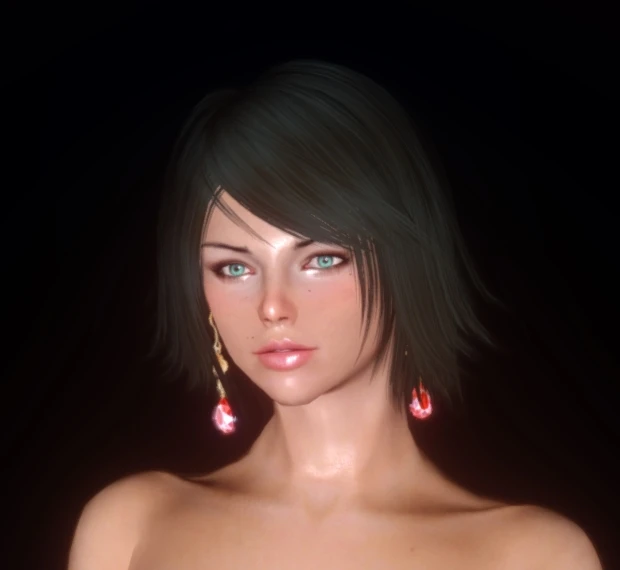
Liz follower preset
⚪ Last updated 2017⚠️ Install Order · 3 steps
Install in this order, then this mod last — most mods fail to load without their framework and dependencies in place.
Preview
🔍 Analysis
- 👍 3.2% endorsement rate — high engagement, a strong quality signal
- 🏆 #4 of 51 Character Presets mods in this game by downloads
📋 About This Mod
Since there were requests about my follower as a preset, here it is:
Required:
Enhanced Character Edit 1. 4 or Racemenu
Install:
- Eihei Skin Texture
- Better Females Eyebrows
- SG hair pack 350
- manually:
- -Copy the . SLOT file to your ECE presets folder, which is in documents\my games\Skyrim\cme_save\
- -Copy the .nif and .dds file to your RM CharGen folder, which is in Skyrim\Data\skse\plugins\CharGen
- -Put the eye texture in Skyrim\Data\textures\actors\character\eyes\ and rename it with the name of an eye texture you don't need, therefore replacing it
Set up ingame:
ECE: Simply load the preset in the "body" tab RM: Go to the "sculpt" tab and add a mask around your neck to prevent a seam. Then, import the . NIF that you previously installed.
Afterwards, choose the correct eye texture, hairs and eyebrows ingame in ECE / Racemenu. This is needed for you to do yourself since skyrim sorts mods uniquely and a preset won't recognize which number the desired texture/model is. The hairs name is "hairbffh".
A face preset for the standalone follower Liz, created by Cantregisterlol. This preset lets you apply Liz's appearance to your own character. With 856 endorsements and over 26,000 downloads, it's a popular choice for players who want a specific look. Last updated in 2017, so it may be dated.
✨ Key Features
📊 Pros & Cons
✅ Pros
- Community favorite with 856 endorsements and 26k downloads.
- Simple to use – just apply the preset in character creation.
- Gives you a proven, popular face look without needing the follower.
⚠️ Cons
- Last updated in 2017 – may not work with the latest game version.
- Only a face preset – no gameplay changes or extras.
For Skyrim players who want a specific, community-approved face for their character without using the follower. If you're after gameplay mods, this isn't for you – it's purely cosmetic.
💡 Beginner Tips
- To use the preset, you'll need to copy the file into your Skyrim data folder and select it during character creation.
- If you're using a mod manager, you can install it manually or through the manager – just make sure it's enabled.
- Since it's from 2017, check if you have any mods that alter character presets, as they might conflict.
📊 Mod Details
- Game
- Skyrim LE Mods
- Author
- Cantregisterlol
- Version
- 1.8
- Downloads
- 26,740
- Endorsements
- 856
- Category
- Character Presets
- Created
- 1/29/2017
- Updated
- 5/7/2017
🔧 How to Install Skyrim LE Mods
Download from Nexus.
📖 Full step-by-step install guide for Skyrim LE →
Visit the official mod page for specific installation instructions for this mod.
🎮 Need cheat codes or console commands? Check ur gaming wiki for Skyrim LE commands, item IDs, and more.
Keep browsing — more Skyrim LE mods await