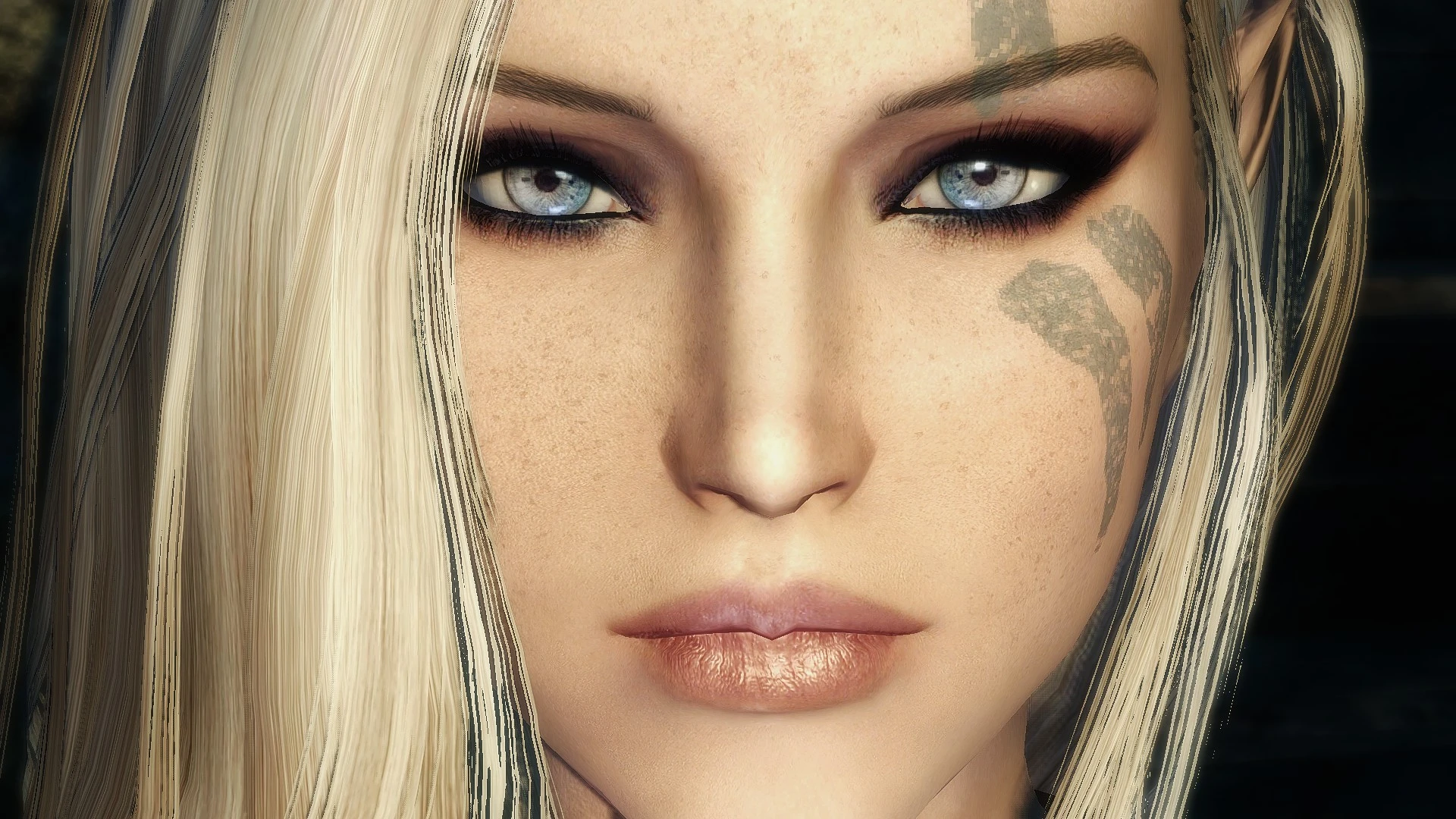
Khinara Jade - RaceMenu Preset
⚪ Last updated 2016⚠️ Install Order · 3 steps
Install in this order, then this mod last — most mods fail to load without their framework and dependencies in place.
Preview
🔍 Analysis
- 👍 2.6% endorsement rate — high engagement, a strong quality signal
- 🏆 #2 of 6 Character Presets mods in this game by downloads
📋 About This Mod
This preset was built off of "Adriana Preset For RaceMenu and ECE" by StephieRawx. I've just added my own twist, and with
permission I've decided to upload and share my character to anyone who likes it.
There is also a "No Elf Ears" version that has normal ears instead of elf ears.
ENBs, head meshes, and skin textures can all have an impact on what your character will look like.
For best results, make sure you have all of the required mods installed.
RaceMenu
The Eyes Of Beauty
Rans Headmesh (Type-C)
KS Hairdos - Renewal
Better Makeup for SKSE - The "High Res Female Face Makeup for SKSE" file,
make sure you read the description about the SKSE ini tweak or else the
makeup will look pixelated.
These are not required but are completely optional. For skin textures I use "SRG Female Textures by Seren4xx" <- This mod is not on Nexus or Steam Workshop and you'll have to package and install the textures manually. This texture is just my personal preference, if you want something faster and easier, some of my other favorites are SG Female Textures Renewal (for beauty) - or - Mature Skin Textures (for realism). :)
Installation:
Note - if you're using the darker skin and makeup version, make sure you use the corresponding head file or you will get a neck seam.
1. Open the console with ` (the key under Esc) and type showracemenu and press Enter, then close the console by again pressing `.
2. Set your gender to Female
3. Set your race to Nord
4. Set Complexion to '0'
5. Click on the "Presets" tab in the upper right
6. Press F9 and click on Khinara Jade.jslot
7. Click on the "Sculpt" tab in the upper right
8. Press F9 and click on Khinara Jade.nif
9. A window should come up, press E to accept
Adriana Preset for RaceMenu and ECE
by StephieRawx
RaceMenu
Brows
by Hvergelmir
The Eyes Of Beauty
KS Hairdos Renewal
by Kalilies, Stealthic Khaos and Shocky
RAN's HeadMesh Variants
Better Makeup for SKSE
by Diethardt
Khinara Jade is a RaceMenu preset for Skyrim, created by Kyndra72 and based on StephieRawx's Adriana preset. It offers a ready-made character face for players who want a specific look without manual sculpting. With 4,625 endorsements and 175,764 downloads, it's a popular choice for character customization enthusiasts.
✨ Key Features
📊 Pros & Cons
✅ Pros
- Huge download count (175k+) and 4.6k endorsements show this preset is widely loved.
- Based on a proven preset (Adriana) so you know the base is solid.
- Simple to use: just drop the file into your RaceMenu folder and load it in-game.
⚠️ Cons
- Last updated in 2016 — may not be compatible with the latest Skyrim Special Edition or Anniversary Edition without tweaks.
- No screenshots or detailed description provided, so you can't see the face before installing.
- Requires RaceMenu and its dependencies (like SKSE) to work, which aren't listed in the description.
For Skyrim players who want a ready-made, attractive female character face without spending hours in the character creator. Perfect for roleplayers or anyone starting a new playthrough who wants a unique look. Skip if you're on the latest Skyrim version and don't want to troubleshoot compatibility.
💡 Beginner Tips
- Make sure you have RaceMenu and SKSE installed, as the preset won't load without them.
- Place the preset file in your Skyrim/Data/SKSE/Plugins/CharGen/Presets folder, then load it via the 'Presets' slot in RaceMenu.
- If you're on Skyrim Special Edition, you may need to convert the preset or use a compatible version of RaceMenu.
📊 Mod Details
- Game
- Skyrim LE Mods
- Author
- Kyndra72
- Version
- Final
- Downloads
- 175,764
- Endorsements
- 4,625
- Category
- Character Presets
- Created
- 6/9/2016
- Updated
- 6/10/2016
🔧 How to Install Skyrim LE Mods
Download from Nexus.
📖 Full step-by-step install guide for Skyrim LE →
Visit the official mod page for specific installation instructions for this mod.
🎮 Need cheat codes or console commands? Check ur gaming wiki for Skyrim LE commands, item IDs, and more.
Keep browsing — more Skyrim LE mods await