Immersive Animations
⚪ Last updated 2014⚠️ Install Order · 3 steps
Install in this order, then this mod last — most mods fail to load without their framework and dependencies in place.
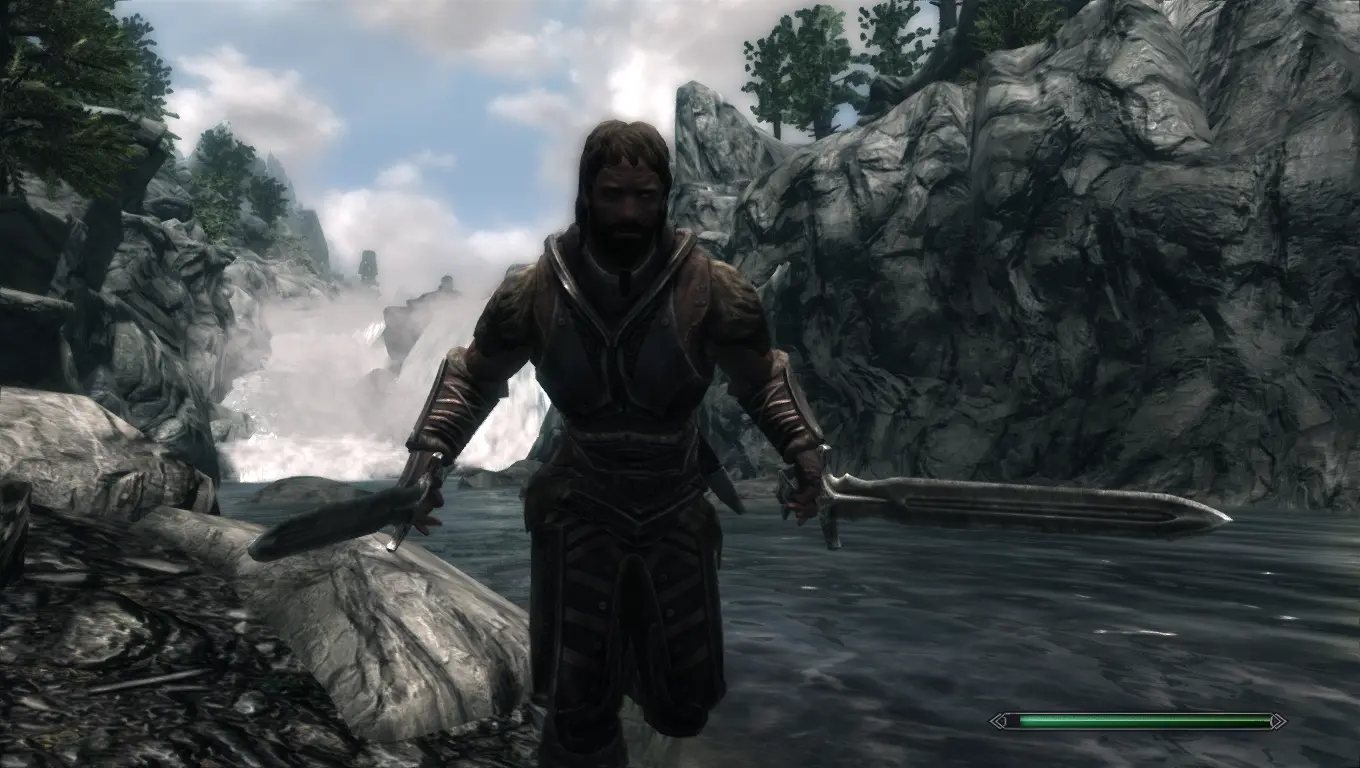
Preview
🔍 Analysis
- 👍 2.7% endorsement rate — high engagement, a strong quality signal
- 🏆 #6 of 118 Animation mods in this game by downloads
📋 About This Mod
Check the file page for available modules and optional files.
Combined Installation Walkthrough (Dual Sheath Redux + Immersive Animations) by Slider6996: mn2J0m2a8kg
(Left video) New and adjusted animations in V2. 0. (Right video) Just a sample of what I'm currently working on (May 1st).
eHSb1WQXkWw&feature=youtu.be _2WqRMjyLWg&feature=youtu.be
(Left video) Here is another one of my crappy rendered videos. I use HiAlgoBoost because my computer is an abacus. If it is unbearable, skip to 0:57 for a clearer picture and animation showcase. (Right video) Here is a showcase of some animations coming in V2. 0.
ZsS7PSvrsLU&feature=youtu.be GhrlhXuUQ08&feature=youtu.be
Brodual and Insane0hflex reviews:
b9DctlbUY2s N1FLSb9joto
Here are a couple videos showcasing the one-handed/dual wielding animations. The first video is very dark because I suck at rendering. The second video was made by DarkAngel13.
oHQNNVa3lko SIOB2cUecVc&feature=player_embedded
To install: First, backup your Skyrim/data/actors/character/animations folder just in case you do not like these animations (particularly if you're installing manually). Then, use Nexus Mod Manager to install, or copy the meshes folder into the Skyrim/data folder and overwrite when prompted. To uninstall, remove the .hkx files from the meshes/actors/character/animations folder. Use the zip file you downloaded as a guideline.
--Check sticky in comments section for install procedure--
FAQ and common complaints:
My weapon sheaths are not in the right position!
You need to explore the XPMS file page and find the appropriate XPMS version for you. There are several versions for different weapons sheath positions. Just read the descriptions and pick the version that best suits your desires.
My character does not block while running!
That is a problem with XPMS. If you're not using FNIS, you need to download the magic-shield arm patch from the XPMS file page and install it. If you are using FNIS, you need to check the skeleton arm fix patch before running Generate FNIS for Users.
My left handed weapon is wielded backwards!
I honestly don't know
Immersive Animations by Bergzore is a highly popular animation overhaul mod with 86,763 endorsements and 3.3 million downloads. It introduces new and adjusted animations to enhance the game's feel. Despite its age (last updated in 2014), it remains a community favorite for players seeking more immersive character movements.
✨ Key Features
📊 Pros & Cons
✅ Pros
- Massive community trust with 86,763 endorsements and 3.3 million downloads.
- Simple concept—just new animations—so it's easy to understand what you're getting.
- Still relevant years later, proving it holds up in the modding scene.
⚠️ Cons
- Last updated in 2014—may not be compatible with current game versions or other mods.
- Potential conflicts with other animation mods since it overhauls animations broadly.
For Skyrim players who want a more immersive feel without overhauling gameplay. If you're tired of vanilla animations and want a community-approved upgrade, this is a safe bet. Skip if you need specific animation tweaks or want modern compatibility guarantees.
💡 Beginner Tips
- Use a mod manager like Nexus Mod Manager or Mod Organizer 2 to easily install and uninstall.
- Check the mod's posts section for any known compatibility patches with popular mods.
- If you're on Special Edition, look for a port or use the mod with caution—it was made for Oldrim.
📊 Mod Details
- Game
- Skyrim LE Mods
- Author
- Bergzore
- Version
- V2.1
- Downloads
- 3,259,634
- Endorsements
- 86,763
- Category
- Animation
- Created
- 4/18/2013
- Updated
- 12/18/2014
🧩 Commonly Used Together
Users add these mods to the same collections — a real compatibility signal, not an AI guess.
🔧 How to Install Skyrim LE Mods
Download from Nexus.
📖 Full step-by-step install guide for Skyrim LE →
Visit the official mod page for specific installation instructions for this mod.
🎮 Need cheat codes or console commands? Check ur gaming wiki for Skyrim LE commands, item IDs, and more.
Keep browsing — more Skyrim LE mods await